
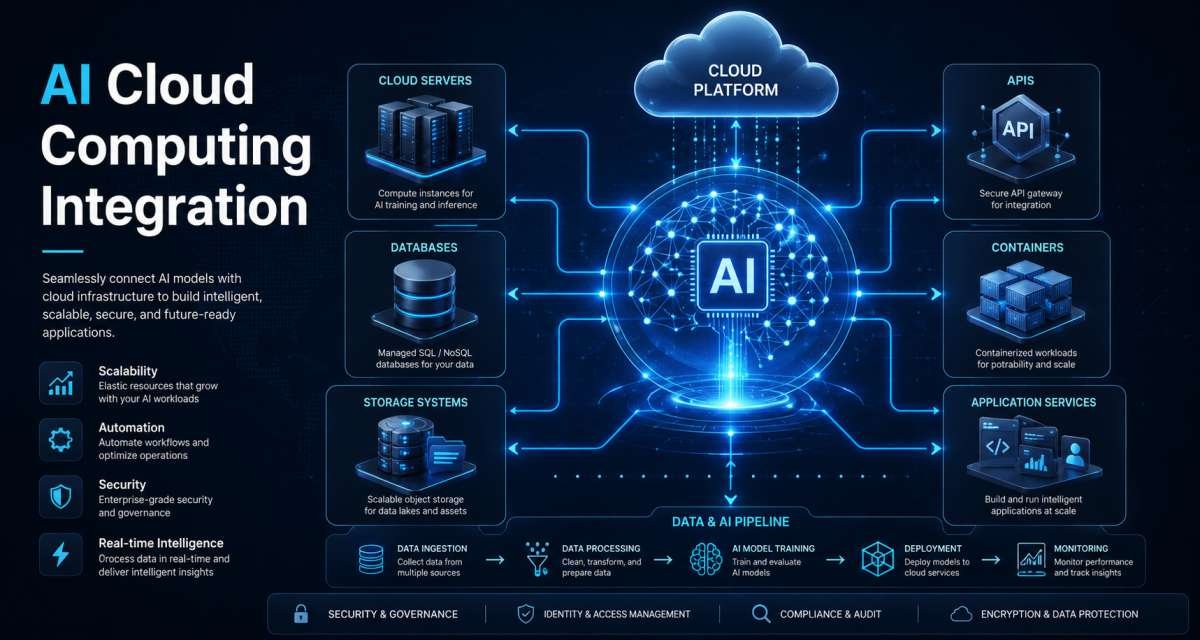
AI becomes useful inside a business when it connects with real data, applications, users, and workflows. A model working on its own does not resolve a support request, analyze company documents, explain a cloud incident, update a product workflow, or help a user make a decision.
AI cloud computing integration is the process of connecting AI capabilities with cloud infrastructure, applications, APIs, data platforms, automation, security controls, and operational systems. The goal is not simply to add an AI model. It is to build a working system in which AI can perform a useful task while the surrounding application controls data access, permissions, review, cost, and reliability.
AI tools for developers, SaaS teams, technical managers, and business owners, this distinction matters. Choosing a model is only one part of an AI project. The larger challenge is deciding what data the model can access, where it runs, what users can ask it to do, what actions it may take, and how its outputs are evaluated.
What AI and Cloud Integration Actually Means
AI and cloud integration means using cloud services to build, run, connect, secure, and monitor AI-powered applications and workflows.
A practical implementation may involve:
- Calling a hosted AI model from a SaaS application
- Running machine learning workloads on cloud compute
- Connecting an AI assistant to documents or databases
- Using a data warehouse as an approved source for AI analysis
- Creating embeddings and retrieval pipelines
- Classifying support requests
- Summarizing operational alerts
- Generating recommendations inside an application
- Monitoring model usage, latency, quality, and cost
- Applying permissions and approval rules to AI actions
The cloud provides the operating environment: compute, storage, networking, databases, identity, APIs, deployment systems, and monitoring.
AI provides capabilities such as prediction, classification, generation, language understanding, extraction, summarization, and decision support.
A customer-support assistant shows how the pieces fit together. Customer messages, product documentation, account information, and previous tickets may already exist in cloud systems. AI can summarize a case, identify its category, suggest a response, or recommend the next step.
The model should not control the entire workflow. The application still decides which customer records the user is allowed to access, what information is logged, whether a response requires review, and whether any action is permitted.
That surrounding system is the integration.
Why Cloud Infrastructure Fits AI Workloads
AI experiments can run on a developer’s laptop. Production systems usually require more predictable infrastructure.
AI workloads may need specialized compute, access to large datasets, shared development environments, deployment pipelines, monitoring, permission controls, and the ability to adjust capacity as demand changes. Cloud platforms provide these capabilities without requiring every organization to build the entire infrastructure itself.
Compute and scaling
Training, fine-tuning, embedding generation, batch processing, and high-volume inference may require significant computing resources.
Cloud infrastructure allows teams to provision resources when needed rather than maintaining the same capacity permanently. A team may use more compute during a batch-processing job and much less after the job finishes.
This flexibility does not make AI compute automatically inexpensive. Poor resource management can still create unnecessary costs. Teams need shutdown rules, usage limits, monitoring, and workload planning.
Data access
Most useful AI applications depend on organizational data.
That data may live in:
- Application databases
- Object storage
- Data warehouses
- Document repositories
- Product analytics systems
- Customer support platforms
- CRM systems
- Application logs
- Event streams
- Internal knowledge bases
Keeping AI services near approved data systems can simplify integration. The harder question is usually not whether the model can access the information, but whether it should.
A useful design therefore begins with data permissions rather than model capabilities.
Managed infrastructure
Cloud services can handle parts of the AI lifecycle such as model access, storage, processing, identity, logging, deployment, networking, and monitoring.
For a smaller company, a managed service model may reduce infrastructure workload. A larger organization may need private networking, detailed access policies, model governance, audit history, and additional controls.
The appropriate setup depends on data sensitivity, workload volume, latency requirements, budget, technical skills, and compliance obligations.
Deployment and operations
AI features need normal software-release discipline.
A production environment should support practices such as:
- Development and staging environments
- Controlled production releases
- Model and prompt versioning
- Rollback
- Load testing
- Logging
- Error monitoring
- Access policies
- Cost alerts
- Usage monitoring
AI behavior can change when the model, prompt, retrieved data, application logic, or user input changes. Teams therefore need to track more than whether the API is technically available.
They also need to know whether the output remains useful.
The Core Architecture of a Cloud AI System
A practical cloud AI architecture can be understood as five connected layers: data, model, application, control, and monitoring.
Each layer solves a different problem.
Data layer
The data layer contains the information the AI feature can use.
Sources may include databases, documents, logs, warehouses, support tickets, event streams, CRM records, and vector stores.
This layer needs:
- Data classification
- Access control
- Encryption
- Retention rules
- Data-quality checks
- Tenant isolation
- Update processes
- Redaction where necessary
Data quality places a limit on AI quality. An assistant using outdated documentation may generate outdated answers even if the model itself is capable.
Permissions matter just as much. In a multi-tenant application, a user from one customer account must not retrieve information belonging to another customer.
Model layer
The model layer provides the AI capability.
A team may use a hosted API, a managed cloud model, a privately deployed model, a specialized model, or several models routed according to the task.
The model layer may also include:
- Prompt templates
- Embeddings
- Retrieval
- Reranking
- Response filters
- Fine-tuned models
- Model routing
- Evaluation datasets
Model and prompt versions should be trackable. If quality changes after an update, the team should be able to identify which model, prompt, and context produced the output.
Application layer
The application layer connects the AI system with the user.
It handles functions such as:
- Authentication
- User permissions
- Input handling
- Context retrieval
- Output presentation
- Editing
- Approval steps
- Saving results
- Audit history
The application should not blindly display or execute everything a model produces.
For example, an internal document assistant may generate a summary immediately, while a workflow involving a sensitive business decision may require human review before any action occurs.
Control layer
The control layer defines what the AI system is allowed to do.
Controls can include:
- Identity and access management
- Role-based permissions
- Data-access rules
- Network restrictions
- Content filters
- Rate limits
- Budget limits
- Tool permissions
- Approval workflows
- Audit logging
Permissions should match the task.
An assistant that summarizes cloud logs may need read access to selected logs. It does not automatically need permission to modify infrastructure.
A support assistant may suggest a refund-related response without being allowed to issue the refund itself.
Monitoring layer
The monitoring layer shows what happens after the AI feature is released.
Useful signals include:
- Request volume
- Latency
- Errors
- Cost
- User feedback
- Output rejection
- User edits
- Retrieval failures
- Model versions
- Prompt versions
- Unsafe requests
- Security events
- Quality changes
Traditional application monitoring tells you whether the service is running. AI monitoring must also help answer whether the system is producing acceptable results.
Both matter.
Where AI Connects With Cloud Workflows
AI may enter a cloud architecture at several points. Good integration connects it to a defined workflow rather than making it a separate feature with unrestricted access.
Applications and APIs
Most users experience AI through an existing application.
Examples include:
- An AI search box
- A support-response assistant
- A document-review feature
- A recommendation panel
- A natural-language analytics interface
- A ticket classifier
- A report summarizer
The application prepares a request using user input, system instructions, approved context, and relevant metadata. The AI service returns an output, and the application decides whether to display, store, edit, reject, or route it for review.
The AI service should not bypass the application’s existing permission model.
Data and retrieval
Many AI applications need information that was not contained in the model’s original training.
A common approach is retrieval-augmented generation. The system searches an approved source for relevant information and gives that context to the model before the answer is generated.
This approach can improve relevance, but it also introduces new requirements.
Retrieved information must be:
- Relevant
- Current enough for the task
- Permission-safe
- Traceable where appropriate
Retrieval does not remove the need for access control. If a user cannot normally view a document, an AI interface should not become an alternate way to retrieve it.
Automation
AI can also support cloud automation.
It may:
- Classify incoming requests
- Summarize incidents
- Draft reports
- Review infrastructure changes
- Explain cloud-cost changes
- Route documents
- Suggest runbook steps
- Identify unusual patterns
The level of automation should reflect the level of risk.
Reading a log is different from restarting a production service. Drafting a customer response is different from sending it. Suggesting an infrastructure change is different from applying it.
As the potential impact increases, approval and rollback controls should become stronger.
Development workflows
Cloud-based AI development environments are another point where AI and cloud systems intersect.
A hosted development workspace can combine repository access, runtimes, terminals, testing tools, configuration, and AI assistance. This can make project setup more repeatable and place AI closer to code, logs, test results, and project context.
AI may help developers’ workflow:
- Explain unfamiliar code
- Draft small changes
- Generate test ideas
- Diagnose errors
- Review configuration
- Summarize pull requests
- Draft documentation
The same safeguards still apply. Developers should inspect generated changes, run tests, protect secrets, and avoid giving AI tools unnecessary access to production resources.
Development environments are therefore one implementation area within a larger cloud AI strategy, not the entire strategy itself.
Practical Use Cases for Businesses and Technical Teams
The best AI cloud projects usually begin with a specific workflow that already has a clear user, input, output, and success condition.
SaaS product features
SaaS companies can integrate AI directly into existing product workflows.
Possible features include:
- AI search
- Report summaries
- Smart onboarding
- Document analysis
- Automated tagging
- Product recommendations
- Natural-language analytics
- Content drafting
- Usage insights
A useful AI feature should understand the application’s permissions and context.
Consider an analytics product in which a user asks why signups declined. The system may query approved metrics, compare relevant segments, and generate an explanation.
The answer should guide the user toward evidence rather than present an AI-generated interpretation as unquestionable fact.
Customer support
Customer support is a practical integration area because support agents often work across many systems.
AI can assist by:
- Summarizing long conversations
- Classifying ticket types
- Detecting urgency
- Suggesting replies
- Recommending help articles
- Translating messages
- Finding related cases
- Routing requests
The relevant data may exist across a ticketing platform, product logs, account systems, documentation, and service-status information.
Access should be limited to what is required for the task. Sensitive responses or account actions may still require a person to review and approve them.
Analytics and forecasting
AI can make cloud data easier to explore.
Possible uses include:
- Natural-language queries
- Metric explanations
- Anomaly summaries
- Demand forecasting
- Churn analysis
- Sales-trend review
- Inventory projections
- Operational planning
The main risk is false confidence.
An AI assistant may produce a persuasive explanation from incomplete or incorrectly scoped data. Users therefore need visibility into the source, time range, and assumptions used when the decision matters.
DevOps and cloud operations
AI can help technical teams interpret operational information.
Examples include:
- Summarizing error logs
- Grouping related alerts
- Explaining deployment failures
- Drafting incident reports
- Reviewing infrastructure-as-code changes
- Suggesting troubleshooting steps
- Explaining usage spikes
- Reviewing cloud-cost changes
For most teams, the safer starting point is AI-assisted operations rather than unrestricted AI-operated infrastructure.
Production changes should have clear permission boundaries, review rules, and rollback paths.
Security analysis
Security teams may use AI to help process large volumes of events and alerts.
AI can assist with:
- Alert triage
- Event summaries
- Policy review
- Suspicious-pattern explanation
- Phishing analysis
- Identity-risk review
- Incident documentation
Security workflows require especially careful data handling. Logs may contain credentials, internal identifiers, customer information, or other sensitive material.
An AI security tool also needs protection against manipulated input and unsafe tool use.
How to Plan an AI Cloud Integration Project
A successful project begins with a workflow, not with a request to “add AI.”
Define the workflow
Start by describing the job the AI should support.
Ask:
- Who will use it?
- What task consumes time today?
- What input does the task require?
- What output should AI produce?
- What decision or action follows?
- Who reviews the result?
- What happens if the answer is wrong?
- How will success be measured?
Compare two project statements.
“Build an AI chatbot” gives a technical team very little direction.
“Help support agents summarize long ticket histories into the current problem, previous actions, product area, urgency, and suggested next step” defines a workflow that can be designed and tested.
Specific workflows are easier to measure.
Map data and permissions
List the data sources the feature needs before connecting them.
For each source, identify:
- Owner
- Sensitivity
- Access rules
- Update frequency
- Retention requirements
- Allowed users
- Allowed AI use
- Redaction needs
- Audit requirements
This prevents a common design failure: connecting AI to data before deciding what access is appropriate.
The AI feature should inherit the same access boundaries as the rest of the product.
Choose a model access method
Teams have several options for accessing models.
These may include:
- Hosted model APIs
- Managed cloud AI services
- Privately deployed models
- Self-hosted models
- Fine-tuned models
- Multiple models routed by task
The choice should depend on the workload rather than model popularity.
Important factors include:
- Data sensitivity
- Latency
- Request volume
- Cost
- Required control
- Expected quality
- Available engineering skills
- Compliance needs
- Regional requirements
Many business features do not require custom model training. Existing models combined with good retrieval, prompts, application rules, and evaluation may be sufficient.
Design human review
Not every AI output needs the same review process.
Low-impact internal summaries may be suitable for immediate display. Higher-impact outputs may require a person to review, edit, and approve them.
Additional review is especially important when the system influences:
- Financial decisions
- Legal work
- Healthcare-related decisions
- Security actions
- Customer account actions
- Production infrastructure
- Employee-related decisions
The review process should be part of the application design, not an informal instruction added later.
Test before production
AI testing needs to cover both software behavior and model behavior.
Test for:
- Useful outputs
- Incorrect outputs
- Missing context
- Permission failures
- Prompt injection attempts
- Unsafe requests
- Retrieval errors
- Latency
- Cost under realistic usage
- Logging
- Auditability
- Fallback behavior
Use examples that represent the actual workflow.
A system that works on five clean demo prompts may still fail when users provide vague instructions, conflicting documents, long inputs, unusual edge cases, or malicious content.
Security, Privacy, and Governance Risks
AI cloud systems combine traditional cloud-security concerns with risks created by model behavior and automated actions.
The more data and tools an AI system can access, the more important its controls become.
Sensitive data exposure
AI workflows may process customer records, private documents, financial information, internal messages, credentials, contracts, or application logs.
Before sending data to an AI system, teams should establish:
- Whether that data is permitted for AI use
- Which service can process it
- Whether inputs or outputs are retained
- Whether sensitive fields need redaction
- Who can access generated results
- Whether outputs are logged
- Whether user permissions are preserved
Credentials and secrets should be managed through approved secret-management mechanisms rather than copied into prompts, source files, or generated documentation.
Prompt injection
Prompt injection occurs when user-controlled or retrieved content attempts to influence the AI system’s instructions.
This becomes more serious when an AI system can retrieve private information or call tools.
Controls can include:
- Treating retrieved documents as untrusted input
- Separating application instructions from user content
- Validating tool requests
- Limiting accessible resources
- Requiring approval for sensitive actions
- Filtering outputs
- Logging suspicious activity
- Testing adversarial examples
A document should not gain system-level authority simply because the model reads it.
Excessive permissions
An AI agent may be able to read files, change code, call services, or execute commands.
Convenience can make teams grant broad access too early.
Use the minimum permissions required for the task. An agent fixing a user-interface problem does not need production database credentials. A documentation tool does not need permission to deploy infrastructure.
Permissions should be divided according to the actions the system actually needs to perform. Read access, write access, deployment access, administrative access, and access to sensitive data should not automatically be grouped together.
Where possible, teams should:
- Use role-based access controls
- Separate development and production permissions
- Limit tool access by workflow
- Use temporary credentials where appropriate
- Restrict access to specific data sources
- Require approval for sensitive actions
- Log tool calls and permission-sensitive operations
- Review permissions regularly
- Remove access that is no longer required
An AI system should also operate within the permissions of the user or service account responsible for the request.
For example, if an employee cannot access a confidential finance folder through the normal application, an AI assistant should not be able to retrieve information from that folder on the employee’s behalf.
The safest design is usually to start with narrow permissions and expand them only when a real workflow requires additional access.
Weak review and monitoring
AI systems can produce incorrect, incomplete, outdated, or inappropriate outputs even when the surrounding application works correctly.
This makes review and monitoring important after deployment.
Teams should determine which outputs can be used immediately and which require human approval.
A low-risk internal summary may only need user feedback. A recommendation that changes a customer account, modifies infrastructure, sends external communication, or influences a significant business decision may require explicit approval.
Monitoring should also identify patterns that are difficult to see from individual requests.
Useful questions include:
- Are users frequently correcting the same type of answer?
- Are retrieval failures increasing?
- Has latency changed after a model update?
- Are costs rising faster than usage?
- Are certain prompts producing more rejected outputs?
- Are permission errors occurring unexpectedly?
- Are users attempting unsafe actions?
- Has output quality changed after a prompt or model update?
Logs should make it possible to investigate important failures without exposing more sensitive data than necessary.
A mature AI system therefore needs both operational monitoring and quality monitoring. Teams need to know whether the service is available and whether the results remain acceptable.
Cost and Performance Planning
AI cloud systems introduce costs that differ from traditional application workloads.
Compute, model requests, storage, retrieval, networking, monitoring, and supporting services can all contribute to the total cost.
Performance also affects user experience. A technically accurate system may still be difficult to use if every request takes too long.
Cost and performance should therefore be considered during architecture design rather than after the feature is already in production.
Training versus inference
Training and inference have different infrastructure requirements.
Training or fine-tuning may require significant computing resources for a limited period. Inference occurs whenever users or applications request predictions or generated outputs.
Many business applications do not need to train a model from the beginning. They may use an existing hosted or managed model and focus engineering effort on prompts, retrieval, data access, application logic, evaluation, and workflow design.
Teams considering custom training should first identify what improvement they expect and whether that improvement justifies the additional infrastructure, data preparation, evaluation, and maintenance work.
Inference planning should consider:
- Expected request volume
- Peak traffic
- Model size
- Input length
- Output length
- Latency requirements
- Concurrency
- Availability requirements
- Cost per request
The most capable model is not automatically the best choice for every task.
Simple classification, routing, extraction, or summarization workflows may be handled by a smaller or less expensive model while more complex tasks use a more capable model.
Token and request usage
For language-model applications, cost often depends partly on the amount of input and output processed.
Long prompts, large retrieved documents, lengthy conversation histories, and unnecessary output can increase usage.
Teams should understand what information is actually required for each request.
Instead of sending an entire document collection to a model, a retrieval system may select only the sections relevant to the user’s question.
Instead of including unlimited conversation history, the application may retain the context necessary for the current task.
Useful controls include:
- Input-length limits
- Output-length limits
- Retrieval limits
- Request quotas
- Usage tracking by feature
- Usage tracking by customer
- Model routing
- Context trimming
- Cost alerts
These controls are not only financial. Smaller requests can also improve latency and reduce the amount of irrelevant information presented to the model.
Latency
AI requests may involve several steps.
A request might require authentication, data retrieval, permission checks, embedding search, model inference, output filtering, logging, and application processing before the user sees a result.
Each step adds time.
Teams should measure end-to-end latency rather than looking only at model response time.
Latency requirements also depend on the workflow.
A background report that runs overnight can tolerate more processing time than an assistant that users interact with while completing a task.
Possible ways to improve performance include:
- Using smaller models for simpler requests
- Reducing unnecessary context
- Optimizing retrieval
- Running independent operations in parallel
- Streaming generated responses
- Precomputing frequently used information
- Caching appropriate results
- Moving slow work to background processing when the workflow allows it
Performance improvements should not weaken permission checks, review controls, or data protection.
Caching and batching
Some AI workloads contain repeated or predictable work.
Caching can reduce repeated processing when the same result can safely be reused.
Examples may include:
- Embeddings for documents that have not changed
- Frequently requested reference information
- Repeated classification results
- Stable intermediate calculations
Caching requires careful design when outputs depend on user permissions, tenant data, changing information, or personalized context.
A cached result must not allow one user to receive information generated from another user’s private data.
Batching can also improve efficiency for workloads that do not require immediate responses.
For example, a company may classify thousands of records, generate embeddings for a document collection, or summarize operational data as a scheduled batch instead of processing each item independently in real time.
The architecture should match the timing requirements of the workflow.
Budget controls
AI experimentation can begin with small costs and increase quickly as usage grows.
Teams should establish budget controls before a feature becomes widely available.
Useful controls include:
- Spending alerts
- Request limits
- User or tenant quotas
- Model-specific budgets
- Usage dashboards
- Maximum output limits
- Automatic shutdown rules for temporary compute
- Cost tracking by environment
- Cost tracking by feature
- Regular usage reviews
Costs should also be connected to business value.
A feature that costs more as customer usage increases may still be valuable if it improves retention, reduces support workload, increases conversion, or creates a product customers are willing to pay for.
The goal is not simply to minimize AI spending. The goal is to understand the relationship between cost, performance, quality, and business value.
Adoption Checklist
Before releasing an AI cloud integration, teams can use the following checklist to review the design.
Workflow
- Is the AI feature connected to a clearly defined user workflow?
- Is the expected input defined?
- Is the expected output defined?
- Is there a clear success condition?
- Is the consequence of an incorrect output understood?
Data
- Are required data sources identified?
- Is each data source approved for AI use?
- Are sensitive fields handled appropriately?
- Are user and tenant permissions preserved?
- Are retention and logging requirements defined?
- Is retrieved information current enough for the task?
Models and application design
- Has the model access method been selected according to workload requirements?
- Are model and prompt versions trackable?
- Does the application control what context is sent to the model?
- Are outputs validated where necessary?
- Is there a fallback when the AI service fails?
Security and permissions
- Does the AI system have only the permissions required for its task?
- Are production permissions separated from development access?
- Are secrets stored through approved secret-management systems?
- Are tool calls restricted and validated?
- Have prompt injection risks been tested?
- Are sensitive actions protected by approval controls?
- Are important actions recorded in audit logs?
Human review
- Is human review required for high-impact outputs?
- Can reviewers see enough context to evaluate the result?
- Can users edit or reject AI-generated outputs?
- Are approval responsibilities clearly defined?
- Is there a rollback or recovery process for important actions?
Testing
- Has the feature been tested with realistic inputs?
- Have incorrect and incomplete inputs been tested?
- Have permission boundaries been tested?
- Have malicious or adversarial inputs been tested?
- Have retrieval failures been tested?
- Have latency and load been measured?
- Has realistic production cost been estimated?
Monitoring
- Are requests, errors, and latency monitored?
- Is model usage monitored?
- Is cost monitored?
- Are user edits and rejected outputs tracked where appropriate?
- Can the team identify which model and prompt produced an important output?
- Are security events visible to the appropriate team?
- Is there a process for reviewing quality after release?
A checklist does not guarantee that an AI system will behave correctly. It provides a structured way to identify important gaps before those gaps become production problems.
Conclusion
AI cloud computing integration is not simply a connection between an application and an AI model.
A useful production system connects models with cloud infrastructure, organizational data, applications, APIs, permissions, monitoring, human review, and operational controls.
The strongest projects usually begin with a specific workflow. Teams identify who needs help, what information the task requires, what output is useful, what actions are allowed, and what happens when the AI is wrong.
Cloud infrastructure provides the compute, storage, networking, identity, deployment, and monitoring systems needed to operate AI at scale. AI adds capabilities such as generation, classification, extraction, prediction, summarization, and decision support.
Neither part should operate without the other controls around it.
As AI systems gain access to more data and tools, architecture decisions become increasingly important. Permission boundaries, data governance, prompt-injection defenses, human approval, testing, cost controls, and monitoring should be designed into the system from the beginning.
Organizations do not need to automate everything at once.
A practical approach is to begin with a narrow, measurable workflow, provide only the data and permissions it requires, evaluate the results with real users, and expand automation as the system proves reliable.
That approach turns AI from an isolated experiment into a controlled part of the cloud architecture—and gives teams a clearer path toward building AI systems that are useful, scalable, secure, and manageable in production.
Frequently Asked Questions About AI Cloud Computing Integration
What is AI cloud computing integration?
It is the process of connecting AI capabilities with cloud infrastructure, data, applications, APIs, security, and workflows so they work together securely and reliably.
Why is cloud computing useful for AI applications?
Cloud computing provides scalable compute, storage, data services, deployment tools, security, and monitoring. It helps teams scale AI workloads without building all infrastructure themselves.
What are the main components of a cloud AI architecture?
A cloud AI architecture usually includes five layers: data, model, application, control, and monitoring. Together, they manage data, AI capabilities, user workflows, permissions, security, and performance.
How can businesses use AI with cloud computing?
Businesses can use cloud AI for customer support, document analysis, search, summarization, forecasting, recommendations, DevOps, security analysis, and reporting.
What data can an AI cloud system access?
It may access approved databases, documents, cloud storage, CRM systems, logs, analytics platforms, and knowledge bases. Access should always follow user permissions and security policies.
What is retrieval-augmented generation in cloud AI?
RAG allows AI to retrieve relevant information from approved sources before generating an answer. It helps provide more accurate and context-aware responses while respecting access permissions.
What are the main security risks of AI cloud integration?
Key risks include data exposure, prompt injection, excessive permissions, unsafe tool use, weak access controls, and poor monitoring.
How should permissions be managed for AI agents?
AI agents should receive only the permissions required for their tasks. Sensitive actions should use stricter controls, human approval, and audit logging when necessary.
Does every AI-generated output require human review?
No. Human review depends on risk. Low-risk outputs may be automated, while important financial, legal, security, healthcare, or production decisions may require approval.
How should an AI cloud integration be tested before production?
Test output quality, incorrect responses, permissions, security risks, retrieval failures, latency, costs, logging, fallback behavior, and unusual or malicious inputs.
How can companies control AI cloud computing costs?
Companies can monitor usage, compute, storage, model requests, and supporting services. Spending alerts, quotas, budgets, usage limits, dashboards, and model routing can help control costs.
Is custom AI model training necessary for cloud AI integration?
Not always. Many applications can use existing models with prompts, retrieval, application rules, and security controls. Custom training is useful only when it provides a clear benefit.
What is the best way to start an AI cloud integration project?
Start with one clear workflow. Define the user, task, required data, expected output, AI permissions, review process, failure handling, and success metrics.
How should AI cloud systems be monitored after deployment?
Monitor errors, latency, costs, usage, model changes, retrieval failures, user feedback, permission failures, security events, and output quality.
What makes an AI cloud integration successful?
Successful integration combines useful AI, reliable cloud infrastructure, secure data access, proper permissions, testing, monitoring, cost controls, and clearly defined workflows.




Leave a Reply