
PHP development covers very different types of work. One developer may spend the day building Laravel APIs. Another may maintain Symfony services, WooCommerce extensions, or an older PHP 7 application. WordPress developers have another set of requirements.
AI coding tools also differ in how they help. Some work inside a PHP IDE and understand project context. Others focus on agent-based development, WordPress generation, private deployment, or support for several AI models.
For most PHP developers, the right tool depends on the framework, editor, repository size, and how much work they want an AI agent to handle.
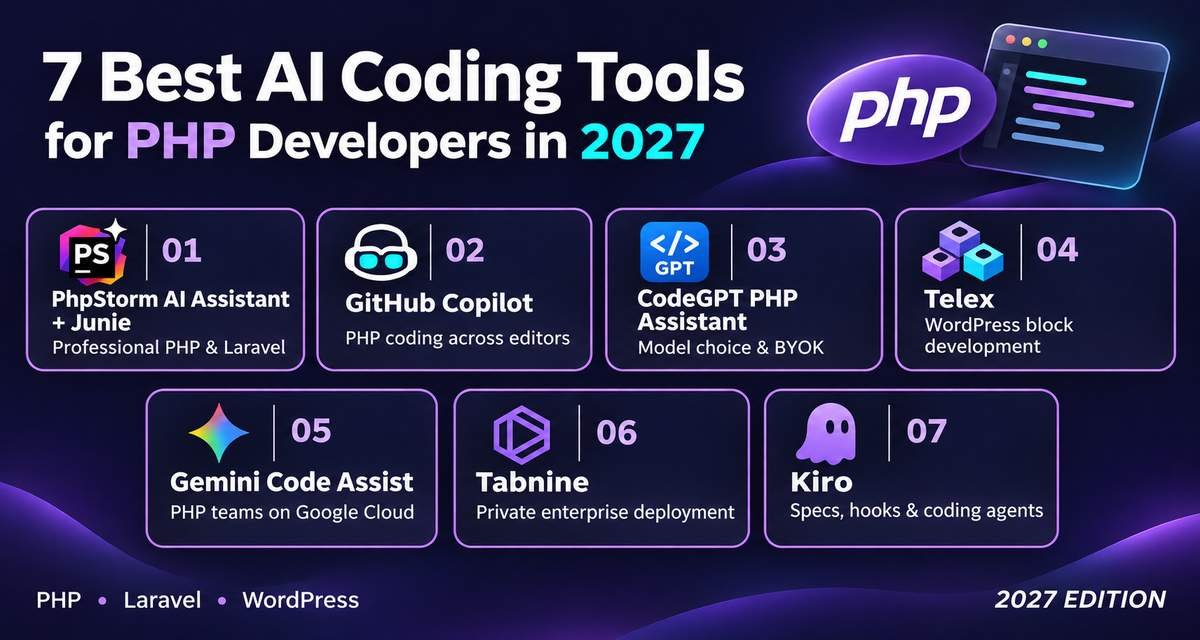
PhpStorm AI Assistant + Junie is the strongest overall option for developers already using PhpStorm. GitHub Copilot fits PHP developers who want one assistant across several editors and GitHub. CodeGPT PHP Assistant is useful for Laravel, Symfony, WordPress, and developers who want BYOK or local models. Telex, the current destination for former CodeWP users, is the specialist choice for AI-assisted WordPress block creation.
Best AI Coding Tools for PHP Developers at a Glance
| Tool | Strongest Fit |
| PhpStorm AI Assistant + Junie | Professional PHP, Laravel, and PhpStorm development |
| GitHub Copilot | General PHP coding across editors and GitHub |
| CodeGPT PHP Assistant | PHP developers who want model choice and BYOK |
| Telex | WordPress block development |
| Gemini Code Assist | PHP teams using Google Cloud |
| Tabnine | Enterprise PHP teams with private deployment needs |
| Kiro | Agent-based PHP development with specs and hooks |
The original shortlist included CodeWP and Amazon Q Developer. Current verification has changed those recommendations. CodeWP’s official URL now redirects to Automattic’s Telex, while AWS stopped accepting new Amazon Q Developer accounts and subscriptions on May 15, 2026, and plans to end support for its IDE plugins on April 30, 2027. Kiro is AWS’s recommended migration path and officially lists PHP among its supported languages.
Comparison Table
| Tool | Best For | Main PHP Use | Free Option | Main Limitation |
| PhpStorm AI + Junie | PhpStorm users | Completion, debugging, refactoring, agents | AI Free included | PhpStorm itself is paid for normal commercial use |
| GitHub Copilot | Most PHP developers | Completion, chat, agents, review | Yes | Chat and agent usage consumes AI credits |
| CodeGPT PHP Assistant | Laravel and multi-model users | PHP generation, refactoring, agents, modernization | Yes | Main coding extension is centered on VS Code |
| Telex | WordPress developers | AI-assisted WordPress blocks | Current official site is accessible without a listed paid plan | Much narrower than a general PHP coding assistant |
| Gemini Code Assist | Google Cloud organizations | PHP completion, generation, agents, code context | No current individual IDE tier | Standard and Enterprise target organizations |
| Tabnine | Privacy-focused companies | Completion, chat, enterprise agents | No current general personal plan verified | Starts at enterprise-oriented pricing |
| Kiro | Agent-based application development | PHP coding, specs, hooks, CLI, project tasks | Yes | Less PHP-specific than PhpStorm or CodeGPT |
How the Tools Were Selected
The ranking focuses on factors that affect PHP development directly:
- PHP language support
- Laravel, Symfony, and WordPress fit
- PhpStorm and VS Code integration
- Project and repository context
- Code generation and editing
- Testing and debugging
- Agent support
- PHP modernization
- Model flexibility
- Privacy and deployment options
- Current product availability
- Current pricing
Products that are being discontinued were not ranked as recommendations for new users.
No ranking is based on claimed hands-on testing.
Best AI Coding Tools for PHP Developers
1. PhpStorm AI Assistant + Junie
Best for: Professional PHP developers who use PhpStorm for Laravel, Symfony, WordPress, or general backend development.
What it does: PhpStorm combines JetBrains’ PHP IDE with AI Assistant and coding agents such as Junie. AI Assistant can generate and edit code, explain errors, work with project context, and provide AI completion. Junie can handle larger tasks that require planning and changes across several files.
Why It Stands Out
PhpStorm already understands PHP before the AI layer is added.
The IDE supports PHP versions from older 5.x releases through modern PHP 8.x language levels. It also includes static analysis, refactoring, debugging, Composer workflows, databases, and integrations with tools such as PHPStan, Psalm, Laravel Pint, PHP CS Fixer, and PHP_CodeSniffer.
That gives the AI useful structure around its output.
PhpStorm 2026.2 also expanded Laravel support with a Laravel tool window, Artisan access, error exploration, Laravel Cloud functions, and additional package support. JetBrains has also expanded support for external coding agents, model providers, MCP, and agent skills.
Key Features
- PHP-aware AI completion
- Project-context chat
- Junie coding agent
- Multi-file editing
- Error explanation
- Refactoring assistance
- Test generation assistance
- Laravel project support
- Terminal access for agents
- MCP integrations
- External agents
- BYOK options
- Local model support
Practical Use Case
A Laravel developer needs to add a subscription-cancellation feature.
The change could touch:
- Routes
- A controller
- A service class
- Eloquent models
- Validation
- Authorization
- Database changes
- PHPUnit or Pest tests
AI Assistant can help with individual edits. Junie can inspect the repository and work through a larger multi-file task while the developer reviews the changes.
Limitations
PhpStorm is not free for normal commercial development.
JetBrains also meters cloud-based AI through monthly AI credits. Developers who regularly assign larger jobs to Junie may need more AI capacity than occasional users.
AI-generated Laravel or Symfony code can also make incorrect assumptions about package versions, project conventions, or database structure. Developers still need tests and static analysis.
Pricing
JetBrains currently includes AI Free with PhpStorm.
JetBrains lists:
- AI Free: $0
- AI Pro: $100/year, or about $8.33/month when billed annually
- AI Ultimate: $300/year
The current commercial PhpStorm pricing page lists the IDE at $289 per user/year for organizations, with AI Pro available as an additional option. Pricing differs for individuals and organizations.
Verdict
Choose PhpStorm AI Assistant + Junie if PhpStorm is already the center of your PHP workflow.
It is especially useful for structured PHP applications where IDE analysis, Composer, databases, testing tools, and framework context matter alongside AI generation.
2. GitHub Copilot
Best for: PHP developers who want AI across their editor, terminal, repositories, and pull requests.
What it does: GitHub Copilot combines code completion, chat, coding agents, CLI assistance, code review, and GitHub workflows. It works in VS Code, JetBrains IDEs such as PhpStorm, and several other editors.
Why It Stands Out
Copilot is useful when a PHP application contains more than PHP.
A modern Laravel project may also include:
- JavaScript or TypeScript
- Blade templates
- CSS
- SQL
- Docker files
- YAML
- shell scripts
- GitHub Actions
Copilot stays available across those parts of the repository.
It also has broader development functions than standard autocomplete. Paid users can access cloud agents, code review, third-party agents, model selection, and GitHub integrations.
Key Features
- PHP code completion
- Chat
- Agent mode
- Multi-file changes
- GitHub cloud agent
- Code review
- Copilot CLI
- PhpStorm support
- VS Code support
- Model selection on paid plans
- Custom instructions
- Third-party coding agents
Practical Use Case
A PHP developer building an API can ask Copilot to create:
- A route
- A request validator
- A controller action
- A service
- Database logic
- Tests
- Documentation
The same assistant can also help update the Docker configuration or CI workflow associated with the project.
Limitations
GitHub changed Copilot billing in June 2026.
Chat, agents, CLI, code review, and related model-driven operations now consume GitHub AI Credits. Paid plans still include unlimited code completion and next-edit suggestions, but longer agent sessions can use more credits.
Copilot is also a general coding product. It does not have the same native PHP inspection system as PhpStorm itself.
Pricing
Current individual plans include:
- Copilot Free: $0
- Copilot Pro: $10/month
- Copilot Pro+: $39/month
- Copilot Max: $100/month
GitHub also lists:
- Business: $19 per user/month
- Enterprise: $39 per user/month
Copilot Free includes 2,000 completions per month and limited AI interactions.
Verdict
GitHub Copilot is the strongest general choice for PHP developers who work across several editors, programming languages, and GitHub workflows.
Choose PhpStorm AI instead if native PHP IDE context is your main requirement.
3. CodeGPT PHP Assistant
Best for: PHP developers who want Laravel and WordPress assistance with BYOK, local models, and provider choice.
What it does: CodeGPT provides a dedicated PHP assistant for modern PHP development. Its current PHP page covers PHP 8.x, Laravel, Symfony, WordPress, CodeIgniter, CakePHP, APIs, database code, and legacy PHP modernization.
Why It Stands Out
CodeGPT is one of the more PHP-specific general AI assistants in this comparison.
Its current PHP support includes:
- PHP 8.x syntax
- Laravel
- Symfony
- WordPress
- Eloquent
- Doctrine
- PDO
- MySQLi
- REST APIs
- Legacy PHP upgrades
CodeGPT also has a dedicated Laravel assistant that covers models, migrations, controllers, Blade templates, Eloquent relationships, validation, PHPUnit, Pest, and multi-file agent work.
Another advantage is model choice. Developers can use CodeGPT-hosted access, their own API keys, or local models such as those exposed through Ollama or LM Studio.
Key Features
- PHP 8.x assistance
- Laravel support
- Symfony support
- WordPress assistance
- Code generation
- Agent mode
- Multi-file editing
- Debugging
- Refactoring
- Legacy PHP modernization
- BYOK
- Local models
- Several AI providers
Practical Use Case
A developer maintaining a PHP 7 application could use CodeGPT to identify old patterns, refactor selected classes toward PHP 8.x syntax, add type declarations, and generate tests around the modified code.
A Laravel developer could instead use agent mode to work across a controller, model, migration, routes, and tests.
Limitations
CodeGPT’s developer workflow is primarily centered on its VS Code extension.
PhpStorm developers who do not want to change editors may get a more direct experience from JetBrains AI or GitHub Copilot.
The product also supports many models, so output quality and cost can differ depending on which provider you choose.
Pricing
CodeGPT currently lists:
- Free: $0
- Professional: $9/month when billed annually
- Teams: $27 per seat/month when billed annually
- AI-First Services: Custom pricing
The Free plan includes daily Economy-model interactions, BYOK, and local models. Professional adds unlimited Economy-model use and autocomplete.
CodeGPT documentation also describes a BYOK-focused route where developers can connect their own provider and pay that provider directly.
Verdict
CodeGPT is a strong option for PHP developers using VS Code who care about framework-specific help and control over the underlying AI provider.
It is especially relevant for Laravel developers and teams modernizing older PHP code.
4. Telex
Best for: WordPress developers creating custom blocks with AI.
What it does: Telex is Automattic’s AI-assisted WordPress authoring environment and is now the official destination when visiting CodeWP’s former website.
The old codewp.ai domain redirects directly to Telex.
Why It Stands Out
Telex is different from the other tools here because it is focused on WordPress rather than general PHP application development.
The current Telex experience centers on turning prompts into WordPress block-based functionality. Its public showcase includes interactive blocks such as accordions, quizzes, recipe cards, weather displays, and other block experiences.
That makes it more relevant to a WordPress creator than a Symfony backend developer.
Key Features
- WordPress-focused AI authoring
- Natural-language generation
- Gutenberg block workflows
- Browser-based environment
- WordPress-specific output
- Current successor destination for CodeWP users
Practical Use Case
A WordPress developer wants a custom interactive FAQ block with configurable sections.
Instead of starting the block structure manually, the developer can describe the required behavior in Telex, generate a starting implementation, and then test and review the result before adding it to a site.
Limitations
Telex should not be treated as a replacement for PhpStorm, Copilot, or CodeGPT.
It is much narrower.
A developer building:
- Laravel services
- Symfony applications
- Composer packages
- CLI tools
- Large PHP APIs
will get more value from another tool in this comparison.
Its current public product pages also do not provide a normal SaaS pricing table comparable to Copilot or CodeGPT.
Pricing
A current standalone paid pricing structure for Telex could not be verified from its official public pages.
The former CodeWP pricing URL now redirects to Telex rather than showing CodeWP subscription plans.
Verdict
Choose Telex if your PHP work is primarily WordPress block development.
Do not choose it as your main AI assistant for general PHP application engineering.
5. Gemini Code Assist
Best for: PHP development teams that already use Google Cloud and need organization-level AI coding assistance.
What it does: Gemini Code Assist Standard and Enterprise provide code completion, generation, conversational assistance, codebase context, transformation tools, agent mode, and Gemini CLI access.
Why It Stands Out
Google lists PHP as a verified coding language for Gemini Code Assist.
The extension is also officially supported in PhpStorm, along with VS Code and several other JetBrains IDEs.
Enterprise customers can also use code customization with PHP repositories. Google’s current documentation says private-code customization supports PHP alongside languages such as Java, Go, Python, Rust, and TypeScript.
Key Features
- Verified PHP support
- PhpStorm integration
- VS Code integration
- Code completion
- Code generation
- Code transformation
- Local codebase awareness
- Agent mode
- Gemini CLI
- PHP repository customization on Enterprise
- Google Cloud integration
Practical Use Case
A company running PHP services on Google Cloud can use Gemini Code Assist inside PhpStorm for development questions, code generation, debugging, and code transformations.
Enterprise teams can connect approved private repositories to make suggestions more relevant to internal PHP libraries and conventions.
Limitations
Google ended the previous consumer IDE version.
Starting June 18, 2026, Gemini Code Assist IDE extensions stopped serving requests for the Individual, Google AI Pro, and Google AI Ultra tiers. Standard and Enterprise remain available for organizations.
That makes Gemini Code Assist a weaker choice for a solo PHP developer looking for a personal coding subscription.
Pricing
Google currently sells Standard and Enterprise through organization licenses.
The current pricing page lists:
Gemini Code Assist Standard
- $0.031232877 per license hour with a monthly commitment
- $0.026027397 per license hour with a 12-month commitment
Gemini Code Assist Enterprise
- $0.073972603 per license hour with a monthly commitment
- $0.061643836 per license hour with a 12-month commitment
Subscriptions are billed monthly.
Verdict
Gemini Code Assist makes the most sense for PHP teams already buying Google Cloud development tools.
Individual PHP developers have easier purchasing options elsewhere.
6. Tabnine
Best for: Companies that want PHP AI coding with strict control over deployment and source-code handling.
What it does: Tabnine provides AI completion, chat, repository context, and agent-based software-development workflows across major IDEs and languages.
Its current platform can run as SaaS, in a VPC, on-premises, or in a fully air-gapped environment.
Why It Stands Out
Tabnine’s main advantage is organizational control.
Its current pricing material states:
- Zero code retention
- No training on customer code
- SaaS or self-hosted deployment
- Air-gapped deployment
- LLM access controls
- Governance rules
- Audit functions
- Context from repositories and development systems
These features matter more to a company with private PHP applications than to a developer experimenting with a small personal project.
Key Features
- PHP coding assistance
- AI completion
- AI chat
- Agent workflows
- Major IDE support
- Repository context
- MCP integration
- SaaS deployment
- VPC deployment
- On-premises deployment
- Air-gapped option
- Governance controls
Practical Use Case
A financial company maintains a private PHP application that cannot send source code to a normal consumer AI service.
Tabnine can be deployed in an approved environment while developers use AI for code completion, explanations, refactoring, and agent-based work.
Limitations
Tabnine is now focused heavily on organization purchases.
Its current public pricing starts much higher than GitHub Copilot Pro or CodeGPT Professional.
A solo Laravel developer who does not need private infrastructure is unlikely to get enough extra value to justify the difference.
Pricing
Tabnine currently lists:
- Code Assistant Platform: $39 per user/month with annual billing
- Agentic Platform: $59 per user/month with annual billing
The Agentic plan adds agents, CLI workflows, organizational context, and broader automation. Extra model costs can apply depending on the deployment and provider arrangement.
Verdict
Tabnine fits enterprise PHP teams with data-control, governance, or private-deployment requirements.
For normal individual PHP development, Copilot, CodeGPT, or PhpStorm AI is easier to justify.
7. Kiro
Best for: PHP developers who want agent-based development built around specifications, project rules, and automation hooks.
What it does: Kiro is an agent-focused development environment available as an IDE, CLI, web interface, and other surfaces. AWS positions it as the successor path for developers moving away from Amazon Q Developer’s IDE plugins.
Why It Stands Out
Kiro officially lists PHP among the programming languages it supports.
It can work with project-level specifications, agent instructions, hooks, MCP servers, custom agents, and project context.
That approach can fit larger PHP features where a developer wants to define requirements before the agent starts changing code.
Kiro is based on Code OSS, so developers moving from VS Code can import compatible settings and extensions.
Key Features
- PHP support
- Agent-based IDE
- CLI
- Specs
- Steering files
- Hooks
- Custom agents
- MCP
- Project context
- Error-fix actions
- Multiple models
- VS Code settings migration
- Cloud sessions on supported plans
Practical Use Case
A developer wants to add team invitations to a Laravel SaaS application.
Instead of immediately generating files, the developer can create a specification describing:
- Invitation states
- Permissions
- Expiration rules
- Database changes
- API behavior
- Email requirements
- Tests
Kiro can then use the specification as context while implementing the tasks.
Limitations
Kiro supports PHP, but its public language-specific guides currently give more detailed documentation for languages such as Java, Python, and TypeScript than for PHP.
It is also a separate development environment. PhpStorm users may prefer to keep their existing PHP IDE rather than move to a Code OSS-based workflow.
Pricing
Kiro currently lists:
- Free: $0/month — 50 credits
- Pro: $20/month — 1,000 credits
- Pro+: $40/month — 2,000 credits
- Pro Max: $100/month — 5,000 credits
- Power: $200/month — 10,000 credits
Paid plans can purchase additional credits at $0.04 each.
Verdict
Kiro is worth comparing if you want an agent-focused PHP development process with specifications and automation.
PhpStorm remains stronger for developers who put PHP-specific IDE analysis first.
Best AI Coding Tools for PHP by Use Case
| PHP Use Case | Best Choice | Alternative |
| PhpStorm development | PhpStorm AI + Junie | GitHub Copilot |
| General PHP coding | GitHub Copilot | CodeGPT |
| Laravel development | PhpStorm AI + Junie | CodeGPT |
| Symfony development | PhpStorm AI + Junie | CodeGPT |
| WordPress block development | Telex | CodeGPT |
| VS Code PHP development | CodeGPT | GitHub Copilot |
| PHP legacy modernization | CodeGPT | PhpStorm AI |
| Google Cloud PHP teams | Gemini Code Assist | GitHub Copilot |
| Private enterprise deployment | Tabnine | — |
| Spec-based PHP development | Kiro | PhpStorm Junie |
| Free starting option | GitHub Copilot Free | CodeGPT Free |
How to Choose an AI Coding Tool for PHP
1. Start With the PHP Framework
Framework context matters.
For Laravel, look for support around:
- Eloquent
- Blade
- Artisan
- migrations
- queues
- policies
- validation
- PHPUnit or Pest
For Symfony, the tool needs to work well with:
- Doctrine
- services
- dependency injection
- console commands
- controllers
- configuration
For WordPress, platform knowledge matters more than generic PHP syntax.
Telex becomes relevant for blocks, while CodeGPT provides broader WordPress coding help.
2. Match the Tool to Your Editor
PhpStorm developers should start with:
- PhpStorm AI Assistant
- Junie
- GitHub Copilot
- Gemini Code Assist
VS Code developers can compare:
- GitHub Copilot
- CodeGPT
- Kiro as an alternative development environment
Changing your whole editor solely for an AI feature rarely makes sense unless the new workflow solves another problem too.
3. Decide How Much Work the Agent Should Handle
Autocomplete is useful for:
- Methods
- repetitive code
- array transformations
- tests
- PHPDoc
- boilerplate
Agents become useful for tasks such as:
- Adding a complete feature
- Refactoring several classes
- Updating old PHP
- Running tests
- Changing database code
- Editing configuration
If you mostly want suggestions while typing, paying for a high-volume agent plan may be unnecessary.
4. Check Your PHP Version
AI assistants can generate syntax that your application cannot run.
For example, a project on PHP 7.4 cannot use every PHP 8.x feature.
Tell the tool the exact runtime version and make sure your IDE or static-analysis tools enforce it.
PhpStorm can configure a PHP language level and flag code that does not match it.
5. Use Static Analysis Beside AI
PHP’s runtime flexibility makes automated checks useful.
Consider using:
- PHPStan
- Psalm
- PHP_CodeSniffer
- PHP CS Fixer
- Laravel Pint
- framework tests
PhpStorm integrates with several of these tools.
AI can generate code quickly, but static analysis can catch type, style, and quality problems before they reach production.
6. Review AI-Generated Database Code
PHP applications frequently depend on SQL or ORMs.
Review generated code for:
- Missing parameter binding
- N+1 queries
- Incorrect joins
- Missing transactions
- Authorization gaps
- Unsafe mass assignment
- Poor indexes
- Unexpected Eloquent loading behavior
Generated code should pass application tests and database review before deployment.
FAQ
What is the best AI coding tool for PHP developers?
PhpStorm AI Assistant + Junie is the strongest overall option for developers already using PhpStorm because it combines AI with a PHP-focused IDE.
GitHub Copilot is the better general option for PHP developers who work across VS Code, PhpStorm, GitHub, and several languages.
What is the best AI coding tool for Laravel?
PhpStorm AI Assistant + Junie is a strong choice for Laravel because PhpStorm 2026.2 includes dedicated Laravel tooling alongside its AI environment.
CodeGPT is another useful option. Its Laravel assistant covers Eloquent, Blade, migrations, controllers, testing, validation, and agent-based multi-file work.
What is the best free AI coding tool for PHP?
GitHub Copilot Free includes 2,000 completions per month and limited agent/chat usage.
CodeGPT Free also provides no-cost access with daily interactions, BYOK, and local-model options.
Kiro has a permanent Free plan with 50 monthly credits.
Can AI help upgrade PHP 7 to PHP 8?
Yes.
CodeGPT specifically positions its PHP assistant for upgrading older PHP 5.x and 7.x projects toward PHP 8.x, including deprecated-function replacement, type declarations, namespaces, PSR conventions, and newer syntax.
Developers should still use automated tests and compatibility tools because language upgrades can change runtime behavior.
Is CodeWP still available?
The old CodeWP website no longer presents the original standalone product.
Its official domain now redirects to Telex, Automattic’s AI-assisted WordPress environment.
For a current 2026 comparison, Telex is more accurate than listing CodeWP as an active standalone service.
Does Gemini Code Assist support PHP?
Yes.
Google includes PHP in its verified coding-language list and supports the Gemini Code Assist extension in PhpStorm.
The current IDE offering is aimed at Standard and Enterprise organization customers after Google deprecated the previous individual Code Assist tier.
Does Amazon Q Developer still support PHP?
Amazon Q Developer does support PHP in its existing coding tools and code review support includes PHP 8.2 and earlier.
However, it is no longer a good recommendation for a new PHP setup. AWS blocked new Amazon Q Developer account and subscription creation starting May 15, 2026, and plans to end support for the IDE plugins on April 30, 2027. AWS recommends moving to Kiro.
Is Kiro good for PHP development?
Kiro officially lists PHP among its supported programming languages.
Its main attraction is agent-based development through specifications, hooks, custom agents, CLI access, and project context. It is less PHP-specific than PhpStorm but can fit developers who prefer a spec-based coding workflow.
Conclusion
PhpStorm AI Assistant + Junie is the strongest choice for developers who want AI inside a PHP-focused IDE.
GitHub Copilot is the better general option for PHP developers working across editors and GitHub. CodeGPT deserves attention from Laravel, Symfony, WordPress, and legacy PHP developers who want model choice or BYOK.
Choose Telex for WordPress block creation, Gemini Code Assist for organization-level Google Cloud development, and Tabnine where private deployment matters.
Kiro is the stronger current AWS-related coding option for new users because Amazon Q Developer’s IDE product is already on its end-of-support path.
The final decision should follow your PHP framework, editor, project size, privacy requirements, and whether you want autocomplete or a coding agent that can handle larger tasks.
Key Sources Used
- JetBrains PhpStorm AI product information and current AI pricing.
- JetBrains PhpStorm 2026.2 PHP, Laravel, and agent updates.
- JetBrains PHP version and IDE documentation.
- GitHub Copilot plans and current AI-credit billing documentation.
- CodeGPT PHP and Laravel assistants.
- CodeGPT current pricing.
- CodeWP official redirect to Automattic Telex.
- Google Gemini Code Assist PHP and PhpStorm support.
- Google Gemini Code Assist current product status and pricing.
- Tabnine current platform pricing, deployment, and privacy information.
- Kiro PHP support and current pricing.
- AWS Amazon Q Developer end-of-support announcement.


Leave a Reply