
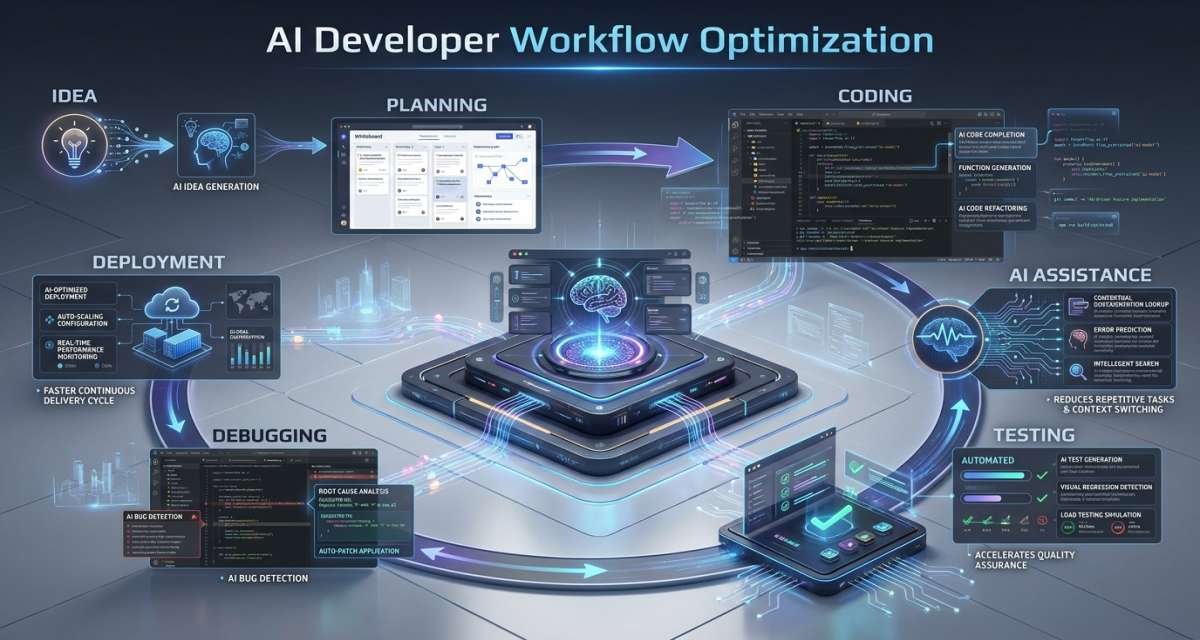
AI can help developers plan tasks, understand unfamiliar code, draft changes, generate tests, debug problems, review pull requests, and update documentation. The value, however, does not come from generating as much code as possible.
AI developer workflow optimization means using AI to reduce friction across the software delivery process while keeping developers responsible for correctness, security, architecture, testing, and release decisions.
A productive workflow uses AI where the output is useful and reviewable. It does not automate every step simply because automation is available. For developers looking to choose the right AI tools for different stages of development, see our guide to AI tools for developers.
The practical goal is to spend less engineering time on repeated manual work and more time on product logic, architecture, problem-solving, quality, and user impact.
Table of Contents
What AI Workflow Optimization Actually Means
AI-assisted software development extends beyond code completion.
Developer-focused AI systems can support work such as:
- Requirement clarification
- Technical planning
- Codebase explanation
- Boilerplate generation
- Refactoring
- Unit-test drafting
- Debugging
- Pull request summaries
- Code review assistance
- Documentation
- Release notes
- DevOps-related explanations
Some tools operate mainly as assistants inside an IDE or chat interface. Others can inspect repositories, edit multiple files, run commands, respond to test results, and prepare code changes for human review.
That creates an important distinction.
The question is no longer only:
“Can AI write this code?”
A better question is:
“Where in this workflow can AI reduce effort without creating more risk, review work, or rework later?”
That shift matters because coding speed is only one part of engineering productivity.
A developer who generates a feature quickly but spends hours correcting incorrect assumptions has not necessarily become more productive. Likewise, a team that creates more pull requests but introduces more defects has not improved its delivery system.
The aim is better flow, not simply more output.
Find Workflow Friction Before Adding AI
A common mistake is choosing an AI coding product first and then looking for places to use it.
Start with the workflow instead.
Map how work moves from an idea or ticket to production and identify where developers repeatedly lose time.
Common friction points include:
- Unclear tickets
- Missing acceptance criteria
- Slow codebase understanding
- Repeated boilerplate
- Poor test coverage
- Difficult debugging
- Long review cycles
- Repeated CI failures
- Stale documentation
- Manual pull request summaries
- Manual release notes
- Repeated investigation of similar problems
Once the bottleneck is visible, decide whether AI can reduce it.
For example, a small startup may gain more from AI-assisted ticket clarification, unit-test drafts, and documentation than from a highly autonomous coding agent.
A larger engineering organization may find value in codebase research, pull request triage, security review support, or documentation across multiple repositories.
The best workflow is not the one using AI at every stage. It is the one using AI at stages where the benefits exceed the additional review and operational costs.
A simple assessment can start with four questions:
- Which developer activities consume repeated time?
- Which outputs are easy for a human to verify?
- Which tasks have enough context for AI to work reliably?
- Which mistakes would create serious product or security risk?
These questions help separate suitable automation from work that still needs tighter human control.
Build an AI-Assisted Developer Loop
A controlled workflow can follow six steps:
clarify → research → draft → review → test → document
The loop gives AI useful responsibilities while preserving engineering checkpoints.
Clarify the task
Do not begin by asking AI to produce code from a vague request.
Define the problem first.
Useful context includes:
- User problem
- Expected behavior
- Relevant component or module
- Known constraints
- Acceptance criteria
- Test expectations
- Security concerns
- Behavior that must remain unchanged
A weak request might be:
“Fix the login bug.”
A stronger request would specify that a password-reset token expires incorrectly, identify the expected behavior, ask the system to locate the relevant logic, and require tests without changing unrelated authentication behavior.
Better context reduces guessing.
AI cannot reliably infer undocumented business rules, private API behavior, database constraints, or product decisions that are not visible in the material it receives.
Use AI to expose missing information before using it to implement the change.
Research the codebase
Developers often spend significant time learning how an unfamiliar part of a system works.
AI can assist by answering focused questions such as:
- What does this module do?
- Which files depend on this function?
- What appears to happen before this API call?
- Which components are likely affected by this change?
- Which edge cases are visible in the current implementation?
- Where is this configuration used?
This can shorten the discovery phase, particularly for developers joining an existing project or moving into an unfamiliar service.
The output still requires verification.
An AI assistant may misunderstand indirect dependencies, configuration behavior, generated code, or conventions that are not represented in the supplied context.
Use its explanation as a navigation aid rather than as definitive documentation.
Draft the change
Once the task and relevant context are understood, AI can create a first implementation draft.
Good candidates include:
- Helper functions
- Validation logic
- Boilerplate
- API client wrappers
- Type definitions
- Small refactors
- Unit-test drafts
- Error-handling patterns
- Documentation updates
Keep the requested change reasonably narrow.
A small change is easier to understand, review, test, and reverse than a large agent-generated modification touching many unrelated files.
For larger work, split the feature into stages.
For example:
- Identify affected modules.
- Draft the data-layer change.
- Review it.
- Draft the service logic.
- Review it.
- Add tests.
- Update documentation.
This keeps the developer involved throughout the process.
Review the output
Generated code should not move directly from an AI tool to production.
Review it as carefully as code written by another contributor.
Check:
- Does it solve the intended problem?
- Does it preserve existing business behavior?
- Are edge cases handled?
- Are permissions correct?
- Are database changes safe?
- Did it introduce unnecessary dependencies?
- Does it match project conventions?
- Is the implementation maintainable?
- Are error paths handled?
- Are security-sensitive operations protected?
AI-generated code can appear polished while containing a wrong assumption.
That makes semantic review more important than checking syntax alone.
The reviewer needs to understand why the code is correct, not merely whether it compiles.
Test before merging
AI can generate tests, but generated tests are not proof that the implementation is correct.
Developers still need to decide which behavior must be verified.
Depending on the change, this may include:
- Unit tests
- Integration tests
- End-to-end tests
- Regression tests
- Permission tests
- Error-condition tests
- Security checks
One useful review question is:
Would this test fail if the original bug still existed?
If the answer is no, the test may be confirming implementation details instead of protecting expected behavior.
Generated tests also need inspection for weak assertions, unrealistic mocks, missing negative cases, and assumptions that merely reproduce the generated implementation.
Document the final change
Documentation is one of the easiest places to introduce AI safely.
AI can draft:
- Pull request summaries
- Release notes
- README changes
- Setup instructions
- API examples
- Migration notes
- Test notes
- Support-facing explanations
- Internal runbook updates
Generate documentation after the implementation has stabilized.
Otherwise, documentation may describe an earlier AI assumption rather than the code that actually ships.
The developer responsible for the change should verify the final text.
Where AI Helps Across the Development Lifecycle
The same workflow principles can be applied throughout the software development lifecycle.
Planning and technical discovery
AI can help turn an incomplete feature request into a clearer engineering task.
A useful workflow is:
- Provide the feature or issue description.
- Ask AI to identify ambiguities.
- Ask for possible edge cases.
- Identify dependencies and likely affected components.
- Turn the results into acceptance criteria.
- Have the developer or product owner approve the scope.
This can uncover missing questions before implementation begins.
It is especially useful when developers would otherwise discover unclear requirements halfway through the work.
Coding and refactoring
Code generation is useful when the problem is bounded, and the expected output is easy to inspect.
Examples include:
- Creating a helper function
- Rewriting repeated logic
- Adding basic validation
- Drafting an API route
- Converting code between established patterns
- Improving error handling
- Adding types
AI becomes less reliable as hidden context increases.
Large architectural changes, payment logic, authorization systems, complex migrations, and domain-heavy workflows usually require more deliberate human reasoning.
AI can still help with alternatives or analysis, but it should not own the design decision.
Testing and debugging
AI can accelerate debugging by helping developers interpret:
- Stack traces
- Error messages
- Test failures
- Logs
- Expected versus actual behavior
It can also propose hypotheses.
The developer should then reproduce the problem and test those hypotheses rather than accepting the first explanation.
For testing, AI can suggest cases from:
- Bug reports
- Requirements
- API contracts
- Changed files
- Existing test suites
- Previous incidents
Useful categories include normal inputs, invalid values, empty states, authorization failures, timeouts, duplicated requests, and boundary conditions.
AI works well here as a brainstorming partner.
Humans still decide whether the resulting coverage is meaningful.
Pull request review
AI-assisted review can provide a first pass over code changes.
It can help:
- Summarize a diff
- Flag suspicious patterns
- Identify possible missing tests
- Point out unclear naming
- Suggest simplifications
- Highlight changed behavior
- Draft review questions
This can make human review more focused.
It should not eliminate human review for important changes.
A human reviewer understands business intent, operational constraints, historical decisions, customer impact, and internal conventions that may not be visible from the code alone.
A practical pattern is:
AI first pass → human technical review → automated tests and security checks → merge decision
Documentation and handoff
AI can improve information flow between engineering, QA, support, product, and operations.
For example, a merged pull request can be turned into:
- A concise technical summary
- QA testing notes
- A release-note draft
- Support documentation
- Migration instructions
This reduces repeated writing while keeping the source of truth connected to the implemented change.
Choose Tasks Based on Risk and Reviewability
Not every developer task should receive the same level of AI autonomy.
A useful way to decide is to compare reviewability with impact.
Good early use cases
Start with work that is easy to inspect and correct:
- Code explanation
- Unit-test drafts
- Documentation
- Pull request summaries
- Edge-case brainstorming
- Small helper functions
- Debugging hypotheses
Errors in these outputs are usually visible before release.
Tasks requiring stronger review
Increase oversight for:
- Database migrations
- Authentication
- Authorization
- Payments
- User permissions
- Infrastructure configuration
- Sensitive data handling
- Public APIs
- Large refactors
Errors here may have wider consequences.
Tasks that should remain human-led
Some decisions involve product or architectural judgment that cannot be reduced to code generation.
Examples include:
- Major system boundaries
- Security policy
- Critical data ownership
- Product trade-offs
- Compliance decisions
- Release approval
AI can provide analysis and alternatives.
Humans should own the decision.
This approach supports developer productivity with AI systems without confusing productivity with unrestricted automation.
Measure Developer Productivity With AI Systems
AI adoption should not be measured by prompts, generated lines of code, or how many developers enable a tool.
Those figures measure activity rather than outcomes.
The better question is:
Are developers delivering reliable changes with less friction and unnecessary rework?
Measure flow
Useful workflow metrics include:
- Task-to-merge cycle time
- Pull request review time
- Review wait time
- Time spent searching for context
- Time spent resolving repeated CI failures
- Handoff delays
If AI improves one task but slows the surrounding process, the overall workflow may not be better.
Measure quality
Track whether faster development is affecting quality.
Useful indicators include:
- Escaped defects
- Change failure rate
- Regression frequency
- Security issues discovered before release
- Incident frequency
- Test effectiveness
More generated code is not a useful productivity gain if defects increase.
Measure rework and review
AI can create hidden costs through review fatigue.
Track:
- How often generated code needs major revision
- Time spent correcting AI output
- Pull requests returned for rework
- Tests rewritten after generation
- Unnecessary code removed during review
This helps determine which tasks actually benefit from AI assistance.
Measure developer experience
Productivity also includes whether engineers can understand and own the work they ship.
Useful signals include:
- Developer satisfaction
- Confidence in AI-assisted changes
- Ease of finding context
- Review burden
- Perceived cognitive load
- Ability to maintain generated code
Do not measure individual developers by how frequently they use AI.
That encourages tool usage rather than good engineering.
Evaluate the workflow instead.
Add Security and Governance Guardrails
AI-assisted development introduces another place where source code and sensitive information can leave normal development boundaries.
Teams should define what developers can and cannot share.
Potentially sensitive material includes:
- API keys
- Credentials
- Customer information
- Production logs
- Proprietary code
- Internal architecture
- Security findings
- Private configuration
- Authentication details
Only approved tools should receive data covered by organizational restrictions.
A basic governance policy should define:
- Approved AI systems
- Allowed repositories
- Restricted data
- Agent permissions
- Required human review
- Security-sensitive tasks
- Logging requirements
- Vendor-data handling expectations
- Who can approve high-risk changes
Agentic tools deserve particular attention because some can modify files, run commands, interact with repositories, or perform actions rather than simply return suggestions.
Give them the minimum access required for the task.
Security also needs to enter the workflow before code generation.
If authentication, authorization, customer data, or another sensitive area is involved, include those constraints when defining the task.
Do not wait until the pull request to ask whether the design is safe.
The practical governance rule remains straightforward:
AI may suggest, explain, draft, test, and review. Humans remain responsible for what is merged and released.
Common Workflow Mistakes to Avoid
Using AI to accelerate unclear requirements
A vague ticket does not become clearer because code can be generated quickly.
Clarify expected behavior first.
Asking for changes that are too large
Large AI-generated changes are harder to understand and review.
Break work into smaller steps with visible checkpoints.
Assuming generated tests are sufficient
AI may write tests that pass without protecting the behavior that matters.
Review assertions and add missing failure cases.
Reviewing syntax instead of intent
Clean code can still implement the wrong business rule.
Review what the code does and why.
Ignoring security until the end
Add security constraints before generation, especially for authentication, permissions, payments, and customer data.
Giving agents unnecessary access
More permissions increase potential impact when the tool makes a mistake.
Limit file, command, repository, and network access to what the task requires.
Automating documentation without verifying it
Generated documentation may describe outdated assumptions.
Check it against the final implementation.
Measuring lines of code
More code can create more maintenance work.
Measure delivery flow, quality, defects, review burden, and rework instead.
Expecting every developer to use AI the same way
Different roles and codebases have different needs.
A frontend engineer, platform engineer, coding learner, and security developer may benefit from very different workflows.
Optimize around the task rather than enforcing identical AI usage.
Conclusion
AI can improve engineering productivity by reducing friction across the entire developer workflow, rather than merely increasing code-generation speed.
Start by finding a real bottleneck. Then use AI on a focused task with enough context, clear constraints, and an output that developers can inspect.
A practical pattern is:
clarify → research → draft → review → test → document
Keep humans responsible for architecture, business logic, security, testing standards, and release decisions.
Teams should then measure whether the workflow actually improves. If cycle time falls while defects, rework, and review burden remain controlled, AI is providing useful leverage. If developers generate more code but spend more time correcting it, change where and how AI is being used.
The next step should be to improve one workflow at a time rather than adopt more tools simply because they are available.
FAQ
What is AI developer workflow optimization?
It is the use of AI to reduce friction across planning, coding, testing, review, debugging, documentation, and release work. The goal is better software delivery, not simply faster code generation.
How can AI improve developer productivity?
AI can reduce repetitive coding, explain unfamiliar code, suggest tests, summarize pull requests, assist with debugging, and draft documentation. It works best on tasks with clear inputs and outputs that developers can verify.
Where should a development team start using AI?
Start with low-risk tasks such as code explanation, unit-test drafts, documentation, pull request summaries, edge-case identification, or small refactors. Measure the result before expanding usage.
Should developers trust AI-generated code?
No generated code should be trusted automatically. Developers should review correctness, business logic, security, dependencies, edge cases, tests, maintainability, and project conventions before merging it.
Can AI coding agents replace developers?
AI agents can complete parts of implementation work, but developers remain responsible for architecture, product decisions, quality, security, and release approval. Agents reduce certain manual tasks rather than removing engineering responsibility.
What metrics should teams use to measure AI productivity?
Useful metrics include cycle time, pull request review time, rework, escaped defects, change failure rate, security findings, documentation freshness, and developer satisfaction. Avoid using generated code volume or prompt counts alone.
How can teams use AI safely in development?
Use approved tools, avoid exposing restricted information, limit agent permissions, keep changes small, require human review, run tests and security checks, and define clear policies for sensitive code and data.




Leave a Reply