
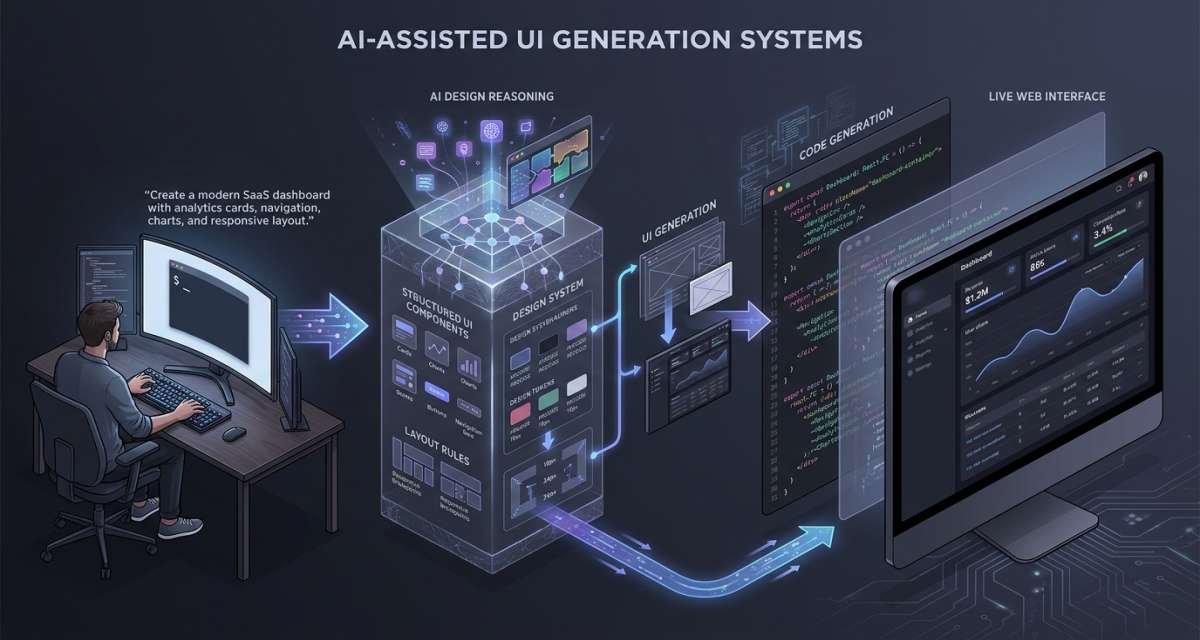
A product team can describe a dashboard, onboarding flow, settings page, landing page, or mobile screen and receive a usable first draft within a short workflow. Depending on the system, the result may include layouts, components, copy, styling, prototypes, or frontend code.
That is the practical purpose of AI-assisted UI generation systems: turning product requirements, prompts, screenshots, wireframes, or existing designs into interface drafts that teams can evaluate and improve.
Generated interfaces can reduce blank-page work and speed up exploration, but they do not remove the need for product thinking, UX judgment, accessibility, frontend engineering, testing, security, or human review.
This guide explains how these systems fit into product development, which types of UI generation are available, how to produce better results, and what teams should check before generated designs or code reach production.
What AI UI Generation Actually Means
AI UI generation uses artificial intelligence to create interface structures from textual or visual input.
The input might be:
- A natural-language prompt
- A product requirement
- A rough wireframe
- A screenshot
- An existing interface
- A design file
- A list of required components
- A description of a user flow
The output might be:
- Wireframes
- High-fidelity screens
- Editable design layers
- Interactive prototypes
- Component structures
- React components
- HTML and CSS
- Utility-class markup
- Full application screens
The main advantage is faster exploration.
Instead of moving directly from an idea to manual design or implementation, teams can create visible alternatives early. A founder can compare different dashboard structures. A designer can test alternative page hierarchies. A developer can generate starter components from an approved design.
The limitation is context.
A generated interface may look convincing while misunderstanding the user goal, ignoring accessibility, missing interaction states, creating unnecessary code, or assuming business rules that do not exist.
For that reason, AI works best as an interface-generation assistant rather than as the final authority on product experience.
Where AI-Generated UI Fits in the Product Workflow
AI UI generation is most useful when it is connected to the normal product and frontend process rather than treated as an isolated shortcut.
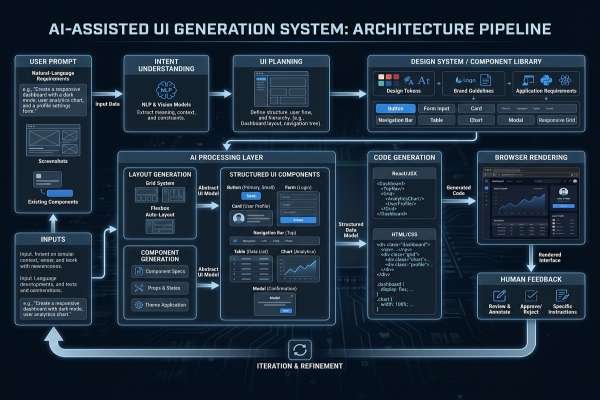
A typical workflow may look like this:
- Define the user problem.
- Clarify requirements and interface states.
- Generate one or more UI directions.
- Review hierarchy and user flow.
- Apply product and design-system rules.
- Generate or refine frontend code where useful.
- Test accessibility, responsiveness, behavior, and performance.
- Review the implementation.
- Move approved work into production.
- Monitor and maintain the released interface.
This is also where AI in the frontend development lifecycle becomes useful. The same system that helps create an initial UI can support planning, component design, testing ideas, code review, documentation, and maintenance.
The level of trust should change as the work gets closer to production.
AI can be given more freedom during brainstorming. Generated production code needs stronger evidence through tests, reviews, accessibility checks, performance measurements, and security controls.
Requirement and state discovery
Many UI problems begin before a screen is designed.
A ticket may say:
“Create a user settings page.”
That leaves important questions unanswered:
- What can the user edit?
- Which settings depend on permissions?
- What happens while data loads?
- What happens after saving?
- What happens when saving fails?
- Are unsaved changes protected?
- How does the page work on mobile?
- Which fields require validation?
- What happens when account data is unavailable?
AI can help identify these missing states before design or coding begins.
For example, a team can ask:
“Review this feature requirement and list missing interface states, validation rules, accessibility concerns, responsive behaviors, and questions we should resolve before implementation.”
The output gives the team material for discussion. Product owners, designers, and developers still decide which states are required.
UI exploration and design handoff
Once the user goal is understood, AI can quickly generate layout directions.
A dashboard might include:
- Navigation
- Summary cards
- Filters
- Charts
- Tables
- Empty states
- Alerts
- Pagination
- Help content
Generating several arrangements makes it easier to compare information hierarchy before investing heavily in one direction.
AI can also help translate a visual design into engineering questions.
Instead of simply seeing a card, a developer needs to know:
- Does it support long content?
- What happens without data?
- Can it be clicked?
- Does it have loading behavior?
- Does it change by permission level?
- How does it resize?
- Is it reused elsewhere?
This turns design handoff into component planning.
Frontend implementation
Once the direction is approved, AI can generate starter frontend code.
Useful tasks include:
- Component scaffolding
- Repeated markup
- Basic forms
- Layout structures
- Utility functions
- Type definitions
- Loading states
- Empty states
- Test drafts
- Documentation
The strongest prompt is not “build the entire interface.”
It is a constrained implementation request that tells the system what already exists and what must remain unchanged.
For example:
“Create a React and TypeScript notification banner using our existing component conventions. Support info, success, warning, and error states. Include a keyboard-accessible dismiss control. Do not introduce another component library.”
The result is easier to evaluate because the task has clear boundaries.
Main Types of AI UI Generation
AI UI systems differ significantly in what they generate.
Understanding the categories helps teams choose the right workflow without assuming every system solves the same problem.
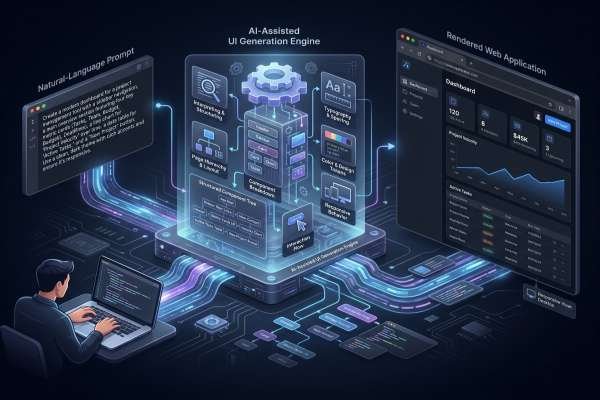
Prompt-to-wireframe
Prompt-to-wireframe systems turn text descriptions into low-fidelity interface structures.
For example:
“Create a three-step mobile onboarding flow for a habit app: choose a goal, configure reminders, and create the first habit.”
The result might show the basic screen sequence, navigation, buttons, fields, and content hierarchy.
This works well during early planning because the team can discuss structure before investing in visual detail.
It is less useful when the interface already has established interaction rules that the system cannot infer.
Prompt-to-interface
Prompt-to-interface generation creates more polished screens from text.
The generated result may include:
- Typography
- Colors
- Cards
- Navigation
- Forms
- Tables
- Charts
- Buttons
- Spacing
- Sample content
These systems are useful for common SaaS patterns such as:
- Login pages
- Settings screens
- Admin dashboards
- Onboarding flows
- Pricing layouts
- Landing-page sections
- Empty states
The main risk is generic output.
Common interface patterns are useful for early drafts, but final screens still need product-specific hierarchy, brand choices, content, and interaction behavior.
Design-to-code
Design-to-code systems start from an existing design rather than inventing the screen.
They attempt to translate visual structure into frontend implementation.
Possible outputs include:
- React
- Vue
- Angular
- HTML
- CSS
- Utility-based styling
- Component structures
This can reduce repetitive implementation work when the interface has already been designed.
But visual similarity does not guarantee good engineering.
Generated code still needs review for component boundaries, responsive behavior, data flow, dependencies, accessibility, state management, and maintainability.
Screenshot-to-code
Screenshot-to-code systems recreate interface structures from images.
This can be useful for:
- Rebuilding legacy screens
- Creating prototypes from visual references
- Converting rough mockups into starter markup
- Reproducing a static layout for further development
The limitation is that a screenshot shows appearance rather than behavior.
It cannot fully communicate:
- Loading states
- Keyboard interaction
- Permissions
- Validation
- API behavior
- Error handling
- Responsive rules
- Component ownership
- Business logic
Treat screenshot-generated code as an approximation of visual structure.
AI app builders
Some systems extend beyond individual UI screens and generate larger application structures.
They may create:
- Routes
- Pages
- Components
- Authentication flows
- Data structures
- Backend connections
- Deployment configuration
This makes them useful for prototypes and early experiments.
The larger the generated system becomes, however, the more review effort it requires.
A preview that appears functional does not tell the team whether the architecture, security model, dependencies, state handling, or generated code will be suitable for long-term maintenance.
How to Generate Better UI With AI
The quality of generated UI depends heavily on the quality of the input.
“Create a dashboard” gives the system very little context.
A better request might say:
“Create a SaaS analytics dashboard for a marketing manager. Include campaign summary cards, a conversion chart, traffic-source table, date filter, campaign status filter, and an alert area for underperforming campaigns. Prioritize the conversion trend and campaign alerts.”
That prompt provides a user, purpose, content hierarchy, and required interface parts.
Define the user goal
Start with what the user needs to accomplish.
Before generating the screen, define:
- Who the user is
- Why they opened the screen
- Their primary action
- The information needed to complete that action
- Secondary actions
- Important constraints
This protects the design from becoming a collection of attractive components with no clear priority.
A UI should solve a user problem before it solves a visual problem.
Describe states and constraints
Do not describe only the default appearance.
Include relevant states such as:
- Loading
- Empty
- Error
- Success
- Disabled
- Validation failure
- Permission restricted
- Offline
- Slow network
- Long content
- Mobile layout
For a file-upload component, the team may need:
- Idle
- Drag active
- Uploading
- Progress
- Unsupported format
- File too large
- Upload failure
- Completed
- Remove file
Defining these states before generation leads to a more useful interface draft.
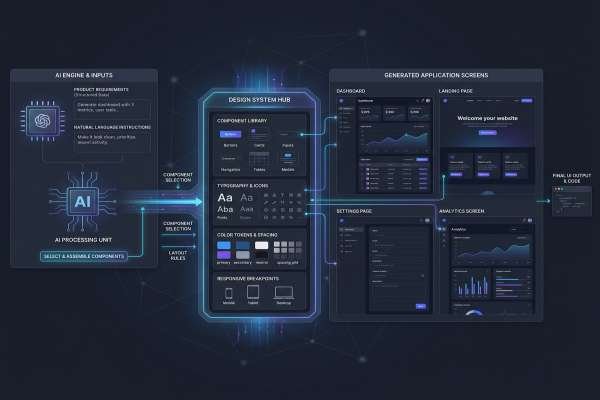
Provide design-system context
A generated interface is more useful when it follows the existing product system.
Where safe and appropriate, provide rules for:
- Typography
- Spacing
- Color tokens
- Buttons
- Inputs
- Cards
- Icons
- Breakpoints
- Component naming
- Interaction patterns
Without that context, AI may create an interface that looks reasonable but introduces a second design language into the product.
The same principle applies to code.
Tell the system which framework, language, styling approach, component library, state-management pattern, and test setup the project already uses.
Generate alternatives instead of one answer
The first generated design should not automatically become the chosen design.
Ask for multiple directions.
For example:
“Generate three dashboard structures. One should prioritize trends, one should prioritize current alerts, and one should prioritize task completion.”
This turns AI into an exploration tool.
The team can compare the alternatives and choose based on user needs rather than accepting the system’s first layout.
Review Generated UI Before Production
Generation is only the first half of the workflow.
The most important work happens during evaluation.
User flow and interaction states
Start with the screen’s purpose.
Ask:
- Is the main action clear?
- Is the most important information easy to find?
- Are unnecessary elements competing for attention?
- Does the screen fit into the larger user journey?
- What happens before this screen?
- What happens after it?
- Are loading and failure states defined?
A visually polished screen can still create a poor experience if the hierarchy is wrong.
Test the complete journey rather than judging one screenshot in isolation.
Design-system and brand fit
Generated screens often use familiar UI patterns.
That is useful during exploration, but production interfaces need consistency.
Review:
- Typography
- Color
- Spacing
- Buttons
- Forms
- Icons
- Component variants
- Border and elevation rules
- Responsive behavior
- Content tone
Replace generated styles with existing design tokens and components wherever appropriate.
AI output should adapt to the product rather than forcing the product to adapt to generated styling.
Accessibility
Accessibility needs both technical and interaction review.
Check:
- Semantic HTML
- Keyboard navigation
- Focus order
- Visible focus states
- Form labels
- Accessible names
- Error announcements
- Color contrast
- Screen reader behavior
- Modal focus handling
- Reduced-motion behavior where relevant
AI can suggest accessible patterns, but it should not be treated as the final accessibility auditor.
Custom components such as tabs, dropdowns, dialogs, sliders, date pickers, and drag-and-drop interfaces deserve particular attention.
Automated tests help, but manual interaction checks remain necessary.
Responsive behavior
A desktop preview does not prove that the interface is responsive.
Check the UI across relevant viewport sizes.
Look for:
- Broken grids
- Overflowing text
- Hidden controls
- Cramped navigation
- Unusable tables
- Cards becoming too narrow
- Incorrect stacking
- Touch targets that are too difficult to use
- Modals that exceed the viewport
Responsive design should be part of the generated requirement, not a cleanup task after implementation.
Real data and edge cases
Generated screens usually contain convenient sample content.
Production data is rarely that tidy.
Test the interface with:
- Long names
- Missing data
- Zero results
- Very large tables
- Large numbers
- Long translated text
- Slow responses
- Failed API calls
- Restricted permissions
- Duplicate submissions
- Mobile content
This reveals layout and interaction problems that a polished demo may hide.
Review AI-Generated Frontend Code
A good-looking interface and a good codebase are different things.
Generated frontend code needs engineering review before it becomes part of the product.
Component structure
Check whether the implementation creates useful reusable components.
Look for:
- Large repeated markup
- Oversized components
- Poorly defined props
- Components with unrelated responsibilities
- Duplicate UI patterns
- Hard-coded styling
A generated page may need to be reorganized around the project’s existing component model.
Do not preserve the original AI structure simply because it works in the preview.
State and data handling
Generated prototypes often depend on static or fake data.
Production interfaces need clear handling for:
- API requests
- Loading
- Errors
- Validation
- Authentication
- Authorization
- Caching
- Empty data
- User updates
- Retry behavior
Review where state lives and which component owns it.
Sample data should not hide missing application logic.
Dependencies and maintainability
AI may introduce packages simply because they make generation easier.
Check every new dependency.
Ask:
- Do we already have a package for this?
- Is the dependency actually necessary?
- Does it match the existing technology stack?
- Does the team understand how it works?
- Will replacing it later be difficult?
Generated code should also be understandable by the developers responsible for maintaining it.
If the team cannot explain the code confidently, simplify or rewrite it before release.
Security
Frontend generation does not remove normal application-security requirements.
Check:
- Input validation
- Authentication assumptions
- Permission checks
- API exposure
- Client-side storage
- Sensitive data handling
- Secret handling
- Third-party scripts
- Dependency changes
- Unsafe rendering
Never put API keys, passwords, tokens, private credentials, customer data, or restricted source code into an AI system unless the organization has explicitly approved that workflow.
Frontend code must also avoid confusing visibility with authorization.
Hiding a button or component in the interface does not replace server-side permission enforcement.
Testing and performance
AI-generated frontend work should pass the same engineering gates as other production code.
Depending on the product, those gates may include:
- Type checking
- Linting
- Unit tests
- Component tests
- Integration tests
- End-to-end tests
- Accessibility checks
- Dependency scanning
- Performance measurement
Generated tests need human review too.
A test that passes is not automatically useful.
Ask:
Would this test fail if the behavior we are trying to protect were actually broken?
Performance should also be measured rather than guessed.
Review:
- Bundle size
- Image loading
- Lazy loading
- Third-party scripts
- Rendering cost
- Interaction delay
- Layout shifts
- Unnecessary client-side work
AI can suggest improvements, but real measurements should determine whether the implementation is acceptable.
Build AI Into the Frontend Lifecycle Safely
Teams get better results when AI becomes a controlled part of the existing frontend workflow rather than a separate process.
Define approved use cases
Start with a list of suitable tasks.
Low-risk examples may include:
- Requirement clarification
- UI state discovery
- Code explanation
- Wireframe generation
- Component starters
- Test-case ideas
- Documentation drafts
- Pull request summaries
- Small refactors
Higher-risk work may require additional approval:
- Authentication
- Payments
- User permissions
- Sensitive customer data
- Security controls
- Large architectural changes
- Production infrastructure
- Legal or compliance interfaces
The goal is not to forbid AI from helping with difficult work. It is to increase review as the consequences increase.
Create prompt standards
Shared prompt structure reduces inconsistent output.
A useful frontend prompt can include:
- User goal
- Framework
- Language
- Styling approach
- Existing components
- Required states
- Accessibility requirements
- Responsive requirements
- Testing framework
- File boundaries
- Behavior that must not change
For refactoring, explicitly state whether behavior must remain identical.
For generated UI, state what should be prioritized.
For test generation, specify which user behavior needs protection.
Add engineering gates
AI-generated work should not receive weaker review because it was created quickly.
Use the same gates expected from production code.
For important interfaces, this may include:
- Design review
- Code review
- Type checking
- Linting
- Automated tests
- Accessibility testing
- Responsive testing
- Security review
- Performance checks
- Product acceptance
The closer a change is to authentication, payments, private data, or critical user flows, the stronger the review should be.
Measure results after release
Do not judge AI UI generation only by how quickly a first draft appears.
Track whether the complete workflow improves.
Useful signals include:
- Time from requirement to approved UI
- Development time
- Pull request review time
- Review comments
- Bugs after release
- Rollbacks
- Accessibility issues
- Performance regressions
- Support tickets
- Time spent rewriting generated code
- Developer satisfaction
A system that produces code faster but creates significantly more cleanup may not be improving the workflow.
Measure the entire delivery process.
When AI UI Generation Is a Good Fit
AI UI generation tends to work best when the required interface uses understandable patterns, and the team has a clear review process.
Good candidates include:
- SaaS dashboards
- Settings screens
- Admin interfaces
- Landing-page sections
- Simple forms
- Empty states
- Internal tools
- Standard onboarding flows
- Prototype mobile screens
- Early design alternatives
It is particularly useful when the team wants to turn an abstract requirement into something visible for discussion.
Be more cautious when the UI involves:
- Complex financial decisions
- Authentication
- Payments
- Sensitive medical or personal information
- Complex accessibility interactions
- Legal or compliance requirements
- Unusual interaction models
- Highly differentiated brand experiences
AI can still assist with these interfaces, but the output needs stronger product, design, engineering, security, and domain review.
Teams should also evaluate their own readiness.
Useful questions include:
- Do we have a consistent design system?
- Do we review frontend code?
- Do we test important user flows?
- Do we have accessibility requirements?
- Do we measure frontend performance?
- Do we have rules for private code and data?
- Do developers know which AI use cases are approved?
- Can we reject or rewrite generated output when necessary?
If these foundations are weak, begin with planning, wireframes, UI-state discovery, code explanation, and documentation before relying heavily on generated production code.
Common Mistakes to Avoid
Generating screens before defining the user problem
A polished interface can still solve the wrong problem.
Define the user, goal, primary action, and required information first.
Describing only the happy path
Real interfaces need loading, error, empty, permission, validation, and mobile states.
Include them before generation.
Treating the first result as the final design
Generate alternatives and compare them.
AI is most useful for exploration when teams remain willing to reject its first answer.
Accepting generic styling
Apply the real design system before production.
Do not allow generated spacing, colors, components, and interaction patterns to create inconsistency.
Assuming visual similarity means good code
A generated interface may match a screenshot while producing difficult code.
Review the implementation independently from the visual result.
Skipping accessibility until the end
Accessibility should influence components and interaction patterns from the start.
Late fixes are usually harder.
Trusting generated tests without review
AI-generated tests may confirm the implementation rather than protect required behavior.
Inspect assertions and missing cases.
Giving the system too much sensitive context
Provide only the information required for the task and follow organizational data policies.
Do not trade security for convenience.
Shipping code the team cannot explain
If the developers responsible for the feature cannot understand the generated implementation, simplify or rewrite it.
Maintainability matters after the generation session is over.
Measuring only generation speed
The goal is not the fastest first draft.
The goal is reaching a reliable production interface with less total friction.
Conclusion
AI-generated interfaces can shorten the distance between an idea and something a team can see, discuss, test, and improve.
The strongest use cases are early UI exploration, state discovery, wireframes, standard interface drafts, design handoff, component scaffolding, and repetitive frontend work.
The workflow should not end when the UI appears on screen.
Review the user goal, interaction states, design-system fit, accessibility, responsive behavior, real-data handling, frontend code, dependencies, security, testing, and performance before moving generated work into production.
A practical process is:
define → generate → compare → refine → implement → test → review → release
Start with a low-risk screen where the outcome is easy to evaluate. Generate several directions, keep the strongest ideas, and rewrite anything that does not meet the product’s standards.
Readers who want to choose a specific platform should move to a separate AI UI generator comparison. Readers who need implementation detail should use dedicated design-to-code, frontend testing, or accessibility guides.
FAQ
What is an AI UI generator?
An AI UI generator creates interface layouts, components, prototypes, or frontend code from text prompts, screenshots, wireframes, requirements, or design files. Its output is usually best treated as a draft for further design and engineering review.
Can AI generate complete user interfaces?
Yes. AI can create dashboards, forms, onboarding flows, landing pages, settings screens, mobile interfaces, and other common UI patterns. Teams still need to verify user flow, states, accessibility, responsiveness, security, and production code.
Are AI-generated UIs production-ready?
They should not be assumed to be production-ready. Generated interfaces need review for real data, interaction states, design-system consistency, accessibility, responsive behavior, code quality, dependencies, testing, and security.
How does AI-generated UI fit into frontend development?
It can support requirement clarification, state discovery, UI exploration, design handoff, component generation, testing ideas, review, and documentation. Developers remain responsible for implementation quality and release decisions.
Can AI replace UI designers or frontend developers?
No. AI can reduce repetitive work and generate useful drafts, but designers still own user experience and product decisions, while developers remain responsible for architecture, behavior, accessibility, security, testing, performance, and maintainability.
What should developers check in AI-generated UI code?
Check component structure, state management, data handling, accessibility, responsive behavior, dependencies, input validation, API usage, permissions, security, tests, performance, and maintainability.
Which UI projects are best suited to AI generation?
Standard dashboards, settings pages, forms, admin tools, onboarding flows, prototypes, landing-page sections, and common SaaS interfaces are good starting points because their structure is easier to generate and review.




Leave a Reply