
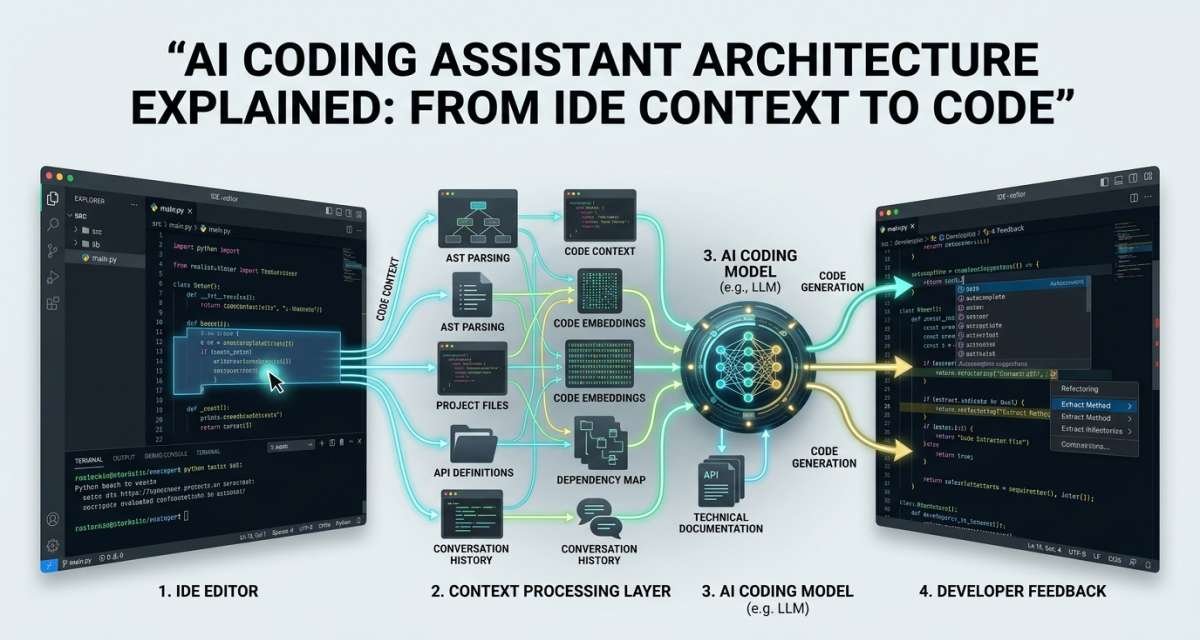
An AI coding assistant is more than a language model attached to a code editor. A useful coding system has to understand developer intent, identify relevant project context, find related files, build a model request, generate an answer, present changes clearly, and give the developer a way to review the result. Explore AI tools for developers
That surrounding architecture is why two tools using capable models can behave very differently inside the same codebase. Context quality, repository retrieval, editor integration, permissions, latency, testing support, and review controls can matter as much as the model itself.
This guide explains the architecture behind modern coding assistants, how that architecture appears inside intelligent IDEs, and how developers can use it in a controlled workflow without treating generated code as automatically correct.
Table of Contents
What an AI Coding Assistant Actually Does
An AI coding assistant uses language models and development context to help with tasks such as code completion, explanation, debugging, test generation, documentation, refactoring, code review, and small implementation tasks.
The interface can take several forms. Some assistants primarily provide inline autocomplete. Others offer chat inside the editor. More advanced systems can inspect a repository, propose a plan, edit several files, run commands or tests, and prepare a reviewable patch.
The important distinction is that the model is only one part of the system.
A coding assistant still needs to answer several questions before useful code reaches the developer:
- What is the developer trying to accomplish?
- Which files are relevant?
- Which code should be included as context?
- Are there project-specific rules to follow?
- What tools or commands can the assistant access?
- How should the model’s answer be returned?
- Which actions require developer approval?
- How will the resulting code be tested and reviewed?
A good architecture coordinates those steps. A weak one may send incomplete or irrelevant context to an otherwise capable model and produce code that looks plausible but does not fit the project.
AI assistance therefore works best as part of an engineering process, not as a substitute for one.
The Core Architecture of an AI Coding Assistant
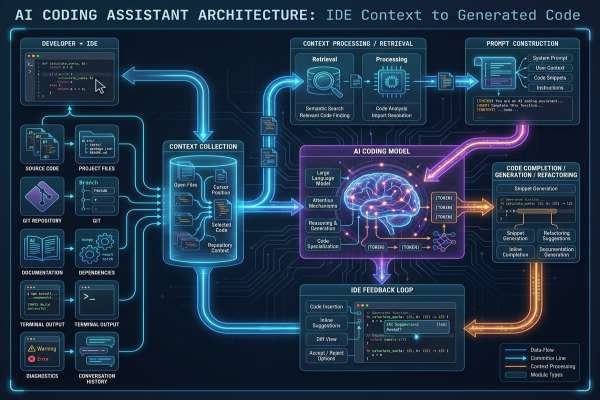
Most modern coding assistants can be understood as a pipeline with seven major layers:
Developer → IDE integration → Context → Repository retrieval → Prompt → Model → Output and review
The exact implementation varies by product, but this model explains the main components.
1. IDE and editor integration
The editor integration is the part developers interact with directly.
It may run inside an IDE, code editor, terminal, browser-based development environment, repository interface, or pull request workflow.
The integration can observe signals such as:
- Current file
- Programming language
- Cursor position
- Selected code
- Nearby lines
- Open files
- Error messages
- Project structure
- Active development task
- Build or test output
These signals help turn a generic language model into something that can respond to the developer’s immediate coding situation.
For example, a request such as “write tests for this function” is much more useful if the system also knows which function is selected, which testing framework the repository uses, and how neighboring tests are structured.
2. Context collection
The context collector determines what information may help answer the request.
Possible context includes:
- The current file
- Selected functions or classes
- Imports and dependencies
- Open tabs
- Related test files
- Configuration files
- Framework information
- Build errors
- API definitions
- Project instructions
- Previous messages in the coding session
The goal is not to provide the model with everything in the repository.
More context can sometimes help, but irrelevant context can add noise, increase latency, or distract the model from the actual task. A strong context system tries to select the smallest useful set of information.
3. Repository indexing
Local file context is enough for simple autocomplete, but many software tasks depend on code elsewhere in the repository.
A repository index gives the assistant a structured way to search beyond the active file.
For example, a developer changing an authentication service may also need information from:
- Controllers
- Middleware
- Data models
- Validation rules
- Test fixtures
- Configuration
- Shared utilities
- Documentation
Without repository awareness, the assistant may generate code that works in isolation but ignores established project patterns.
4. Retrieval
The retrieval layer uses the index and other tools to find the most relevant information for a particular request.
It may combine methods such as:
- Text search
- File search
- Symbol search
- Semantic search
- Language-server information
- Dependency relationships
- Recent edit history
- Test discovery
- Repository metadata
Semantic search is especially useful when the developer does not know the exact name of a symbol.
A question such as “Where are user permissions checked?” may need to locate guards, middleware, decorators, policies, or authorization services even when none of those files contains that exact phrase.
Retrieval turns a large repository into a smaller collection of relevant evidence for the model.
5. Prompt construction
Once useful context has been collected, the system has to organize it into a model request.
A prompt may contain:
- System-level instructions
- Developer request
- Selected code
- Retrieved files or snippets
- Project-specific instructions
- Conversation history
- Tool results
- Formatting requirements
- Safety restrictions
Prompt construction is an architectural component in its own right.
Simply sending raw repository content to a model is not the same as giving it a clear task with prioritized context and constraints. The system has to decide what matters and how the information should be arranged.
6. Model generation
The language model processes the assembled request and generates a response.
Depending on the task, that response might be:
- A code completion
- An explanation
- A proposed patch
- Unit tests
- Documentation
- A refactoring suggestion
- A review comment
- A commit or pull request summary
The model predicts a useful answer from the information it receives. It does not independently prove that the resulting code is correct.
That distinction matters. Code can be syntactically polished while still containing a wrong assumption, missing an edge case, using an inappropriate dependency, or violating a business rule.
7. Output, controls, and developer review
The final layer turns model output into something the developer can inspect and act on.
The result may appear as:
- Inline “ghost text”
- A chat response
- A diff
- A patch preview
- A proposed file edit
- A new file
- Test output
- A pull request summary
For agent-based systems, this layer also becomes an important control boundary.
The assistant may need permission before it edits files, executes commands, accesses external resources, or performs higher-risk actions. A well-designed workflow keeps significant changes visible and reviewable rather than silently applying them.
This is why AI coding assistant architecture should be viewed as a complete development system. The model is central, but context, retrieval, permissions, output design, testing, and review determine whether its work is useful in practice.
How Context and Repository Awareness Improve Results
Context is the information an assistant uses to understand both the developer’s request and the software surrounding it.
Generic models can generate generic code. Repository-aware assistants have a better chance of generating code that fits an existing project.
Local file context
The simplest context comes from the active file.
The assistant may inspect:
- Nearby code
- Imports
- Function signatures
- Types
- Comments
- Naming conventions
- Cursor position
This is especially useful for inline completion and small local edits.
Suppose a developer begins writing:
function calculateDiscount(user, cart) {
The surrounding file may reveal existing helper functions, data types, naming conventions, and error-handling patterns. Those details can help the assistant produce a more relevant completion.
Local context is fast, but it has limits. A function may depend on validation rules, data structures, or services defined elsewhere.
Project-wide context
Repository-level context helps with changes that cross file boundaries.
It allows the system to answer questions such as:
- Where is this function called?
- Which test covers this behavior?
- Where is this API route validated?
- Which files depend on this type?
- How does this project structure similar services?
This makes project-aware assistance more useful for debugging, onboarding, multi-file refactoring, and feature work.
Semantic retrieval
Keyword search works when the developer knows what to search for. Semantic retrieval helps when the concept is known but the implementation name is not.
For example, a developer asking about “login permission checks” may need code from an authorization guard even though the words “login permission” never appear in the file.
A retrieval system can use meaning, symbols, repository structure, and other signals to surface likely relevant code.
Project instructions and workflow context
Code alone does not describe every project rule.
Teams may also need the assistant to know:
- Preferred libraries
- Naming conventions
- Test commands
- Architecture patterns
- Files that should not be modified
- Security requirements
- Dependency policies
- Build instructions
Explicit project instructions can make AI output more consistent with the repository.
They also reduce the need for developers to repeat the same rules in every prompt.
Context quality is therefore not about maximizing the amount of information sent to the model. It is about selecting the information that best explains the task and the constraints around it.
How a Coding Request Moves Through the System
The architecture becomes easier to understand when viewed as a single request moving from developer intent to reviewed code.
Consider this task:
Add unit tests for the payment validation function. Follow the style used by the existing tests.
Developer intent
The developer defines the desired outcome.
A precise request gives the system a better starting point than a vague instruction such as “fix this” or “write tests.”
Useful intent may include:
- The expected result
- The affected feature
- Constraints
- Files to inspect
- Behavior that must not change
Context selection and retrieval
The assistant examines the active file and determines what additional information is needed.
For this test request, it might retrieve:
- The payment validation function
- Existing payment tests
- Test setup files
- Shared fixtures
- Mocking utilities
- Relevant configuration
The system does not need the entire repository. It needs the pieces that explain how this project tests similar behavior.
Prompt assembly and generation
The prompt builder combines the developer’s request with the selected context.
The model can then draft tests that are more likely to match the repository’s framework, naming conventions, and testing style.
For a more complex task, an agent may first create a plan, inspect additional files, make edits, and run tests.
Review, testing, and acceptance
The generated result returns to the developer.
The developer should then check:
- Does the code compile?
- Do the tests pass?
- Do the tests verify meaningful behavior?
- Are important edge cases covered?
- Did the assistant change unrelated code?
- Does the implementation follow project conventions?
- Are there security or privacy concerns?
- Can the developer explain the change?
The architecture can automate parts of this loop, but final responsibility remains with the engineering team.
How AI Changes the IDE
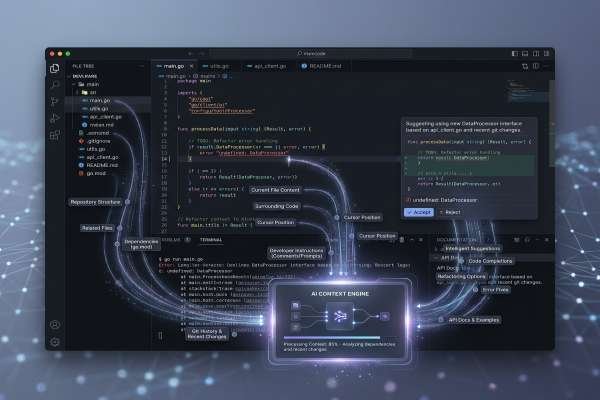
An intelligent IDE combines several different kinds of assistance. Understanding those layers helps clarify what AI has actually added to the developer workspace.
Traditional IDE intelligence
IDEs were “intelligent” before modern language models.
Traditional features rely on compilers, parsers, type systems, language servers, syntax trees, static analysis, and project indexes.
They support tasks such as:
- Syntax highlighting
- Autocomplete
- Parameter hints
- Go to definition
- Find references
- Symbol rename
- Linting
- Formatting
- Error detection
- Debugging
Many of these operations are deterministic. The IDE understands known properties of the language and project structure.
A safe symbol rename, for example, is fundamentally different from asking a language model to rewrite a module.
AI-assisted features
Model-based assistance introduces more flexible interactions.
Developers can describe intent in natural language and ask the IDE to:
- Explain code
- Generate a function
- Suggest a bug fix
- Draft tests
- Write documentation
- Summarize changes
- Suggest refactoring options
This flexibility is useful because the developer does not always need to know the exact command or symbol name.
The trade-off is predictability. Traditional language tooling can often make guarantees that a generative model cannot.
Agent-based workflows
Agents extend the architecture beyond suggestion and chat.
A coding agent may be able to:
- Read a task.
- Search the repository.
- Identify relevant files.
- Create a plan.
- Edit multiple files.
- Run tests or builds.
- Interpret errors.
- Revise the changes.
- Present a final diff or patch.
This turns the IDE from a place where AI suggests text into an environment where AI can participate in a development task.
The extra capability also increases risk.
An autocomplete suggestion may affect a few lines. An agent with terminal and repository access can potentially change many files or execute commands. Permissions, visibility, testing, and approval therefore become more important as autonomy increases.
A practical intelligent IDE systems overview can be reduced to three layers:
deterministic development tools → AI suggestions and chat → controlled agentic execution
Each layer can support the developer, but the required level of oversight rises with the scope of what the system can change.
A Practical AI Programming Assistant Workflow
Understanding the architecture is useful, but developers also need a workflow that uses it effectively.
A reliable AI programming assistant workflow keeps the assistant involved throughout development while placing checkpoints before significant decisions.
Define a narrow task
Start with the work, not the tool.
Instead of:
Fix the login bug.
Use something closer to:
Find why expired password-reset tokens redirect users without showing the expected error. Explain the likely cause before suggesting a change.
A focused task reduces guesswork and makes the output easier to evaluate.
Useful task descriptions can include:
- Current behavior
- Expected behavior
- Relevant module
- Constraints
- What should not change
Give relevant context
Provide or expose the files and information that define the problem.
Depending on the task, that might include:
- The failing function
- Related tests
- Error output
- Framework information
- API contracts
- Database models
- Existing implementation patterns
- Security requirements
Poor context often produces generic solutions. Relevant context makes the assistant more likely to fit the existing codebase.
Ask for a plan before larger changes
For anything beyond a trivial edit, separate reasoning about the change from implementation.
Ask the assistant to identify:
- What it thinks the problem is
- Which files it needs to inspect
- Which files may change
- What assumptions it is making
- Which tests should be added or updated
- What risks it sees
Reviewing the plan can catch a misunderstanding before it becomes a large diff.
Generate small changes
Smaller patches are easier to understand, test, and reverse.
Instead of asking one agent to implement a feature, migrate data, add tests, update documentation, and change deployment configuration in a single run, break the work into reviewable stages.
A useful sequence is:
- Diagnose the issue.
- Agree on the proposed change.
- Generate a minimal patch.
- Run tests.
- Review edge cases.
- Continue only if the result is sound.
The principle is simple: increase reviewability by limiting the size of each AI-generated change.
Test and review
AI-generated code should pass through the same engineering controls as human-written code.
At minimum, confirm:
- The code builds or compiles.
- Relevant tests pass.
- New tests check meaningful behavior.
- Edge cases are considered.
- Error handling is appropriate.
- The implementation follows project style.
- No unrelated files were changed.
- Dependencies are appropriate.
- Sensitive logic receives additional review.
AI can help write tests and inspect its own output, but it should not be the only system judging whether its work is correct.
Where AI Coding Assistants Are Most Useful
AI assistance tends to work best on tasks that are clear, constrained, and easy to verify.
Code completion
Inline completion can reduce repetitive typing for:
- Boilerplate
- Common framework patterns
- Data transformations
- Small utilities
- Test setup
- Repetitive API calls
The developer should still evaluate whether the suggested code matches the intended behavior.
Understanding unfamiliar code
AI can help developers explore a codebase by answering questions such as:
- What does this module do?
- Where does this request flow next?
- Which service creates this value?
- What files are involved in this feature?
This is useful for onboarding and debugging, but explanations should be checked against the actual source.
Debugging
An assistant can combine:
- Error messages
- Selected code
- Types
- Related files
- Existing tests
to suggest possible causes.
The most useful role is often diagnosis support rather than blindly applying the first proposed fix.
Test generation
Test generation is a strong use case when the assistant can see existing test patterns.
It can help draft:
- Unit tests
- Edge cases
- Fixtures
- Mock setup
- Integration test ideas
Generated tests still need review. A test that simply reproduces the current implementation may pass without proving the intended behavior.
Documentation
Code-aware assistants can help create:
- Function explanations
- API notes
- README updates
- Usage examples
- Pull request summaries
- Onboarding documentation
Generated documentation should be checked against actual behavior before publication.
Small refactors
AI can suggest ways to:
- Split large functions
- Reduce duplication
- Improve naming
- Extract helpers
- Add missing error handling
Refactors require particular care because code can become cleaner while behavior changes accidentally. Existing tests make these tasks safer.
Pull request support
AI can help prepare a review by:
- Summarizing the diff
- Highlighting risky areas
- Listing test changes
- Identifying possible edge cases
- Suggesting files that deserve closer inspection
The reviewer should still read the actual diff rather than approving a change from its AI-generated summary.
Security, Privacy, and Reliability Risks
AI coding systems can interact with source code, internal documentation, repositories, terminals, logs, and other development resources. That makes security part of the architecture rather than an optional extra.
Sensitive information
Developers should avoid exposing information such as:
- API keys
- Passwords
- Access tokens
- Private certificates
- Customer records
- Production secrets
- Sensitive logs
unless the organization has explicitly approved that tool and workflow.
The relevant question is not only what the model can generate. Teams also need to understand what the system can read, what information it transmits, and what controls exist around sensitive files.
Unsafe or incorrect code
Generated code can contain:
- Missing validation
- Incorrect authorization
- Weak error handling
- Insecure defaults
- Faulty dependency choices
- Incorrect API usage
- Missing edge cases
Security-sensitive areas such as authentication, authorization, payment handling, encryption, data deletion, permissions, and infrastructure should receive stronger human review.
Prompt injection
Agent-based systems may read content from files, issues, documentation, comments, web resources, or tool output.
Untrusted content can contain instructions intended to manipulate the agent rather than inform the developer.
The more sources an agent can consume and the more actions it can perform, the more important it becomes to distinguish trusted instructions from untrusted content and require approval for risky operations.
Excessive permissions
An assistant should not receive more access than its task requires.
An agent that only needs to update tests may not need:
- Production access
- Deployment credentials
- Broad filesystem permissions
- Unrestricted shell access
- Permission to merge directly into a protected branch
Least-privilege access limits the consequences of both model mistakes and malicious inputs.
Loss of code understanding
A subtler risk appears when developers routinely accept code they cannot explain.
That can create maintenance problems even if the immediate change works.
Developers should be able to understand accepted AI-generated code, explain why it works, and modify it later without depending on the assistant to reconstruct the original reasoning.
How Teams Should Evaluate and Adopt AI Coding Systems
Teams should evaluate an assistant as a development system rather than judging it only by how impressive its generated code looks in a demonstration.
Context quality
Ask:
- Can it understand the current file?
- Can it find related files?
- Can it use repository-wide context?
- Can it see relevant tests?
- Can it follow project instructions?
- Can it avoid excluded or unrelated files?
A model cannot compensate indefinitely for poor context selection.
Control and reviewability
For systems that edit files or run commands, check:
- Are proposed changes visible?
- Can developers review diffs before acceptance?
- Can command execution require approval?
- Can terminal access be disabled or restricted?
- Are agent actions understandable?
- Can developers see what the assistant changed?
The wider the assistant’s scope, the more important these controls become.
Security and governance
Team policies should define:
- Approved tools
- Allowed repositories
- Sensitive data rules
- Files or folders that should be excluded
- Test requirements
- Human approval requirements
- Security review requirements
- Dependency policies
- Disclosure expectations where relevant
- Rules for agent permissions
Small teams may only need a concise written policy. Larger organizations may need administrative controls, auditing, repository restrictions, and formal security approval.
Engineering workflow fit
The best system is one that fits the team’s actual development process.
A frontend team may care about component patterns, TypeScript, accessibility, and design-system conventions. A backend team may prioritize APIs, data models, databases, caching, and integration tests. DevOps teams may need stricter controls around infrastructure and command execution.
Teams should therefore ask what work they want AI to support before choosing how much access or autonomy to give it.
A sensible layered setup is:
- Traditional IDE tooling for navigation and deterministic refactoring
- Inline AI completion for small coding tasks
- Chat for explanations and debugging
- Repository-aware retrieval for project questions
- Agents for scoped, reviewable work
- Automated checks for builds, tests, and security
- Human review before merge
This structure adds AI to the existing software delivery process instead of creating a separate workflow that bypasses normal engineering controls.
Conclusion
The most useful way to understand AI coding assistants is to look beyond the model.
A modern system connects the developer’s IDE, local code context, repository search, retrieval, project instructions, prompt construction, model generation, output controls, tests, and human review. Each layer influences the quality of the final result.
For individual developers, a good starting point is to use AI for small, verifiable tasks such as explanations, tests, documentation, debugging assistance, and limited refactors. Give the assistant relevant context, ask for a plan before larger changes, review every meaningful diff, and test what it produces.
For teams, adoption also requires decisions about data access, repository permissions, agent capabilities, code review, security, and accountability.
AI can reduce repetitive work and make large codebases easier to explore. It does not remove the need to understand the software being changed. The safest and most useful architecture keeps automation close to the developer while keeping engineering judgment at the final decision point.
FAQ
What is an AI coding assistant?
An AI coding assistant is a development tool that uses language models and code context to help developers write, explain, test, debug, review, and document software. It may work through autocomplete, chat, repository search, or coding agents.
How does an AI coding assistant work?
It collects relevant context from the developer’s workspace, retrieves useful repository information, combines that material with the developer’s request, sends the resulting prompt to a model, and returns code or explanations for review.
Why is repository context important for AI coding tools?
Repository context helps the assistant understand code outside the current file, including related services, tests, types, configuration, and project patterns. Without it, suggestions may be locally plausible but inconsistent with the larger system.
What is the difference between AI autocomplete and a coding agent?
Autocomplete normally predicts code near the cursor. A coding agent can handle a broader task by searching files, planning changes, editing multiple files, running checks, and preparing a patch. Agents therefore require stronger permission and review controls.
Can AI-generated code be used in production?
Yes, AI-generated code can become part of production software, but it should be reviewed, tested, and checked for security, dependency, maintainability, and project-specific issues before release.
What tasks are best suited to AI coding assistants?
Good use cases include code completion, code explanation, debugging support, test drafts, documentation, small refactors, pull request summaries, and other tasks with clear requirements and verifiable results.
Do AI coding assistants replace developers?
No. They can automate parts of coding and software analysis, but developers remain responsible for requirements, architecture, business rules, security decisions, testing, code quality, and final approval.




Leave a Reply