
React developers can now use AI for much more than autocomplete. Current tools can turn a prompt into a working React interface, convert Figma screens into components, reuse an existing design system, edit a project visually, and create frontend code that can move into a normal Git workflow.Read 100 best AI tools for developers in 2027
The right tool depends on where the work starts.
If you start with a prompt, v0 and Tempo make more sense. If the starting point is Figma, Builder.io Visual Copilot, Locofy, and Anima are stronger options. Puck AI solves another problem by adding AI-powered visual building directly inside an existing React product.
v0 by Vercel is the strongest overall choice for prompt-driven React and Next.js development. Builder.io Visual Copilot is better for teams that need Figma-to-code work tied to an existing component system. Locofy and Anima are strong design-to-React choices, while Puck AI stands out for developers who want to embed an AI visual editor inside their own React application.
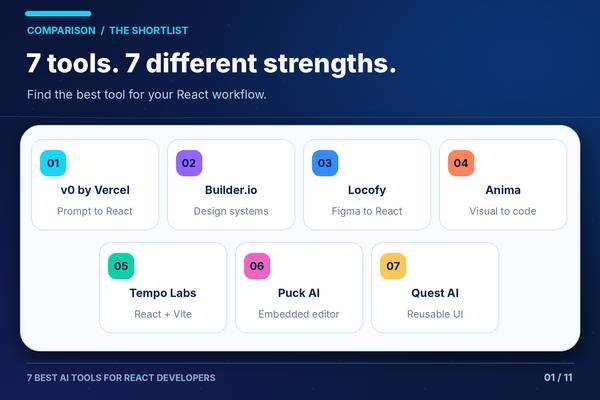
Best AI Tools for React Developers at a Glance
| Tool | Strongest Fit |
| v0 by Vercel | Prompt-to-React and Next.js development |
| Builder.io Visual Copilot | Figma-to-code with existing design systems |
| Locofy | Figma-to-React and frontend handoff |
| Anima | Figma, screenshots, and URLs to editable React |
| Tempo Labs | Visual AI development for React applications |
| Puck AI | Embedded AI visual editing inside React products |
| Quest AI | Figma-to-React components and application UI |
One change was made after current product verification. CodeParrot appeared in the earlier shortlist, but its official pricing URL now resolves to a parked domain rather than an active product page. It was therefore removed from the final ranking instead of being presented as a current recommendation. Anima takes its place because its React code-generation product is active and has current 2026 documentation.
Comparison Table
| Tool | Best For | Main React Use | Free Option | Main Limitation |
| v0 | New React/Next.js projects | Prompt, screenshot, or Figma to application | Yes | Strongly centered on Next.js and Vercel’s preferred stack |
| Builder.io Visual Copilot | Product teams with design systems | Figma to React using existing components | Yes | Setup creates more value for teams than small one-off projects |
| Locofy | Frontend handoff from Figma | Responsive React and Next.js generation | Yes/trial options | Several advanced codebase integrations are restricted to higher plans |
| Anima | Designers and frontend developers | Figma, image, or URL to React | Yes | Generated frontend still needs developer review for application logic |
| Tempo | Prompt-driven React application building | React + TypeScript + Vite app generation | Yes | Better suited to generated projects than every mature custom React stack |
| Puck AI | SaaS products and internal platforms | Embedded AI page/interface generation | Open-source core | Requires developers to integrate Puck into their own application |
| Quest AI | Figma-centered React teams | React components and full application UI | Free access documented | Current commercial pricing is not clearly published in official docs |
How the Tools Were Selected
The ranking focuses on criteria that matter specifically for React development:
- React and Next.js support
- Quality of component-oriented workflows
- Figma and design-system support
- Existing-code integration
- Git and export options
- Visual editing
- AI-assisted iteration
- Developer control over generated code
- Free access and pricing
- Current product availability
Generic coding assistants received less weight because this article focuses on tools with a clear React, frontend, visual-development, or design-to-code use case.
The recommendations are based on current product information and official documentation, not claimed hands-on testing.
Best AI Tools for React Developers
1. v0 by Vercel
Best for: React and Next.js developers who want to move from an idea to working application code quickly.
What it does: v0 is Vercel’s browser-based AI application builder. Developers can provide a text prompt, screenshot, or Figma design and generate a working application with an editable preview.
Vercel’s current workflow uses React and Next.js as the default foundation, with TypeScript, Tailwind CSS, and shadcn/ui in the standard generated stack. Projects can include routes, API handlers, authentication scaffolding, and data integrations.
Why It Stands Out
v0 is unusually close to the React ecosystem.
It does not generate a generic static website and leave the developer to rebuild it. Its default output is a real Next.js project that can move into GitHub and normal development tools.
Current v0 projects also use Git-based workflows. Vercel says chats can work on branches with automatic commits and pull-request-based merging into the main project.
This makes v0 useful beyond disposable prototypes.
Key Features
- React and Next.js generation
- TypeScript output
- Tailwind CSS
- shadcn/ui
- Prompt-to-app workflow
- Screenshot input
- Figma input
- Live browser preview
- Visual design editing
- GitHub workflow
- API route generation
- Vercel deployment
- Database integrations
Practical Use Case
A developer needs an internal analytics dashboard.
They can describe the layout and data views to v0, generate the initial Next.js application, adjust the interface visually, and connect the generated project to GitHub.
The developer can then continue working on authentication, business rules, tests, and backend integrations in the normal repository.
Limitations
v0 is most natural for React developers who are comfortable with the Next.js ecosystem.
Its default assumptions around Next.js, TypeScript, Tailwind, shadcn/ui, and Vercel may be less useful if your company has a custom React architecture based on another framework or a large existing frontend with strict internal conventions.
It is also stronger at creating new interfaces and applications than understanding every detail of a mature multi-year repository.
Pricing
Vercel currently offers a free v0 tier with $5 in monthly credits and up to seven messages per day.
Its current comparison material lists:
- Free: $0
- Team: $30 per user/month
- Business: $100 per user/month
- Enterprise: Custom pricing
Usage is credit-based, so the number of tasks you can complete depends partly on the models and prompts used.
Verdict
Choose v0 if you build React through Next.js and frequently start new pages, features, dashboards, prototypes, or applications.
For teams that already have a mature component library and receive most new UI work from Figma, Builder.io or Locofy may fit the development process better.
2. Builder.io Visual Copilot
Best for: React teams that want to convert designs into code while reusing their existing components and design system.
What it does: Builder.io’s Visual Copilot turns Figma designs into frontend code and can work with a team’s frameworks, components, syntax, and design tokens.
Builder now positions much of this development workflow inside Fusion, its visual IDE. Developers can connect repositories, work visually, use the Figma plugin, and bring generated changes back into their normal code workflow.
Why It Stands Out
The main difference is existing-system awareness.
A design-to-code tool that invents new buttons, cards, and layout patterns can create more cleanup work than it saves.
Builder lets teams connect actual application components and use those components during visual development and Figma-to-code work. Its React product also supports registered React components inside Builder.
Visual Copilot can work with React and several other frontend frameworks, so it also fits organizations that do not use one framework everywhere.
Key Features
- Figma-to-code
- React support
- Existing component reuse
- Design token context
- Visual editing
- GitHub integration
- GitLab integration
- Bitbucket integration
- Figma plugin
- VS Code extension
- Real-time collaboration
- MCP servers on paid plans
Practical Use Case
A product designer creates a new billing page using components from the company’s Figma design system.
Instead of rebuilding the page manually, the frontend team can bring the design into Builder and map the output to the application’s existing React components.
Developers can then review the generated implementation and continue working through Git.
Limitations
Builder creates more value when a team has reusable components, a design system, and an established product-development workflow.
A solo developer who only needs a quick React landing page may find v0 or Anima easier to start with.
Some enterprise functions, repository controls, and design-system options are also limited to higher plans.
Pricing
Builder Fusion currently lists:
- Free: $0
- Pro: $24 per user/month
- Team: $40 per user/month
- Enterprise: Custom
Pro and Team currently include 500 monthly Agent Credits per included user, with additional blocks available for purchase.
Verdict
Builder.io is one of the strongest options for teams trying to connect designers and React engineers without discarding their existing component system.
Choose v0 instead when the project starts primarily from prompts rather than a structured Figma and code workflow.
3. Locofy
Best for: Frontend developers who regularly turn Figma designs into React or Next.js code.
What it does: Locofy uses its Large Design Models to convert design files into structured frontend code. It directly supports React and Next.js, along with several other web and mobile targets.
The workflow can start from a Figma plugin, Figma URL, CLI, or MCP integration.
Why It Stands Out
Locofy gives React developers several ways to fit design-to-code into their existing workflow.
A developer can:
- Start inside Figma
- Paste a Figma URL into Locofy
- Run Locofy from the command line
- Connect Locofy through MCP to another coding agent
The MCP workflow currently works with tools such as Cursor, Claude Code, Gemini CLI, GitHub Copilot, and other MCP clients.
Locofy can also map Figma components to real components from an existing React codebase. During generation, it can replace the design representation with the application’s actual component implementation.
Key Features
- Figma-to-React
- Figma-to-Next.js
- Component-based output
- Agent Mode
- Visual refinement
- CLI
- MCP server
- Existing component mapping
- GitHub workflows
- Multiple breakpoint support
- Custom styling configuration
- Code export
Practical Use Case
A developer receives five responsive Figma screens for a new customer portal.
Locofy can generate the initial React or Next.js structure, create reusable components, and provide a working frontend foundation.
If the company already has a shared button, card, and navigation library, those existing components can be mapped into the design-to-code process on supported plans.
Limitations
Locofy itself says design structure affects output quality.
Clear layer names, grouping, and proper Figma Auto Layout can improve the generated result. A poorly structured design can therefore require more cleanup.
Several useful team features also have plan restrictions. Current documentation says custom-component mapping and GitHub sync are available on Enterprise and some legacy annual subscriptions, but not on current monthly Free, Hobby, or Pro plans.
Pricing
Locofy currently uses LDM tokens as its usage system.
The company offers self-service and Enterprise plans, while its documentation also refers to a five-day trial. Exact current self-service dollar prices were not exposed clearly in the official pricing page available during verification, so they are not reproduced here.
Verdict
Choose Locofy if Figma-to-React work is a frequent part of your job and you want several ways to bring design context into your development environment.
Builder.io deserves more attention when product teams want deeper collaboration around an established component system.
4. Anima
Best for: React developers who want to turn Figma files, screenshots, or existing websites into editable frontend code.
What it does: Anima generates React or HTML from visual input. Developers can start with a Figma design, screenshot, mockup, existing website, or prompt and continue editing the generated application in its browser environment.
For React, Anima supports JavaScript or TypeScript and lets users choose styling approaches such as Tailwind, standard CSS, or inline styles.
Why It Stands Out
Anima covers more input types than a pure Figma plugin.
You can start from:
- Figma
- A screenshot
- A mockup
- A URL
- An AI-generated image
- A prompt
The output can remain editable React code rather than a visual prototype that has to be recreated later.
Anima also has tooling aimed at existing development systems. Its Frontier product focuses on bringing Figma-to-React generation into VS Code while reusing existing components and design systems.
Key Features
- Figma-to-React
- Screenshot-to-React
- URL-to-React
- TypeScript or JavaScript
- Tailwind support
- CSS output
- UI-library support
- Browser preview
- Code export
- Figma plugin
- MCP/API options
- Existing design-system workflows
Practical Use Case
A team has a working marketing site and wants to rebuild one section inside a React application.
A developer can use Anima to bring in the visual reference, create an editable React starting point, and then connect the generated frontend to the application’s real data and business logic.
Limitations
Visual accuracy is only one part of application quality.
Generated React still needs developer review for:
- State management
- Accessibility
- API behavior
- Authentication
- Performance
- Error handling
- Testing
Anima is strongest on frontend generation rather than replacing the rest of the application-engineering process.
Pricing
Anima currently has a Free plan that includes:
- 5 AI Playground chat messages per day
- 5 Figma design imports or website clones
- 5 code generations through the Figma plugin
Anima also offers paid plans and an Enterprise plan that currently starts at $500 per month when paid annually.
Verdict
Anima is a good choice if React work often starts from designs, screenshots, or existing websites.
Locofy provides a more structured Figma-centered developer workflow, while Anima offers more flexibility in the type of visual source you can begin with.
5. Tempo Labs
Best for: Developers who want to build and visually edit React applications with AI.
What it does: Tempo is an AI development environment built around React applications.
Its current documentation describes a default starter repository using:
- React
- TypeScript
- Vite
- Tailwind CSS
- shadcn/ui
- React Router
Projects can connect to GitHub and move between Tempo’s visual environment and a normal repository.
Why It Stands Out
Tempo combines prompting and visual editing rather than forcing a developer to choose between a code generator and a design canvas.
A project can start from a description. Tempo then generates requirements and wireframes before opening the project in its editor for further changes.
GitHub integration lets teams create repositories and branches, work through AI chat or the built-in code editor, and merge changes through Git workflows.
Key Features
- React application generation
- TypeScript
- Vite
- Tailwind
- shadcn/ui
- Visual editing
- AI chat
- Requirements generation
- Wireframe generation
- GitHub integration
- Branch workflows
- npm package support
- Live deployment and sharing
Practical Use Case
A frontend developer needs a working admin application rather than one isolated component.
They can describe the application in Tempo, review its generated requirements and wireframes, open the generated React project, and refine both the interface and code before pushing the project to GitHub.
Limitations
Tempo’s default environment has strong opinions about the project stack.
That works well for new React + TypeScript + Vite projects but may create more friction when a company has an existing frontend architecture with custom build tooling, uncommon libraries, or strict repository conventions.
Pricing
Tempo currently documents:
- Free: $0 — 30 prompts, up to 5 per day
- Pro: $30/month — 150 prompts
- Scale: $50/month — 250 prompts
- Ultimate: $100/month — 555 prompts
- Power: $350/month — 2,150 prompts
- Unlimited: $500/month — unlimited prompts
Paid users can also purchase 250 additional prompts for $50.
Verdict
Tempo is a good fit for developers who want AI-generated React applications but still value a visual environment and Git-based ownership.
v0 has the advantage for Next. js-first teams, while Tempo is more directly centered on React + Vite in its standard starter setup.
6. Puck AI
Best for: Developers who want to put an AI visual editor inside an existing React product.
What it does: Puck is an open-source visual editor for React. Developers embed it directly into their own application, register React components, connect data, and decide which components users can work with.
Puck AI adds an agent that can generate and edit pages using those components and the context configured by the development team.
Why It Stands Out
Puck solves a different problem from v0 or Locofy.
With most AI builders, developers use the product to create their own application.
With Puck, developers can give their users or internal teams an AI interface builder inside the application they are developing.
The core editor stores output as JSON and lets the host application keep control over data and rendering.
Puck works with React environments, including Next.js, and supports React Server Components through an opt-in configuration.
Key Features
- Open-source React editor
- Embeddable visual builder
- AI Copilot
- Existing React components
- Custom data sources
- Component rules
- Next.js compatibility
- React Server Components support
- Headless AI API
- BYOK on supported plans
- JSON output
- Self-controlled backend data
Practical Use Case
A SaaS company wants customers to build branded landing pages inside its product.
The engineering team can embed Puck, register approved React components, connect product data, and add Puck AI so customers can describe the page they want.
The generated page stays within the component and data boundaries defined by the application.
Limitations
Puck is not a normal React coding assistant.
Developers need to integrate and configure it before users receive value. It is therefore much more relevant to SaaS builders, internal-platform teams, and companies creating visual tools than to someone who only wants help writing React components.
Pricing
The core Puck editor is open source under the MIT License.
Puck’s current cloud pricing includes:
- Pay-as-you-go: Model cost plus a 20% platform fee
- Launch: $199/month
- Growth: $799/month
- Enterprise: Custom pricing
Launch and Growth support BYOK, while Enterprise includes private deployment options.
Verdict
Choose Puck AI if the AI visual builder needs to become a feature of your React product.
Choose v0, Builder, Locofy, or Anima if the AI tool is primarily for your development team rather than your application’s users.
7. Quest AI
Best for: React developers and designers who want Figma designs converted into reusable React components.
What it does: Quest turns Figma designs into React code and allows teams to create individual components or full React applications.
Its official documentation says developers can nest existing components inside Quest-generated components and also use Quest-generated components inside an existing application.
Why It Stands Out
Quest is specifically centered on React rather than trying to support every frontend framework.
Its documented workflow includes:
- Figma import
- Responsive output
- React code
- Component reuse
- Props and bindings
- Backend interface configuration
- Existing component support
Quest also documents support for MUI and Chakra UI-based component systems.
Key Features
- Figma-to-React
- React component generation
- Full app generation
- Existing component nesting
- Props
- Bindings
- Responsive design
- MUI support
- Chakra UI support
- Code export
Practical Use Case
A design team creates a set of dashboard components in Figma using MUI.
A React developer can bring the designs into Quest, generate reusable components, configure props, and export the result into the product repository for further engineering.
Limitations
Quest ranks last because its official documentation appears less recently updated than the higher-ranked products.
The documentation still clearly describes the React product and remains accessible, but current public pricing and recent feature information are less transparent.
That makes it harder to evaluate as a new commercial purchase without contacting or testing the service first.
Pricing
Quest’s official getting-started documentation describes a free account that allows users to test the product and includes one code download.
A current official commercial pricing table could not be verified, so older third-party price figures are not reproduced here.
Verdict
Quest remains relevant for Figma-to-React work, particularly for teams centered on reusable components.
For a new purchase in 2026, Locofy, Builder, or Anima currently provides clearer product and pricing information.
Best AI Tools for React Developers by Use Case
| React Use Case | Best Choice | Alternative |
| Prompt-to-React app | v0 | Tempo |
| Next.js development | v0 | Builder.io |
| Figma-to-React | Locofy | Anima |
| Existing design system | Builder.io Visual Copilot | Locofy |
| Screenshot-to-React | Anima | v0 |
| React + Vite app generation | Tempo | v0 |
| Embedded visual editor | Puck AI | — |
| AI page builder inside a SaaS app | Puck AI | — |
| Figma + MUI components | Quest AI | Locofy |
| Free starting option | v0 Free | Builder Free |
| Visual React development | Tempo | Builder Fusion |
How to Choose an AI Tool for React Development
1. Identify Where the Work Starts
Start with the input.
If you usually begin with a written feature description, compare v0 and Tempo.
If most work arrives from Figma, compare:
- Builder.io
- Locofy
- Anima
- Quest
If you want users inside your own product to create interfaces, look at Puck AI.
2. Check the Generated React Stack
“React support” can mean very different things.
One tool may generate:
- Next.js
- TypeScript
- Tailwind
- shadcn/ui
Another may generate plain React with:
- Vite
- CSS
- MUI
- Chakra UI
Choose a tool whose output resembles your actual project.
Every generated component becomes maintenance work after the AI finishes.
3. Check Whether It Reuses Your Components
This becomes more important as a frontend codebase grows.
If your company already has:
- Buttons
- Modals
- Forms
- Tables
- Navigation
- Cards
- Design tokens
- Typography rules
you usually do not want the AI creating another version of each component.
Builder.io and Locofy are especially relevant when existing components and design systems need to stay part of the generated result.
4. Decide How Much Visual Editing You Need
Some React developers prefer code-first work.
Others regularly need to adjust:
- Spacing
- Layout
- Typography
- Breakpoints
- Content
- Component placement
Visual tools such as Builder, Tempo, v0, and Puck can shorten that feedback loop.
A pure coding agent may be better if most of your work involves application state, API logic, testing, or complex TypeScript rather than UI implementation.
5. Check Code Ownership and Export
Generated code should fit the long-term development process.
Look for:
- Git integration
- Code export
- Local editing
- Branch support
- Framework control
- Component reuse
- No mandatory runtime dependency
A prototype can tolerate platform lock-in. A production frontend usually needs a clearer ownership path.
6. Review Generated React Before Shipping
AI-generated UI can compile and still create problems.
Check for:
- Incorrect component boundaries
- Duplicate components
- Unnecessary state
- Missing accessibility attributes
- Poor keyboard navigation
- Unstable list keys
- Excessive client components
- Incorrect effect dependencies
- Large bundle additions
- Weak TypeScript types
- Missing loading states
- Missing error states
Generated UI should go through normal review, testing, and accessibility checks.
FAQ
What is the best AI tool for React developers?
v0 by Vercel is the strongest overall option for developers building new React and Next.js applications from prompts, screenshots, or Figma designs.
For existing design systems and Figma-heavy product teams, Builder.io Visual Copilot or Locofy may be a better fit.
What is the best AI tool for generating React code from Figma?
Locofy, Builder.io Visual Copilot, and Anima are the strongest options in this comparison.
Locofy focuses heavily on structured Figma-to-frontend conversion. Builder is especially useful when an existing React component system should be reused. Anima accepts Figma plus other visual inputs such as screenshots and URLs.
What is the best free AI tool for React developers?
Several products provide free access.
v0 Free currently includes $5 in monthly credits and seven messages per day. Builder has a $0 Fusion plan. Anima has a free plan with limited daily chat and code generation, while Tempo includes 30 prompts on its free plan.
Can AI generate production React code?
Yes, current products can generate real React source code that can be exported, committed, and extended.
That does not mean generated code should move directly to production.
Developers still need to review accessibility, state management, TypeScript, data fetching, security, performance, dependencies, and tests.
Is v0 only for Next.js?
v0 is heavily centered on Next.js.
Vercel’s current documentation describes its standard output as React, Next.js, TypeScript, Tailwind CSS, and shadcn/ui. Developers working with backend languages or very different frontend stacks may need another development tool for those parts of the repository.
Which AI tool is best for an existing React design system?
Builder.io Visual Copilot is a strong first choice because it can work with real code components, framework rules, and design tokens.
Locofy is another strong option, but current custom-component mapping is restricted to Enterprise and certain older annual plans.
What is Puck AI used for?
Puck AI lets developers put an AI-powered visual interface builder inside a React application.
Instead of using an external AI tool to create your own product, you can use Puck so users or internal teams can generate pages and interfaces from the components you allow.
Is CodeParrot still available?
Current verification does not support listing CodeParrot as an active recommendation.
Its official pricing URL currently resolves to a parked GoDaddy domain. Because its current product availability could not be verified, it was removed from this ranking rather than relying on older documentation.
Conclusion
v0 by Vercel is the strongest overall choice for prompt-driven React and Next.js development.
Choose Builder.io Visual Copilot when an existing design system and React component library need to stay central to the workflow. Locofy is a strong Figma-to-React option, while Anima gives developers more ways to start from visual references such as Figma, screenshots, and URLs.
Tempo fits developers who want to build React applications through a mix of AI generation and visual editing. Puck AI serves a different audience by letting developers embed AI visual building inside their own React products.
Quest AI remains relevant for component-based Figma-to-React work, but its current commercial information is less transparent than the higher-ranked options.
The best choice depends on where your React work begins: a prompt, a Figma file, an existing design system, or a React product that needs its own AI interface builder.
Key Sources Used
- Vercel’s current v0 product and React/Next.js workflow information.
- Builder.io Visual Copilot, React integration, Fusion features, and pricing.
- Locofy React, Next.js, CLI, MCP, custom-component, and pricing documentation.
- Anima React generation and current pricing information.
- Tempo React stack, GitHub workflow, and current prompt-based pricing.
- Puck React editor, Puck AI, and current cloud pricing.
- Quest AI official React documentation and free-product onboarding information.
- CodeParrot’s current domain status used to verify its removal from the final ranking.



Leave a Reply