
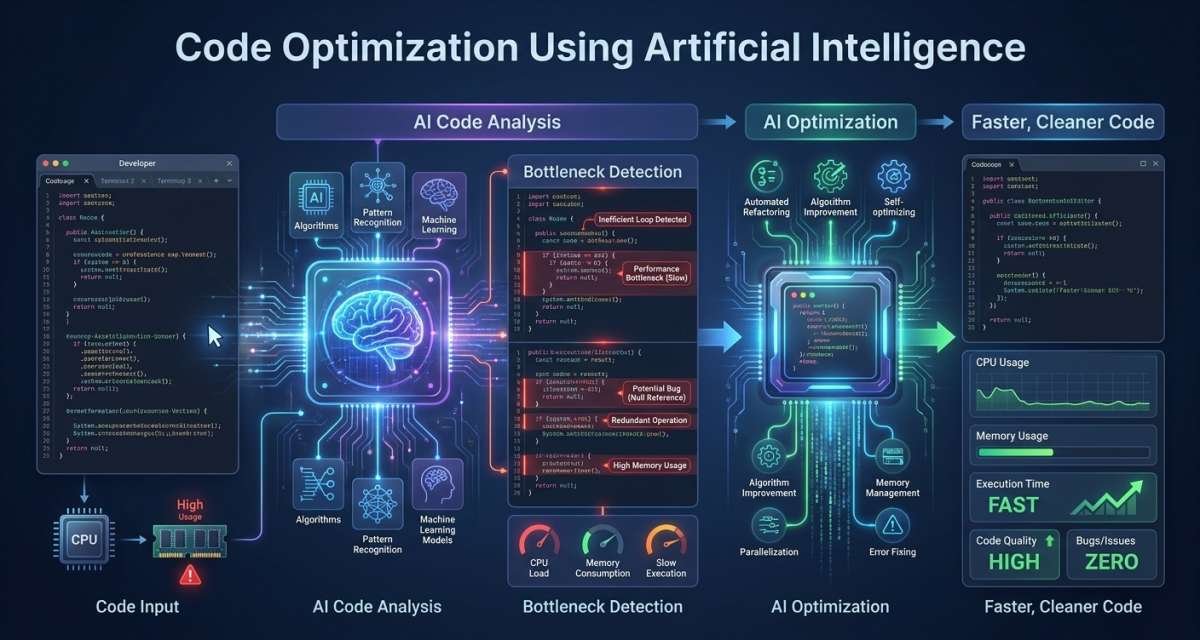
Code optimization using artificial intelligence can help developers improve the performance, structure, readability, testing, and maintainability of existing software. The useful part is not asking AI to rewrite an entire codebase. It is giving AI a specific engineering problem and using its suggestions inside a normal development and review process.
That distinction matters because clean-looking code is not necessarily correct code, and faster-looking code is not necessarily faster. Developers still need profiling, tests, static analysis, benchmarks, security checks, and human review.
This guide explains where AI-assisted optimization is useful, how performance tuning and refactoring fit together, what a safe workflow looks like, and which decisions should remain under human control.
What AI-Assisted Code Optimization Actually Means
AI-assisted code optimization uses AI models and developer tools to analyze existing code and suggest ways to make it faster, clearer, easier to test, or easier to maintain.
Optimization is broader than performance. Depending on the problem, an improvement might mean:
- Reducing algorithmic complexity
- Removing duplicated logic
- Breaking a large function into smaller units
- Reducing unnecessary database calls
- Improving naming
- Identifying edge cases
- Drafting missing tests
- Simplifying state management
- Explaining legacy logic
- Highlighting risky changes before review
The goal should always be defined before AI changes the code.
A vague instruction such as “make this code better” gives the system too much freedom. A request such as “reduce repeated database queries without changing the API response format” creates a clear boundary.
Code optimization vs. code generation
Code generation creates new code. Optimization starts with code that already exists and tries to improve it.
Asking AI to build a login form is code generation. Asking it to inspect an existing login form for repeated validation logic, unnecessary rendering, or unclear error handling is optimization.
The second task requires understanding current behavior and protecting it during changes.
AI optimization vs. compiler optimization
Compiler optimization and AI-assisted optimization work at different layers.
A compiler may improve machine-level execution after code has been written. AI can help developers reconsider the code itself.
For example, a compiler may optimize instructions inside a loop. AI might identify that the application is using nested loops where a lookup structure could reduce the amount of work.
Neither removes the need for measurement. A suggestion is only a hypothesis until profiling or benchmarking shows that it improved the real workload.
Where AI Helps Developers Improve Existing Code
AI is most useful when the task is clearly defined, enough context is available, and the result can be verified.
Performance analysis
AI can inspect a function, query pattern, request path, or application component and suggest possible bottlenecks.
It may notice:
- Repeated database calls
- Expensive loops
- Duplicate calculations
- Unnecessary network requests
- Large payloads
- Excessive rendering
- Poor caching candidates
- Blocking work in user-facing requests
AI-driven performance optimization becomes more useful when these suggestions are combined with actual runtime evidence rather than source code alone.
For example, an assistant may suspect that repeated queries are slowing an API. The developer workflow should then inspect query behavior and measure response times instead of assuming the recommendation is correct.
Refactoring and maintainability
AI can help reduce duplication, extract smaller functions, improve names, simplify nested conditions, and identify code that is difficult to test.
This is where AI code refactoring systems can save time, especially with repetitive maintenance work.
The important constraint is behavioral stability. A refactor should improve the internal structure without unexpectedly changing what users, APIs, or other modules observe.
Testing and debugging
AI can draft unit tests, suggest edge cases, explain errors, and propose debugging paths.
For a date parser, for example, it might identify cases involving:
- Empty input
- Invalid formats
- Boundary dates
- Leap years
- Time-zone differences
For an inconsistent API, it may suggest investigating missing asynchronous waits, race conditions, cache behavior, or retry logic.
These ideas help developers investigate faster, but generated tests are not proof that the implementation is correct. A test can reproduce the same misunderstanding as the code.
Legacy code, documentation, and review
Legacy code is another useful low-risk starting point.
Before changing an unfamiliar module, a developer can ask AI to:
- Explain the module in plain language
- Identify inputs and outputs
- List side effects
- Find external dependencies
- Describe likely failure paths
- Identify files that may be affected by a change
This creates a better starting point for human investigation.
AI can also summarize pull requests, draft documentation, and suggest review questions. These tasks reduce repetitive work without giving the AI final authority over production behavior.
A Safe AI Code Optimization Workflow
A reliable workflow keeps the developer in control from the first prompt to the final merge.
1. Define the problem
Start with evidence or a specific maintenance goal.
Instead of:
“Optimize this function.”
Use:
“This function becomes slow with large arrays. Suggest two ways to reduce its time complexity without changing its output.”
For refactoring, a useful instruction might be:
“Extract the validation logic into a helper. Do not change public method names, response fields, database writes, or error messages.”
Clear boundaries reduce unnecessary rewrites.
2. Give the AI enough context
Useful context may include:
- Programming language
- Framework
- Relevant dependencies
- Expected inputs and outputs
- Performance problem
- Existing tests
- Architecture rules
- Functions or interfaces that cannot change
- Security or privacy restrictions
Suppose a FastAPI endpoint repeatedly queries the database. Saying only “optimize this” may lead to unrelated restructuring.
A better request explains that the API response must remain unchanged, existing tests must pass, and the goal is specifically to reduce redundant queries.
3. Ask for options and trade-offs
Do not always ask for a final rewrite immediately.
Ask for two or three possible approaches and have the AI explain:
- Expected benefit
- Possible risk
- Complexity
- Behavior that could change
- Tests needed to validate it
This separates reasoning from implementation and gives the developer a chance to reject poor approaches before a large diff appears.
4. Test and measure
Every optimization should be validated according to the type of change.
For behavior-related changes, use:
- Unit tests
- Integration tests
- Contract tests
- End-to-end tests
- Type checks
- Linters
- Static analysis
- Security scanning
For performance changes, add:
- Profiling
- Benchmarks
- Load tests
- Query analysis
- Browser performance tools
- Runtime telemetry
A code change that looks simpler may perform worse. A change that makes a benchmark faster may introduce errors elsewhere.
Measure the thing you intended to improve and verify that important surrounding behavior remains stable.
5. Review the final diff
Treat AI-generated changes exactly like production code written by another developer.
Review:
- Logic
- Edge cases
- Error handling
- Security
- Input validation
- Permissions
- Dependencies
- Side effects
- Naming
- Maintainability
- Performance evidence
Smaller changes are easier to understand, test, approve, and roll back. Avoid combining a large structural cleanup with unrelated feature changes.
Performance Optimization: Measure Before Changing Code
Performance work is one area where AI can be useful but misleading.
Source code shows what the application might be doing. Runtime data shows what is actually happening.
Establish a baseline
Before making a performance change, record the current behavior.
Depending on the application, that could include:
- Average response time
- p95 or p99 latency
- Throughput
- Error rate
- Query duration
- CPU use
- Memory use
- Queue waiting time
- Page rendering time
- User-facing interaction delay
The exact metric matters less than choosing one that represents the problem.
If checkout latency is the issue, reducing CPU use elsewhere does not prove success.
Use runtime evidence
Metrics, logs, traces, and profiles answer different questions.
- Metrics show how values such as latency, memory, errors, or request volume change over time.
- Logs provide event details and can help explain errors, retries, integration failures, or unusual execution paths.
- Traces show where time is spent across a request, especially when multiple services are involved.
- Profiles help identify code-level hot paths, allocation problems, lock contention, or expensive functions.
AI can help summarize these signals and propose likely causes. The developer should use those findings to narrow the investigation rather than treating them as a diagnosis.
Suppose an API becomes slower after a release. Source-level AI analysis may suggest several possible inefficient functions. Trace data may show that nearly all of the added delay comes from one database call.
That evidence should drive the optimization.
Validate the improvement
After changing the code, compare the same measurements again.
Check whether:
- The targeted latency decreased
- Throughput improved
- Memory use remained acceptable
- Error rates stayed stable
- Database pressure changed
- User-facing behavior improved
- The change introduced a new bottleneck
Performance optimization without before-and-after measurement is guesswork.
Refactoring With AI Without Changing Behavior
Refactoring should make code easier to work with without unexpectedly changing its external behavior.
AI can accelerate that process, but large automated rewrites are difficult to review.
Start with a small scope
Choose one function, module, service, or repeated pattern.
Good early tasks include:
- Renaming unclear variables
- Extracting validation logic
- Reducing duplicated helper code
- Breaking down one oversized function
- Simplifying nested conditions
- Removing confirmed dead code
- Standardizing repeated test patterns
Avoid starting with a whole-repository cleanup.
A smaller scope makes unintended changes easier to detect.
Protect behavior with tests
Tests are especially valuable before modifying legacy code.
If a module has weak coverage, add tests that capture the behavior the application currently depends on.
These tests may cover:
- Inputs and outputs
- Error responses
- Database side effects
- Events
- External service calls
- Permission checks
- Boundary cases
AI can help draft those tests, but developers need to verify the expectations.
An AI assistant can misunderstand a business rule and produce a test that simply formalizes the misunderstanding.
Review structural changes carefully
A refactor can look cleaner while becoming harder to maintain.
Review whether the change:
- Actually reduces complexity
- Introduces unnecessary abstractions
- Hides important business rules
- Creates too many small functions
- Moves security checks
- Changes error handling
- Alters side effects
- Adds unwanted dependencies
Separate cosmetic cleanup from important logic changes where possible. Reviewers should be able to understand why each part of the diff exists.
Practical Optimization Use Cases
Different parts of a software system need different validation methods.
Backend applications
Backend developers can use AI to inspect:
- Repeated database queries
- Expensive loops
- Serialization work
- Error handling
- Caching opportunities
- API payloads
- Blocking operations
Suppose an endpoint loads related customer, order, invoice, and shipping information through repeated calls. AI might recommend batching requests, reducing duplicated lookups, or reconsidering query structure.
The developer should then inspect query behavior and measure the endpoint before and after the change.
Do not add caching simply because it sounds faster. Caching can introduce stale data and invalidation problems.
Frontend applications
Frontend optimization may involve:
- Unnecessary re-renders
- Duplicated state
- Expensive calculations
- Large components
- Repeated network requests
- Bundle size
- Unclear component boundaries
For example, if an entire dashboard re-renders whenever one filter changes, AI may suggest isolating state or memoizing specific components.
Verify the result with browser performance tools and actual interaction flows. Adding memoization everywhere can increase complexity without delivering a useful improvement.
Testing and QA
AI can help generate candidate scenarios for APIs, forms, workflows, and business logic.
For a checkout process, test ideas might include:
- Payment failure
- Invalid promotion codes
- Partial addresses
- Duplicate submissions
- Retry behavior
- Abandoned sessions
AI broadens the list of cases. QA engineers and developers still determine which cases reflect the actual product requirements.
Legacy systems and pull requests
For unfamiliar code, explanation is often safer than immediate rewriting.
A useful sequence is:
- Ask AI to explain the current logic.
- Identify dependencies and side effects.
- Add missing tests.
- Define the intended refactor.
- Make a small change.
- Review and run checks.
- Continue in small batches.
For pull requests, AI can summarize changes and identify areas requiring extra attention. Authentication, billing, permissions, database migrations, and public interfaces should still receive direct human review.
DevOps and automation scripts
AI may help inspect deployment scripts, CI workflows, shell commands, error handling, and rollback logic.
These changes can have a much larger blast radius than an isolated application function.
Use staging or dry-run environments where possible, and keep human approval around actions that can modify production infrastructure, credentials, permissions, or customer-facing services.
Risks, Security, Privacy, and Human Control
The largest risk is not that AI always produces bad code. It is that plausible output can make weak code look trustworthy.
Security and correctness
AI-generated or AI-modified code may contain:
- Missing validation
- Weak permission checks
- Unsafe database handling
- Poor error handling
- Insecure dependency usage
- Incorrect assumptions
- Missing edge cases
Passing functional tests does not automatically make code secure.
Security-sensitive changes should continue to use normal secure-development practices, including specialist tools and manual review.
Sensitive data
Prompts can contain company information just as easily as source files or logs.
Do not send sensitive information to unapproved systems.
Examples include:
- API keys
- Access tokens
- Passwords
- Credentials
- Customer information
- Payment data
- Private repositories
- Confidential business logic
- Sensitive production logs
- Internal security details
Teams should understand data retention, repository permissions, access controls, logging, and organizational policies before connecting AI tools to private development environments.
Hallucinated logic
An AI assistant may confidently suggest an API, method, dependency, or behavior that does not exist in the project’s environment.
Verify generated code against:
- The installed software version
- Existing project code
- Official documentation
- Tests
- Build results
Confidence in the wording of an AI response is not evidence that the implementation is correct.
Over-engineering and technical debt
AI can also generate more code than the problem requires.
A simple helper may become a class hierarchy. A small validation change may introduce several abstractions. A straightforward function may be split into so many pieces that debugging becomes harder.
Optimization should reduce future maintenance cost, not merely create a larger and more polished-looking diff.
Keep humans in control of high-risk decisions such as:
- Authentication and authorization
- Payments and billing
- Database migrations
- Encryption
- Secrets handling
- Public API changes
- Cross-service contracts
- Infrastructure configuration
- Large architectural changes
- Security policy changes
If a change can expose data, disrupt production, change customer behavior, or create substantial cost, require human approval.
Choosing and Adopting AI Support for a Team
The right AI support depends on the development workflow rather than popularity.
A tool may specialize in IDE assistance, codebase explanation, test generation, pull-request review, repository search, or multi-file editing. Those are different use cases.
Match tools to workflows
Start by asking what problem the team wants to solve.
Examples:
- Developers spend too much time understanding legacy services.
- Unit-test coverage is difficult to expand.
- Pull-request preparation takes too long.
- Repetitive refactoring consumes engineering time.
- Performance investigations are slow.
- Documentation consistently falls behind code.
Choose capabilities around the pain point.
A broad tool with many features does not necessarily improve a poorly defined process.
Establish team rules
Before wider use, define:
- Which repositories may use AI
- What information developers may put into prompts
- Which tools are approved
- Whether generated code must be identified
- Required test coverage
- Required security checks
- Pull-request size expectations
- Areas that always require senior review
Without shared rules, developers may use different systems with different privacy assumptions and review standards.
Start with low-risk use cases
Useful pilot tasks include:
- Explaining legacy functions
- Drafting unit tests
- Improving internal documentation
- Reviewing non-sensitive utilities
- Suggesting narrow refactors
- Summarizing pull requests
Do not make authentication, payments, encryption, database migrations, production infrastructure, or customer data the first experiment.
Start where mistakes are easy to detect and easy to reverse.
Measure quality, not code volume
Producing more code is not a useful success metric on its own.
Better questions include:
- Did review time improve without increasing defects?
- Did tests become more useful?
- Did maintainability improve?
- Were performance changes validated more consistently?
- Did the team reduce duplicated work?
- Did AI-generated changes create more review burden?
- Can developers still explain the code they merge?
AI should strengthen engineering discipline rather than create more code for reviewers to inspect.
Conclusion
Code optimization using artificial intelligence works best when AI is treated as an engineering assistant rather than an autonomous authority.
Start by defining a specific problem. Give the system enough context and constraints. Ask for options before large changes. Protect behavior with tests. Use profiles and runtime evidence for performance work. Keep refactoring changes small. Review every production diff.
Teams should begin with low-risk work such as code explanation, test drafts, documentation, focused refactoring, and review preparation. Security-sensitive code, payments, permissions, migrations, infrastructure, and confidential data require much tighter control.
The goal is not to make AI produce the maximum amount of code. The goal is to help developers make existing software easier to understand, safer to change, and measurably better with the right AI tools for software developers.
FAQ
What is AI code optimization?
AI code optimization uses AI tools to analyze and improve existing code. It can support performance tuning, refactoring, testing, debugging, documentation, and review, but developers still need to validate the results.
Can AI automatically optimize production code?
AI can suggest or apply changes, but production optimization should not be fully trusted without review. Run tests, measure performance, check security, and inspect the final diff before deployment.
How is AI-assisted optimization different from code generation?
Code generation creates new code from a request. AI-assisted optimization starts with existing code and tries to improve performance, structure, readability, testing, or maintainability.
Can AI safely refactor legacy code?
It can help, especially when the scope is small and current behavior is protected by tests. Start with code explanation and characterization tests before making larger structural changes.
How can AI find performance bottlenecks?
AI can analyze source code and help interpret metrics, logs, traces, and profiles. These signals can point to likely bottlenecks, but developers should confirm the cause with profiling and before-and-after measurements.
Is AI-generated code secure?
Not automatically. AI output can contain insecure patterns, incorrect assumptions, or missing validation. Use normal security scanning, code review, testing, and secure-development practices.
What should never be shared with an AI coding tool?
Avoid sharing credentials, API keys, access tokens, customer data, payment information, confidential code, or sensitive production logs unless the tool and workflow are explicitly approved by your organization.




Leave a Reply