
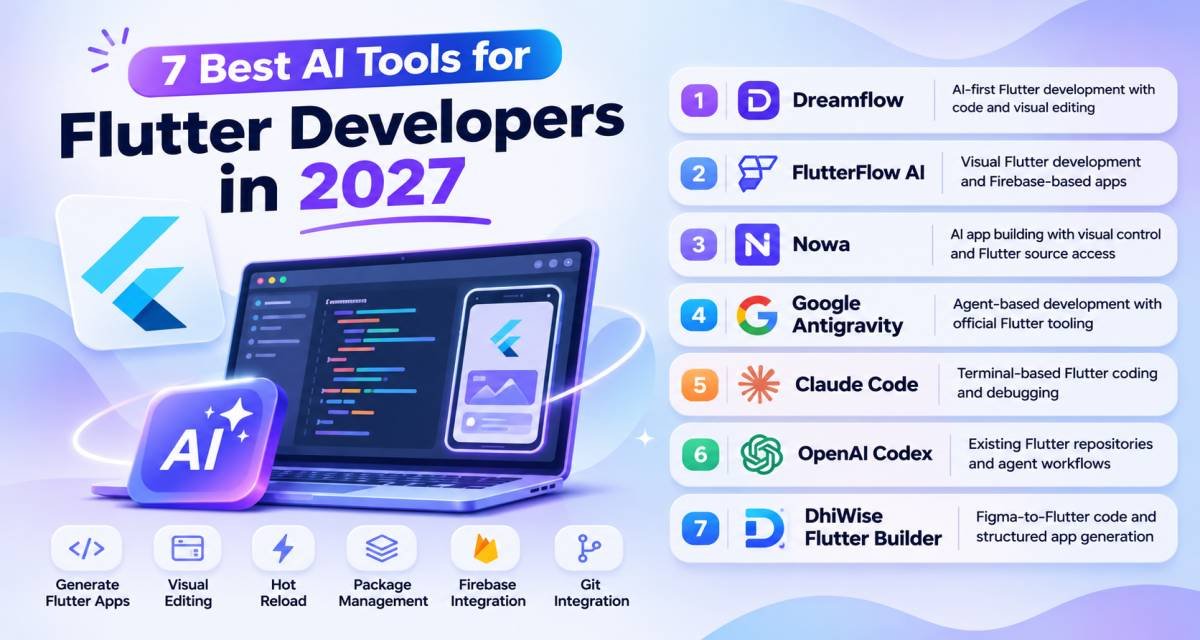
Flutter developers now have several types of AI tools to choose from.
Some can generate a complete Flutter app from a prompt. Others combine AI with a visual editor. A newer group connects coding agents directly to Flutter’s own developer tools, so the agent can analyze Dart code, run tests, manage packages, inspect a running app, and use hot reload.
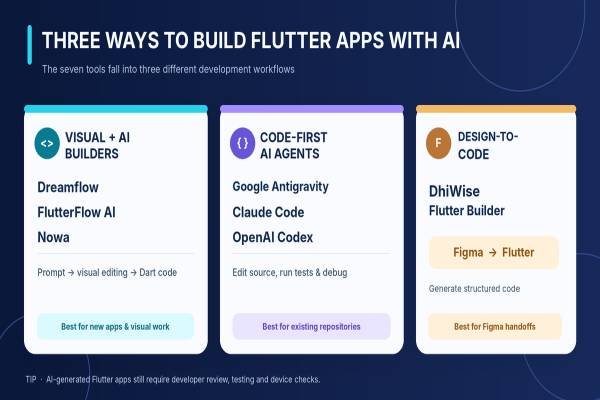
The best choice depends on whether you are starting a new app, maintaining an existing Dart codebase, working from designs, or trying to give an AI coding agent deeper Flutter context.
Dreamflow is the strongest overall choice for developers who want AI, visual editing, and direct Flutter code in one workspace. FlutterFlow AI is better for visual development, Firebase workflows, and app deployment. Nowa is a strong alternative with an AI agent and visual editor. For existing codebases, Google Antigravity, Claude Code, and OpenAI Codex now stand out because Flutter provides official Dart and Flutter plugins for them.
Best AI Tools for Flutter Developers at a Glance
| Tool | Strongest Fit |
| Dreamflow | AI-first Flutter development with code and visual editing |
| FlutterFlow AI | Visual Flutter development and Firebase-based apps |
| Nowa | AI app building with visual control and Flutter source access |
| Google Antigravity | Agent-based development with official Flutter tooling |
| Claude Code + Dart & Flutter Plugin | Terminal-based Flutter coding and debugging |
| OpenAI Codex + Dart & Flutter Plugin | Existing Flutter repositories and agent workflows |
| DhiWise Flutter Builder | Figma-to-Flutter code and structured app generation |
Comparison Table
| Tool | Best For | Flutter Approach | Free Option | Main Limitation |
| Dreamflow | Developers building new Flutter apps | AI agent + visual editor + Dart code | Yes | Git and full code export require higher plans |
| FlutterFlow AI | Visual app development | Prompt/Figma generation + visual builder + agents | Yes | Lower plans have AI and project limits |
| Nowa | AI plus visual Flutter building | Agent + visual editor + editable code | Yes | GitHub integration requires Scale |
| Google Antigravity | Agent-based Flutter coding | Official Flutter plugin, skills, MCP, hot reload | Yes | General coding agent rather than Flutter-only environment |
| Claude Code | Terminal developers | Official Dart/Flutter plugin + MCP | Claude Code requires a supported paid plan or API billing | No visual Flutter builder |
| OpenAI Codex | Repository-level coding tasks | Official Flutter plugin + MCP + CLI/IDE workflows | Included across ChatGPT plans with plan-based limits | No built-in visual Flutter canvas |
| DhiWise Flutter Builder | Figma-to-Flutter development | Design-to-code and app configuration | Preview/code viewing available free | Current commercial path is less clear as DhiWise shifts attention to Rocket.new |
How the Tools Were Selected
The ranking uses criteria that directly affect Flutter development:
- Dart and Flutter support
- Quality of project context
- Ability to work with real Flutter source
- UI and widget generation
- Testing and debugging
- Hot reload or app inspection
- Package management
- Firebase and backend integration
- Figma support
- Git and source-code ownership
- Agent support
- Current product availability
- Pricing and free access
Extra weight was given to products that work with Flutter’s current official AI tooling rather than tools that only generate generic Dart snippets.
The ranking is based on current product documentation and public product information. It does not claim hands-on testing.
Best AI Tools for Flutter Developers
1. Dreamflow
Best for: Flutter developers who want AI generation, visual editing, and direct Dart code in the same environment.
What it does: Dreamflow is a Flutter-based AI development environment from the team behind FlutterFlow. It combines three editing surfaces: an AI agent, a visual canvas, and a code editor. Changes made in one surface stay connected to the Flutter source code.
Why It Stands Out
Dreamflow is built around Flutter rather than adding Flutter support to a general coding platform.
Developers can start with a natural-language description, generate an application, adjust widgets visually, and then edit the Dart source directly.
Dreamflow describes code as the source of truth. That matters because developers are not limited to a visual abstraction after the first AI generation.
Its developer workflow also supports Git on the Pro tier and lets teams define rules that control AI generation and architecture.
Key Features
- Flutter and Dart code generation
- AI development agent
- Visual Flutter editor
- Direct code editor
- Code and visual synchronization
- Firebase integration
- Supabase integration
- Web deployment
- App Store deployment
- Google Play deployment
- Local simulator and device workflows
- Git version control on Pro
- Model selection
- Architecture rules
Practical Use Case
A Flutter developer wants to build a booking application.
They can ask Dreamflow to create the first screens and navigation, connect Firebase or Supabase, refine the interface through the visual canvas, and then open the generated Dart files to implement custom business logic.
If an error appears while the app runs, Dreamflow’s debug console can expose logs that can be sent back to the agent for another debugging pass.
Limitations
Dreamflow works best when developers are comfortable building inside its environment.
The Free plan is mainly for exploration. Full source export, mobile store deployment, and local device workflows start with the Hobby plan, while Git version control requires Pro.
Teams that already have a large Flutter repository and only want an agent inside their current terminal or IDE may prefer Claude Code, Codex, or Antigravity.
Pricing
Dreamflow currently lists:
- Free: $0/month, with 10 one-time starter AI credits
- Hobby: $20/month, with 100 credits per month
- Pro: $90/month, with 500 credits per month
Hobby adds full code export, local testing, and mobile store deployment. Pro adds Git version control and higher model access.
Verdict
Choose Dreamflow if you want Flutter development to move freely between prompts, visual changes, and Dart code.
It is especially useful for new apps where both development speed and source-code access matter.
2. FlutterFlow AI
Best for:
Developers and product teams that want visual Flutter development with AI generation, Firebase integration, and deployment tools.
What it does: FlutterFlow combines its visual Flutter builder with AI-generated pages, components, Figma imports, coding agents, backend integrations, testing tools, and source-code export.
Why It Stands Out
FlutterFlow now has several separate AI workflows.
Developers can use:
- Prompt to Component
- Prompt to Page
- Image to Component
- Figma import
- External coding agents
- AI features inside the finished app
Its July 2026 update also added direct Claude Code and Codex integration inside FlutterFlow Desktop. The selected agent can receive FlutterFlow project context, propose changes, and update the project through FlutterFlow tooling.
FlutterFlow also has an MCP workflow that lets compatible coding agents edit FlutterFlow projects from the terminal.
Key Features
- Prompt-to-page generation
- Prompt-to-component generation
- Image-to-component
- Figma frame import
- Visual Flutter editor
- Firebase integration
- Supabase integration
- API integrations
- Custom Dart code
- AI coding agent support
- Claude Code integration
- Codex integration
- GitHub integration on Growth and higher
- Code export on paid plans
- Automated tests on higher plans
- App store deployment
Practical Use Case
A startup needs a Flutter marketplace app.
The team can generate the first screens with AI, import selected designs from Figma, connect Firebase authentication and Firestore, add custom Dart where needed, and use an external agent for targeted project changes.
The visual builder remains available for designers or developers who want to adjust layouts without editing Dart manually.
Limitations
FlutterFlow places many advanced features behind plan tiers.
The Free plan includes only five AI-generation requests for the lifetime of the account and two editable projects. Code download starts with Basic. GitHub integration and branching start with Growth. Figma Frame Import is currently listed under Business.
External AI coding agents also run through the developer’s own Claude or ChatGPT account, so their usage limits and billing are separate from FlutterFlow.
Pricing
Current monthly USD pricing is:
- Free: $0
- Basic: $39/month
- Growth: $80/month for the first seat and $55 for the second
- Business: $150/month for the first seat and $85 for seats 2–5
- Enterprise: Custom
FlutterFlow currently gives Basic 50 AI-generation requests per month, Growth 200 per seat, and Business 500 per seat.
Verdict
FlutterFlow AI is a strong choice when visual development, backend setup, deployment, and AI generation need to exist in one product.
Developers who want a more code-first Flutter workflow should compare Dreamflow or the official Flutter agent plugins.
3. Nowa
Best for: Flutter developers and founders who want an AI agent, full visual editing, and access to normal Flutter code.
What it does: Nowa combines an AI Flutter agent with a visual editor and code access. The agent can create screens, app logic, data connections, and other application features, while developers can switch to visual or code editing at any time.
Why It Stands Out
Nowa is built specifically around Flutter.
Its AI sees the project as a connected application rather than a collection of unrelated source files, according to the vendor. Developers can also keep local projects on their own computers and work on the same Flutter project in Nowa and an IDE such as VS Code.
Nowa supports:
- Firebase
- Supabase
- RevenueCat
- REST APIs
- pub.dev packages
- OpenAI-powered app features
- Google Sheets
The current product can also publish apps to iOS, Android, and the web.
Key Features
- Flutter AI agent
- Visual editor
- Direct Dart code editing
- Local projects
- Firebase
- Supabase
- API integrations
- Custom packages
- Hot reload
- Device simulators
- App Store deployment
- Google Play deployment
- Web publishing
- GitHub integration on Scale
Practical Use Case
A developer wants to build a subscription-based habit tracker.
The AI can create the initial screens and logic, while the developer can use the visual editor to refine layouts.
RevenueCat can handle subscription-related integration, and the app can connect to Firebase or Supabase for authentication and data.
The project can later be opened locally for direct Dart development.
Limitations
Nowa’s main pricing page and some documentation currently show different descriptions of AI quotas because Nowa changed from monthly limits to daily credit limits during 2026.
The newest pricing page and August 2026 product update show the current daily-credit model, so older monthly quota documentation should not be used for current buying decisions.
GitHub integration also requires the Scale plan.
Pricing
Nowa currently lists:
- Starter: Free, with $5 of AI credits each day
- Launch: $24/month when billed annually, with $20 of AI credits each day
- Scale: $49/month when billed annually, with $50 of AI credits each day
- Enterprise: Custom
Launch adds mobile and web deployment. Scale adds GitHub integration and higher AI usage.
Verdict
Nowa is a good middle option between a no-code Flutter builder and a normal coding environment.
Choose it if you want AI to build larger parts of an application but still want visual editing and access to the Flutter project.
4. Google Antigravity + Official Dart & Flutter Plugin
Best for: Flutter developers who want a general coding agent connected directly to official Flutter developer tools.
What it does: Google Antigravity is an agent-based development platform with desktop, CLI, and enterprise options. Flutter’s official documentation now provides a dedicated Dart and Flutter integration for Antigravity.
Why It Stands Out
The official Flutter integration changes what a general AI agent can do with a Flutter project.
Flutter’s Dart and Flutter MCP server can give compatible agents tools to:
- Analyze Dart errors
- Resolve symbols
- Retrieve API signatures
- Search pub.dev
- Manage pubspec.yaml
- Run tests
- Format Dart
- Inspect a running Flutter app
- Interact with the running app
- Trigger hot reload
The MCP server is experimental and currently requires Dart 3.9 or later.
Antigravity also supports agentic hot reload. When the agent changes a running Flutter app, it can reload the app as part of the workflow.
Key Features
- Official Dart and Flutter plugin
- Flutter agent skills
- Dart and Flutter MCP
- File editing
- Terminal commands
- Error analysis
- Test execution
- Package management
- Running-app inspection
- Agentic hot reload
- Custom agents
- Multiple model options
- CLI and desktop workflows
Practical Use Case
A developer has an existing Flutter application with a failing widget test and a package conflict.
Antigravity can use Flutter’s official tooling to inspect analyzer errors, check package information, update dependencies, run tests, and continue fixing the project based on actual development feedback.
This workflow is better suited to an existing repository than a visual app builder.
Limitations
Antigravity is a general agent platform.
It does not give Flutter developers the drag-and-drop canvas offered by Dreamflow, FlutterFlow, or Nowa.
Flutter’s MCP server is also still marked experimental, so teams should expect its interface and capabilities to change.
Pricing
Google Antigravity currently has an Individual plan at $0/month with baseline quotas, unlimited tab completions, and unlimited command requests.
Google also offers:
- Google AI Pro: $20/month
- Google AI Ultra: $100/month for a 5x Antigravity usage level versus Pro
- Higher AI Ultra tier: $200/month with a 20x usage level versus Pro
- Organization access: Through Google Cloud and Gemini Enterprise Agent Platform
Google changed these plan levels in May 2026.
Verdict
Choose Antigravity if you already have a real Flutter codebase and want an agent that can work with official Dart and Flutter developer tools.
Choose Dreamflow or FlutterFlow when a visual Flutter canvas is more important.
5. Claude Code + Official Dart & Flutter Plugin
Best for: Flutter developers who prefer terminal-based development and want the AI agent to work with Flutter’s own tools.
What it does: Claude Code is Anthropic’s terminal coding agent. Flutter now provides an official Dart and Flutter Claude Code plugin that bundles Flutter agent skills and Dart/Flutter MCP configuration.
Why It Stands Out
Claude Code already works directly with local repositories, Git, terminal commands, and MCP servers.
The official Flutter plugin adds framework-specific context rather than relying only on general model knowledge.
Flutter’s official agent skills include workflows for tasks such as:
- Responsive Flutter layouts
- Declarative routing
- JSON serialization
- Dart tests
- Package dependency work
- Static-analysis fixes
With Dart and Flutter MCP, Claude Code can also run tests, inspect analyzer errors, work with package dependencies, and interact with a running Flutter application.
Key Features
- Official Flutter plugin
- Dart agent skills
- Flutter agent skills
- Dart/Flutter MCP
- Terminal workflow
- Multi-file edits
- Git integration
- Test execution
- Analyzer feedback
- Package management
- Running-app tools
- MCP ecosystem
Practical Use Case
A Flutter developer needs to refactor navigation across a medium-sized application.
Claude Code can inspect the project, use official Flutter routing guidance, modify related files, run static analysis and tests, and fix errors based on the actual output.
Limitations
Claude Code does not include a Flutter visual builder.
Developers still work primarily through the terminal and their chosen IDE.
Usage is also limited by the selected Claude subscription or billed by API tokens if a Console account is used.
Pricing
Claude Code is included with individual Claude plans including:
- Pro: $20/month, or $200/year
- Max 5x: $100/month
- Max 20x: $200/month
API-based Claude Code usage is billed separately at current Claude API rates.
Verdict
Claude Code is a strong choice for developers who already live in the terminal and want a Flutter-aware coding agent without moving the project into a visual builder.
The official Flutter plugin makes it much more relevant to Dart development than a generic chat workflow.
6. OpenAI Codex + Official Dart & Flutter Plugin
Best for: Flutter developers who want an agent for repository-level changes, testing, review, and multi-step development.
What it does: Codex is OpenAI’s coding agent for CLI, IDE, app, web, and cloud workflows. Flutter now provides an official Dart and Flutter Codex plugin with agent skills and MCP configuration.
Why It Stands Out
The official Flutter plugin lets Codex use framework-specific instructions rather than depending only on model memory.
Codex can also connect directly to the Dart and Flutter MCP server. Flutter documents the Codex MCP configuration and notes that the server can expose analysis, package, test, formatting, symbol, and running-app tools.
Codex itself can work in several environments. Developers can use it from the CLI, IDE, desktop app, or cloud and review changes before applying them.
Key Features
- Official Flutter plugin
- Flutter and Dart agent skills
- Dart/Flutter MCP
- CLI
- IDE workflows
- Multi-file tasks
- Parallel agent workflows
- Test execution
- Code review
- Git-based workflows
- Project rules
- Running-app inspection through MCP
Practical Use Case
A Flutter team wants to add offline caching to an existing application.
Codex can inspect the repository, identify the current data layer, add a package if required, update models and repositories, run analysis and tests, and return a set of code changes for review.
Limitations
Codex does not provide its own visual Flutter canvas.
It suits code-centric development better than Figma-driven or drag-and-drop app creation.
Flutter’s MCP integration is experimental, so developers should also keep the normal Flutter SDK, analyzer, and tests in the review process.
Pricing
Codex is included across ChatGPT plans, including Free and Go, with limits that vary by plan. Paid subscriptions offer higher usage, and eligible users can buy additional Codex credits when they reach their included limits.
OpenAI also includes Codex with Plus, Pro, Business, Enterprise, and Edu subscriptions.
Verdict
Choose Codex if your Flutter work already happens in a real repository and you want an agent to handle larger engineering tasks, tests, and code review.
Dreamflow and FlutterFlow remain better choices if visual app creation is the main goal.
7. DhiWise Flutter Builder
Best for: Developers who want to turn Figma designs into structured Flutter code with configurable state management.
What it does: DhiWise’s Flutter Builder converts Figma designs into Flutter screens and lets developers configure navigation, APIs, authentication, runtime permissions, and application behavior before generating the code.
Why It Stands Out
DhiWise approaches Flutter development from the design-to-code side.
Its Flutter Builder can generate code with several state-management choices:
- GetX
- BLoC
- Provider
- Riverpod
- No state-management layer
Developers can also import Postman or Swagger API definitions and connect generated code to GitHub, GitLab, VS Code, Android Studio, or IntelliJ on supported plans.
Key Features
- Figma-to-Flutter
- Widget recognition
- UI customization
- Navigation configuration
- API integration
- Postman import
- Swagger import
- Social authentication
- GetX
- BLoC
- Provider
- Riverpod
- Source-code export
- GitHub/GitLab sync
Practical Use Case
A mobile team receives a finished Figma design and wants a Flutter starting point using Riverpod.
DhiWise can import the screens, identify widgets, configure navigation and API calls, and generate a Riverpod-based Flutter project that the development team can continue editing.
Limitations
DhiWise ranks last because its current commercial direction is less clear than the other products.
The Flutter Builder documentation remains accessible and the official Flutter product page is active. However, DhiWise’s main pricing URL now redirects to the company’s newer Rocket.new product, and several DhiWise pages encourage users to move toward Rocket.
The documentation also contains references to older Flutter SDK versions in some code-export sections, so teams should verify generated SDK compatibility before adopting it for a new 2026 project.
Pricing
DhiWise allows users to create and preview Flutter applications without paying. Its documentation states that source-code download and GitHub/GitLab synchronization require a paid plan.
A current standalone DhiWise Flutter Builder price could not be verified because the present pricing path redirects to Rocket.new. Older price figures are therefore omitted.
Verdict
DhiWise can still be useful for Figma-to-Flutter workflows, especially when state-management generation matters.
For a new buying decision, confirm the current product roadmap and commercial terms before making it part of a long-term Flutter workflow.
Best AI Tools for Flutter Developers by Use Case
| Flutter Use Case | Best Choice | Alternative |
| Overall AI Flutter development | Dreamflow | FlutterFlow AI |
| Visual Flutter development | FlutterFlow AI | Nowa |
| Prompt-to-Flutter app | Dreamflow | Nowa |
| Firebase-based application | FlutterFlow AI | Dreamflow |
| Visual editor + full code | Dreamflow | Nowa |
| Existing Flutter repository | Google Antigravity | Claude Code |
| Terminal Flutter development | Claude Code | Codex |
| Multi-step coding agent | Codex | Claude Code |
| Official Flutter AI tooling | Antigravity | Claude Code / Codex |
| Figma-to-Flutter | DhiWise | FlutterFlow |
| Free starting option | Antigravity Individual | Nowa Starter |
| App Store deployment | Dreamflow | FlutterFlow / Nowa |
How to Choose an AI Tool for Flutter Development
1. Decide Whether You Are Building a New App or Editing an Existing One
This is the most useful first filter.
For a new application, compare:
- Dreamflow
- FlutterFlow
- Nowa
These products can create screens and application structure before much code exists.
For an existing Flutter repository, compare:
- Antigravity
- Claude Code
- Codex
These agents can work directly with the code you already have and can use Flutter’s official AI tooling.
2. Decide How Important a Visual Editor Is
Some Flutter developers want direct Dart control.
Others regularly work with designers or want to refine interfaces visually.
If visual editing matters, prioritize:
- Dreamflow
- FlutterFlow
- Nowa
- DhiWise
If most work happens in source code and a terminal, prioritize Antigravity, Claude Code, or Codex.
3. Look for Official Dart and Flutter Tool Access
A general coding model may know Dart syntax, but that is different from being connected to the actual Flutter development environment.
Flutter’s current MCP server can expose:
- Analyzer errors
- Symbols and signatures
- pub.dev search
- Package dependency management
- Tests
- Formatting
- Running application state
- App interaction
- Hot reload
This is an important advantage for supported coding agents.
4. Check Source-Code Ownership
A visual builder is easier to adopt if the application can leave the platform.
Check whether you can:
- Download the full Flutter project
- Edit Dart locally
- Use your own packages
- Commit to Git
- Build outside the platform
Dreamflow, FlutterFlow, Nowa, and DhiWise provide code-export paths, but the required plan differs between products.
5. Compare Backend Requirements
Flutter apps often need more than UI.
Common requirements include:
- Firebase Authentication
- Firestore
- Supabase
- REST APIs
- Payments
- Push notifications
- Cloud functions
- Custom backend services
FlutterFlow has deep Firebase support. Dreamflow and Nowa both support Firebase and Supabase. DhiWise focuses more on API integration and generated app structure.
A code-first agent such as Claude Code or Codex can work with almost any backend, but the developer is responsible for architecture and setup.
6. Check the State-Management Strategy
AI-generated Flutter can become hard to maintain if it mixes state-management approaches.
Decide whether your application uses:
- Riverpod
- BLoC
- Provider
- GetX
- ChangeNotifier
- Another internal pattern
Tell a coding agent the expected approach before letting it create larger features.
DhiWise lets developers select several state-management options during generation. Code-first agents can follow project rules or official Flutter skills when configured correctly.
FAQ
What is the best AI tool for Flutter developers?
Dreamflow is the strongest overall choice in this comparison if you want AI generation, visual editing, and direct Flutter code in one environment.
For developers maintaining an existing repository, Google Antigravity, Claude Code, or OpenAI Codex may be a better fit because Flutter now provides official Dart and Flutter plugins and MCP tooling for those agents.
What is the best free AI tool for Flutter development?
Several tools have free access.
Google Antigravity currently has a $0 Individual plan. FlutterFlow has a Free plan with limited AI generation. Nowa Starter is free with daily AI credits. Dreamflow Free gives users starter AI credits for experimentation.
The best free option depends on whether you want a coding agent or a visual Flutter builder.
Can AI build a complete Flutter app?
Yes, several current platforms can generate more than individual widgets.
Dreamflow, FlutterFlow, and Nowa can help create multiple screens, logic, navigation, backend connections, and deployment workflows.
Generated applications still need developer review, testing, security checks, and device testing before release.
Which AI tool is best for FlutterFlow developers?
FlutterFlow now supports external coding agents directly.
Its desktop application can set up Claude Code or Codex, provide the agent with FlutterFlow project context, and apply project changes after review. Its CLI and MCP workflow can also connect other compatible agents.
Can Claude Code work with Flutter?
Yes.
Flutter provides an official Dart and Flutter plugin for Claude Code. The plugin bundles agent skills and the Dart/Flutter MCP configuration.
The MCP server can help Claude Code run tests, inspect errors, manage dependencies, and work with a running Flutter application.
Can OpenAI Codex work with Flutter?
Yes.
Flutter now provides an official Dart and Flutter Codex plugin. Flutter also documents how to connect Codex CLI to the Dart and Flutter MCP server.
Codex itself is included across ChatGPT plans, with usage depending on the selected plan.
Does Google Antigravity support Flutter?
Yes.
Flutter’s official AI documentation provides dedicated setup instructions for Antigravity and an official Dart and Flutter integration.
Antigravity also supports agentic hot reload for Flutter development.
Is FlutterFlow better than Dreamflow?
They fit different development styles.
FlutterFlow has a mature visual app platform, strong Firebase workflows, design tools, deployment, collaboration, and a large set of integrations.
Dreamflow is more code-centric. Its visual, agent, and code surfaces stay synchronized around the Flutter source.
Choose FlutterFlow if visual app building and platform features matter most. Choose Dreamflow if direct Dart access is central to how you want to work.
Conclusion
Dreamflow is the strongest overall choice for developers who want AI, visual Flutter editing, and direct Dart code inside one environment.
FlutterFlow AI is a better match for teams that want a mature visual workflow, Firebase integration, collaboration, and deployment tools. Nowa offers another Flutter-native route with an AI agent, visual editing, local projects, and source access.
For existing Flutter repositories, the market changed significantly in August 2026. Flutter now maintains official plugins and skills for coding agents. Google Antigravity, Claude Code, and OpenAI Codex can connect to Dart and Flutter development tools instead of working from source text alone.
DhiWise Flutter Builder still has a useful Figma-to-code workflow, but its current commercial direction is less clear than the other products, so confirm its roadmap before adopting it for a new long-term project.
The final choice should follow the way you actually build Flutter apps: visual-first, code-first, Figma-first, or agent-first.
Key Sources Used
- Dreamflow official product, developer, feature, and pricing information.
- FlutterFlow AI features, AI Agent documentation, current plans, and pricing.
- Nowa Flutter AI builder, current pricing, and August 2026 AI-credit update.
- Flutter’s official August 2026 AI development guide and Dart/Flutter MCP documentation.
- Google Antigravity product, plans, and pricing information.
- Anthropic Claude Code product and pricing information.
- OpenAI Codex availability and current ChatGPT plan access.
- DhiWise Flutter Builder, state management, API, and code-export documentation.



Leave a Reply