
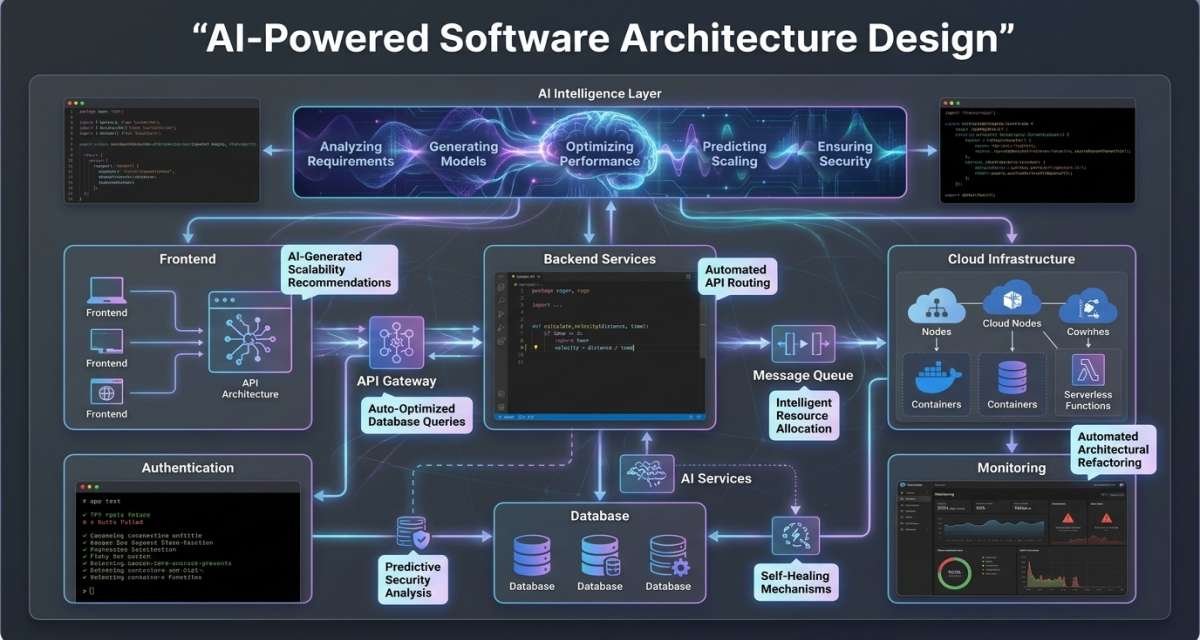
AI can help software teams turn rough requirements into architecture options, compare trade-offs, draft decision records, create diagram outlines, and identify design risks with the right AI tools for software developers.
But architecture still depends on human judgment. Business goals, engineering skills, security requirements, cost limits, performance expectations, existing systems, and future product changes all influence whether a design is appropriate.
AI-powered software architecture design works best when AI acts as a design partner rather than the final decision-maker. The goal is to use it to ask better questions, explore alternatives, document reasoning, and challenge assumptions before engineers commit to a design.
This guide explains where AI adds value, where human review remains essential, and how teams can introduce it without adding unnecessary architectural complexity.
Table of Contents
What AI Can and Cannot Do in Architecture
AI is useful for architecture work because much of the early process involves organizing information, comparing alternatives, identifying missing questions, and documenting decisions.
Teams can use AI to:
- Turn product requirements into architecture questions
- Identify missing non-functional requirements
- Suggest possible architecture styles
- Compare design trade-offs
- Draft architecture decision records
- Produce first-draft diagram descriptions
- Review designs for security or operational risks
- Summarize existing systems from documentation
- Identify assumptions that have not been documented
- Generate questions for architecture reviews
These tasks can reduce research and documentation effort. They can also help teams examine more than one design before committing to implementation.
What AI cannot do reliably is determine which architecture is unquestionably correct.
Two technically valid architectures may have very different consequences for a five-person startup and a large engineering organization. A design that improves independent scaling may also increase deployment, monitoring, networking, and debugging complexity.
AI does not own those consequences. The engineering team does.
The practical rule is simple: use AI to generate and challenge architectural reasoning, but keep approval and ownership with architects, technical leads, and engineers.
Start With Requirements, Constraints, and Boundaries
Architecture quality depends heavily on the quality of the input.
A request such as “design a SaaS platform” leaves too many questions unanswered. AI has to fill the gaps with assumptions, which can produce a polished but unsuitable design.This is why understanding AI-driven SaaS development structure is important when using AI to plan and design software systems.
Before requesting architecture suggestions, describe what the system needs to do and the conditions under which it must operate.
Functional requirements
Functional requirements define the capabilities users and other systems need.
Examples include:
- Users can create accounts
- Teams can invite members
- Administrators can manage billing
- Customers can export reports
- The system sends notifications
- The application synchronizes with a CRM
AI can help translate these capabilities into questions about components, service boundaries, APIs, data entities, and workflows.
The objective is not to generate services for every feature. It is to understand which responsibilities belong together and which should remain separate.
Quality requirements
Quality requirements describe how the system must behave.
They may include:
- Response time
- Availability
- Scalability
- Security
- Auditability
- Data retention
- Disaster recovery
- Observability
- Maintainability
These requirements can change the architecture more significantly than the feature list.
A reporting feature for a small internal team may work well inside an existing application. The same feature serving thousands of customers with strict authorization requirements may need different data access, caching, monitoring, and scaling decisions.
Ask AI to connect each proposed architecture choice to the quality requirement it is intended to support.
Technical and business constraints
Architecture exists inside constraints.
Typical constraints include:
- Small engineering team
- Existing PostgreSQL database
- Required cloud provider
- Fixed launch date
- Limited infrastructure budget
- Existing monolithic application
- Compliance obligations
- Limited DevOps maturity
These details prevent AI from recommending technically attractive designs that the organization cannot reasonably operate.
A useful prompt structure is:
“Given these requirements and constraints, suggest three architecture options. For each, explain the benefits, trade-offs, operational requirements, risks, and conditions that would make it a poor fit.”
This turns the AI response into material for comparison rather than an automatic architecture decision.
Use AI to Explore Architecture Options
One of AI’s most useful roles is expanding the option space.
Teams often settle on familiar patterns early. AI can quickly suggest alternatives and force the team to explain why one option fits better than another.
Compare architecture styles
Depending on the system, useful options may include:
- Monolith
- Modular monolith
- Microservices
- Serverless functions
- Event-driven architecture
- Layered architecture
- Hexagonal architecture
The right choice depends on context.
For a new product with a small team and changing domain boundaries, a modular monolith may reduce operational overhead while preserving clean internal modules.
A system with clear service ownership, different scaling requirements, and multiple engineering teams may have stronger reasons to separate some capabilities into independent services.
The value of AI is not that it can name these patterns. The value comes from asking it to compare them against the same requirements and constraints.
Decide when microservices make sense
The AI microservices architecture concept becomes relevant when different parts of an AI workflow genuinely need different ownership, deployment, security, or scaling characteristics.
For example, an AI application might eventually separate:
- Document retrieval
- Model inference
- Access control
- Prompt or context preparation
- Safety checks
- Monitoring and evaluation
Model inference may have different resource and latency requirements from retrieval. Security-sensitive data access may need stricter controls than other components. Different teams may also need to release certain capabilities independently.
Those are valid reasons to consider service separation.
They are not reasons to automatically build a large distributed system.
Microservices introduce additional network communication, monitoring requirements, deployment processes, failure points, data-consistency challenges, and debugging work.
For a small product or early-stage application, keeping these responsibilities as well-defined modules inside one deployable application may be simpler.
AI can help with this decision by asking:
- Which components need independent scaling?
- Which change at different speeds?
- Which have distinct security boundaries?
- Which require separate ownership?
- Which failures need to remain isolated?
- Can the team operate a distributed system reliably?
Split a component because the separation solves a real problem, not because microservices sound more advanced.
Surface trade-offs and hidden assumptions
Every architecture has costs.
Ask AI to review each design from multiple perspectives rather than simply listing advantages.
Useful questions include:
- Does this architecture slow delivery?
- Does it make testing harder?
- Where can partial failures occur?
- Does it introduce unnecessary data duplication?
- What new operational skills are required?
- How does it affect deployment?
- What happens if traffic grows?
- What happens if traffic does not grow?
- Does it make authorization easier or harder?
- What assumptions does the design depend on?
Hidden assumptions deserve particular attention.
An architecture may quietly assume that traffic is predictable, one region is enough, permissions are simple, the database can remain centralized, or real-time processing is unnecessary.
AI can help expose those assumptions so the team can either validate them or redesign around them.
A useful review request is:
“List every assumption this architecture depends on. Classify each assumption as product, technical, security, team, cost, data, or scaling related.”
The output becomes a checklist for human review.
Turn Architecture Decisions Into ADRs and Diagrams
Architecture is not complete when a team agrees on a design. The reasoning also needs to be understandable later.
AI is particularly useful for turning discussions into structured documentation.
Draft architecture decision records
Architecture decision records, or ADRs, capture why an important design choice was made.
A practical ADR can include:
- Title
- Status
- Context
- Decision
- Options considered
- Consequences
- Risks
- Open questions
- Review date
AI can draft an ADR from meeting notes, tickets, diagrams, or technical discussions.
The important constraint is that it should not invent missing rationale.
A useful instruction is:
“Create a draft ADR from these notes. Include the decision, alternatives, trade-offs, consequences, risks, and unresolved questions. Do not invent information. Mark uncertain points clearly.”
The result should still be reviewed by the people responsible for the architecture.
AI becomes more useful when it has access to approved examples of the team’s existing ADRs and architectural conventions. That gives it clearer context about terminology, decision style, and documentation expectations.
Create architecture diagrams safely
AI can also create draft representations for:
- System context diagrams
- Container diagrams
- Component diagrams
- Sequence diagrams
- Deployment diagrams
- Data-flow diagrams
- Event-flow diagrams
Text-based formats are particularly useful because teams can review and modify them before rendering a diagram.
But a clean-looking diagram can still contain a wrong architecture.
AI may omit a component, invent a data flow, overlook an authorization boundary, or misunderstand which system owns specific data.
A practical workflow is:
- Provide the known requirements and system boundaries.
- Ask AI for a text-based diagram draft.
- Review every actor, service, database, integration, and data flow.
- Identify missing or incorrect elements.
- Revise the diagram.
- Store the approved version with the architecture documentation.
Treat the diagram as a visualization of reviewed architecture, not evidence that the architecture is correct.
Review AI-Suggested Architecture
An AI-generated architecture proposal should face the same scrutiny as a proposal written by a person.
The review should determine not only whether the system could work, but whether the organization can build, operate, secure, and evolve it.
Product and team fit
Start with context.
Ask:
- Does the architecture solve the actual product problem?
- Is it more complex than the current product needs?
- Can the team build and operate it?
- Does it fit the available budget?
- Does it fit the delivery timeline?
- Can it accommodate expected product changes?
Architecture complexity has an organizational cost. A system can be technically sophisticated and still be the wrong choice for the team responsible for it.
Technical and operational review
Next, examine how the proposed design behaves in production.
Check:
- Are boundaries and responsibilities clear?
- Is data ownership understandable?
- What happens when one dependency fails?
- How will the system be tested?
- How will it be deployed?
- How will releases be rolled back?
- Which metrics should be monitored?
- Which alerts are required?
- What is the recovery process?
- Who owns each component?
This matters even more when a design uses multiple services.
Independent services may provide deployment and scaling flexibility, but the team then needs reliable monitoring, tracing, failure handling, versioning, and incident-response practices.
A design that ignores operations is incomplete.
Security review
Architecture prompts often contain sensitive information, so security needs attention both during AI use and during architecture review.
Check:
- Where is sensitive data stored?
- Which component can access it?
- How is access controlled?
- Are secrets kept outside prompts and source code?
- Can one service access more data than it requires?
- Are logs safe?
- Are third-party integrations controlled?
- Are audit requirements covered?
- Can generated outputs trigger sensitive actions?
- Are AI-related changes traceable?
Do not assume a generated security control is correct because it sounds technically plausible. Review it against the organization’s real policies and threat model.
Manage Security, Privacy, and Governance
Software architecture can expose some of the most sensitive information about a product.
Prompts may contain:
- Internal APIs
- Database names
- Authentication flows
- Infrastructure details
- Security controls
- Customer-data flows
- Incident information
- Cloud configuration
- Internal architecture diagrams
Do not submit restricted information to an AI system unless the organization has approved that system for the relevant data.
A safer architecture workflow includes:
- Approved AI tools
- Redacted diagrams and logs
- No API keys, passwords, or secrets in prompts
- Access-controlled architecture repositories
- Human approval for architectural decisions
- Security review for sensitive designs
- Clear ownership of final decisions
- Records of significant AI-assisted decisions
For teams with internal architecture standards, approved documentation can also be used as controlled context for AI-assisted work rather than relying on generic answers.
This can help the model work from organization-specific patterns, constraints, and terminology.
Governance should focus on accountability. AI may assist with the analysis, but someone must remain responsible for approving the design and its consequences.
Adopt AI in Architecture Work Gradually
Teams do not need to begin by asking AI to design an entire production system.
A staged approach makes it easier to learn where the technology actually helps.
Phase 1: Understand
Start with explanation and analysis.
Ask AI to:
- Explain an existing architecture document
- Summarize a system diagram
- Describe a data flow
- Identify unclear sections
- Convert meeting notes into architecture questions
These are relatively low-risk tasks because AI is helping the team understand existing material rather than making major decisions.
Phase 2: Explore
Next, use AI to compare possibilities.
Ask it to:
- Compare a monolith with a modular monolith
- Compare service-boundary options
- Identify data-ownership risks
- Suggest possible event flows
- List scaling assumptions
- Challenge a proposed API structure
Require alternatives rather than asking for one “best” answer.
Phase 3: Document
Once the team has made decisions, use AI to reduce documentation work.
It can help:
- Draft ADRs
- Create diagram outlines
- Summarize rejected alternatives
- Prepare review notes
- Organize unresolved questions
Documentation is one of the areas where AI can save time without transferring decision authority.
Phase 4: Review
After a design exists, use AI as a critic.
Ask it to look for:
- Missing security controls
- Operational weaknesses
- Unclear ownership
- Missing quality requirements
- Failure scenarios
- Monitoring gaps
- Untested assumptions
This can be more useful than asking AI to generate the architecture from scratch because the model has a specific proposal to challenge.
Common Mistakes to Avoid
Asking for architecture without enough context
Generic inputs create generic designs.
Include users, scale, data requirements, current technology, team size, budget, compliance needs, integrations, and delivery constraints.
Accepting the first design
Architecture involves trade-offs. Ask for alternatives and compare them before making a decision.
Treating AI output as authoritative
AI can make incorrect assumptions or overlook domain-specific constraints.
Use generated material as a draft for review.
Introducing distributed complexity too early
Microservices, queues, event buses, separate databases, and multiple deployment pipelines all create operational costs.
Use them when they solve a demonstrated problem.
Ignoring production operations
Architecture needs deployment, observability, failure recovery, rollback, ownership, and incident handling.
A diagram without these considerations does not describe the complete operating system.
Mixing business, prompt, and model logic carelessly
In AI-enabled systems, prompt behavior, model access, retrieval, and business rules may evolve differently.
Keep responsibilities clear even if they initially remain inside one deployable application.
Sending sensitive architecture data without controls
Do not expose secrets, private customer information, sensitive logs, or restricted architecture details through unapproved AI tools for developers.
Failing to document architectural reasoning
The architecture may survive longer than the people who made the original decision.
Use ADRs and other design records to preserve the reasoning, alternatives, consequences, and assumptions behind important choices.
Conclusion
AI can make architecture work faster without making architecture automatic.
Its strongest uses are turning requirements into better questions, comparing design options, exposing assumptions, drafting ADRs and diagrams, and reviewing proposed systems for technical, operational, and security risks.
Start with clearly defined requirements and constraints. Ask for alternatives rather than final answers. Keep the architecture as simple as the product and team allow, and introduce separate services only when independent scaling, ownership, deployment, or security requirements justify the additional complexity.
Most importantly, keep the decision human-owned.
AI can improve the quality and speed of architectural reasoning. Architects and engineering teams remain responsible for deciding what should be built and for operating the system that follows.
FAQ
Can AI design software architecture?
AI can suggest architecture options, identify requirements, compare trade-offs, draft diagrams, and document decisions. Engineers should still review and approve the final architecture against real product, security, cost, and operational constraints.
How is AI used in software architecture?
Teams can use AI to analyze requirements, compare architecture patterns, identify hidden assumptions, draft ADRs, create diagram outlines, summarize existing systems, and review proposed designs for risks.
Can AI create software architecture diagrams?
Yes. AI can produce first drafts of context, component, sequence, deployment, data-flow, and similar diagrams. Engineers should verify every component, relationship, access boundary, and data flow before treating the diagram as authoritative.
Should an AI application use microservices?
Not automatically. Microservices are useful when components need separate scaling, ownership, deployment, or security boundaries. A modular monolith may be easier for smaller teams, simple applications, and early-stage products.
What information should I give AI before asking for an architecture?
Provide functional requirements, quality requirements, expected users and scale, data constraints, integrations, security needs, existing technology, team size, budget, and delivery constraints.
Is it safe to share architecture information with AI?
Only share information that your organization permits the AI system to process. Avoid exposing secrets, restricted diagrams, credentials, customer information, or sensitive security details through unapproved tools.
Can AI replace software architects?
AI can reduce research, analysis, and documentation work, but architecture still requires judgment, stakeholder alignment, accountability, and long-term system ownership. Those responsibilities remain with people.




Leave a Reply