
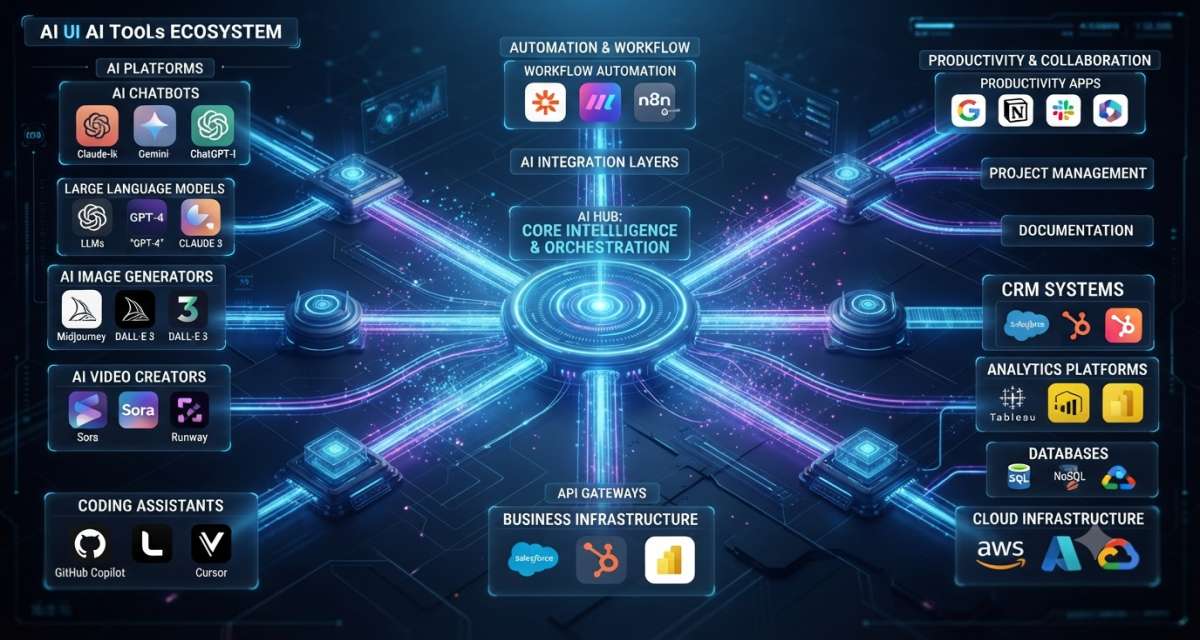
Most teams do not struggle because they lack AI tools. They struggle because every tool looks useful, but the pieces do not clearly fit together.
One team may use ChatGPT for writing, GitHub Copilot for coding, a vector database for retrieval, an automation tool for workflows, a chatbot for support, and a reporting assistant for analytics. Each tool may help on its own. The problem starts when nobody knows which tool owns which job, where data goes, who can access it, and how quality is checked.
That is why the structure of the AI tools ecosystem matters. It gives teams a way to organize tools by role, risk, and workflow, rather than chasing every new product.
Table of Contents
1.The Simple Way to Understand the AI Tool Ecosystem
An AI tools ecosystem is the connected set of tools, platforms, models, data systems, workflows, and controls that help people build, use, monitor, and govern AI.
A simple AI tool may only help one user write text. A full ecosystem may include model providers, data pipelines, vector databases, orchestration frameworks, AI agents, business apps, monitoring tools, security controls, and governance policies.
IBM describes the AI stack as technologies, frameworks, and infrastructure components that support the end-to-end AI lifecycle. MongoDB also frames the AI stack as a set of components, including model providers, LLM frameworks, vector databases, monitoring tools, and deployment solutions.
For a business, this means AI tools should not be evaluated solely on features. They should be reviewed based on their position in the workflow.
A writing assistant, a model API, a vector database, and an observability tool do very different jobs. Comparing them as “AI tools” without structure creates confusion.
2.The Seven Layers That Make AI Tools Work Together
A clear AI ecosystem usually has seven layers. A small team may use only two or three. A larger company may need all seven.
Infrastructure layer
The infrastructure layer provides compute, storage, networking, and deployment support. It includes cloud platforms, GPUs, containers, serverless functions, APIs, and deployment systems.
This layer matters most for teams building AI products, internal copilots, agent systems, or data-heavy applications. Deloitte notes that AI infrastructure now includes a knowledge layer with vector databases, graph databases, knowledge graphs, context-aware chatbots, and data pipelines.
For a non-technical team, infrastructure may be hidden inside SaaS tools. For developers, it becomes a design decision.
Model layer
The model layer contains the systems that generate, classify, reason, summarize, translate, search, or predict.
This includes:
- Large language models
- Image generation models
- Speech models
- Embedding models
- Classification models
- Open-source models
- Proprietary model APIs
The model is the reasoning or generation engine. It is not the full product. A model needs data access, prompts, workflow rules, testing, monitoring, and a user experience.
A team choosing a model should ask:
- What task must the model perform?
- Does it need text, image, voice, code, or multimodal input?
- How private is the data?
- What latency is acceptable?
- What cost is acceptable?
- Can the output be checked?
Data and knowledge layer
The data layer gives AI tools the context they need. Without it, the model can only respond from its general training and the user’s prompt.
This layer may include:
- Company documents
- Product databases
- Customer records
- Knowledge bases
- Embeddings
- Vector databases
- Search indexes
- Data warehouses
- Knowledge graphs
- Retrieval-augmented generation pipelines
This layer is where many AI projects succeed or fail. A chatbot connected to poor documentation gives poor answers. A sales assistant connected to outdated CRM data creates wrong summaries. A coding assistant with a limited repository context may miss the real issue.
For teams building RAG systems, the data layer should include document cleaning, chunking, permission checks, retrieval testing, and source citation.
Orchestration layer
The orchestration layer connects models, prompts, tools, APIs, memory, workflows, and decisions.
This is where AI moves from “answer this question” to “complete this task.”
Examples include:
- Prompt templates
- Workflow builders
- Agent frameworks
- Tool calling
- Function calling
- API connectors
- Routing between models
- Human approval steps
- Memory and session handling
Agent frameworks and orchestration tools are growing in popularity because AI workflows now require multiple prompts. A support agent may search docs, check an account, draft a reply, and ask for human approval before sending it.
Research on agentic software ecosystems argues that AI agents, the tools and APIs they use, and the runtime environments they operate in must develop together for agent-based software work to scale.
Application layer
The application layer is what users see.
This includes:
- Chatbots
- Writing assistants
- Coding copilots
- CRM assistants
- Analytics copilots
- Design tools
- Meeting assistants
- Customer support tools
- AI search tools
- Internal knowledge assistants
Many buyers only see this layer. That is why the market feels crowded. Hundreds of tools may use similar models underneath but differ in user experience, data access, workflow fit, and governance.
A business should ask whether an AI app solves a real workflow problem or only adds another interface.
Evaluation and monitoring layer
AI output needs checking. The evaluation and monitoring layer helps teams measure quality, cost, safety, and reliability.
This layer may include:
- Prompt tests
- Output scoring
- Human review
- A/B tests
- Regression tests
- Hallucination checks
- Response logging
- Cost monitoring
- Latency tracking
- User feedback
- Model drift checks
Traditional software monitoring checks uptime, errors, and performance. AI monitoring also needs to check answer quality, source use, policy violations, and unexpected tool actions.
For example, a customer support chatbot may be online, fast, and still wrong. Normal uptime monitoring would miss that. AI evaluation should check whether the answer is accurate, allowed, sourced, and useful.
Governance and security layer
The governance layer defines what AI tools are allowed to do, what data they can access, and how risk is controlled.
NIST’s AI Risk Management Framework was created to help organizations manage risks to individuals, organizations, and society linked to AI systems. OWASP’s GenAI Security Project lists major risks for LLM and generative AI applications, including prompt injection, sensitive information disclosure, supply chain risks, and excessive agency.
This layer includes:
- Approved tool lists
- Data access rules
- Role-based permissions
- Prompt and output logging
- Human approval rules
- Vendor review
- Security testing
- Legal review
- Model usage policy
- Incident response
Governance should not be added after the tool is already inside every team. It should be part of the tool selection process.
3. How AI Tool Categories Connect in Real Workflows
A clear ecosystem becomes easier to understand when you map tools to workflows.
Take an internal knowledge assistant.
The workflow may look like this:
- A user asks a question
- The app checks the user’s permissions
- The retrieval system searches approved documents
- The model receives the question and retrieves the context
- The response is generated
- The answer includes sources
- The system logs the interaction
- Risk rules check the output
- User feedback improves future testing
This one workflow may use tools from six layers: application, identity, data, retrieval, model, orchestration, monitoring, and governance.
A coding assistant workflow looks different:
- The developer opens a repository
- The assistant reads selected files
- The model explains the code or drafts a change
- Tests run in the development environment
- Pull request review checks the change
- Security scanning reviews dependencies and patterns
- CI/CD validates the output before merging
The lesson is simple: AI tools should be evaluated within the workflow in which they will operate.
4. The Difference Between AI Apps, AI Platforms, and AI Infrastructure
These three terms are often mixed up.
AI apps
AI apps are user-facing tools. They help with writing, coding, design, research, support, sales, analysis, or productivity.
Examples include chat interfaces, AI writing tools, meeting summarizers, image generators, and customer support assistants.
They are usually easiest to adopt because users can start quickly. They also create risk if employees paste private data into unapproved tools.
AI platforms
AI platforms help teams build, connect, manage, or deploy AI systems.
They may include model access, prompt management, evaluation, workflow design, connectors, deployment, and monitoring.
A platform is useful when a company wants repeatable AI workflows instead of scattered individual tools.
AI infrastructure
AI infrastructure is the technical base. It includes compute, storage, databases, APIs, model hosting, networking, security, and deployment systems.
Infrastructure matters more when AI becomes part of a product or internal system. It affects cost, speed, reliability, privacy, and scale.
A small company may start with AI apps. A software company may need platforms and infrastructure earlier.
5. Where AI Agents Fit Into the Ecosystem
AI agents are systems that can plan steps, use tools, call APIs, retrieve data, and act across workflows. They sit between the model, orchestration, and application layers.
An agent may:
- Read an email
- Search a knowledge base
- Open a support ticket
- Update a CRM field
- Draft a response
- Ask for human approval
- Trigger a workflow
This makes agents useful, but also riskier than simple chatbots. A chatbot gives an answer. An agent may take action.
That is why agent systems need permission limits, tool registries, approval gates, logging, and rollback plans. OWASP’s LLM risk guidance includes excessive agency as a key risk area for systems that can act through tools and integrations.
A safe agent design asks:
- What tools can the agent use?
- What data can it read?
- What actions can it take?
- Which actions need approval?
- What logs are saved?
- How can a bad action be reversed?
- Who owns the workflow?
Agents should be added only where the workflow is clear enough to control.
6. How to Choose Tools Without Creating Tool Sprawl
Tool sprawl happens when every team adopts separate AI tools without a shared structure. It leads to duplicate costs, security gaps, inconsistent quality, and unclear ownership.
Use this decision process before adding a new tool.
Step 1: Name the workflow
Do not start with the tool. Start with the job.
Examples:
- Draft product documentation
- Summarize sales calls
- Generate SQL drafts
- Review pull requests
- Answer HR policy questions
- Triage support tickets
If the workflow is unclear, the tool will be hard to evaluate.
Step 2: Identify the layer
Ask where the tool sits:
- User-facing app
- Model provider
- Data connector
- Orchestration tool
- Monitoring tool
- Security tool
- Governance tool
This prevents teams from buying several tools that address the same layer while ignoring others.
Step 3: Check data access
Ask what data the tool needs and what it stores.
Review:
- Customer data
- Employee data
- Source code
- Financial data
- Credentials
- Legal documents
- Product plans
- Support tickets
High-risk data needs stronger review.
Step 4: Test output quality
Do not judge a tool by a demo. Test it on real use cases with safe sample data.
Check:
- Accuracy
- Source use
- Error handling
- Bias risk
- Cost
- Speed
- User effort
- Review needs
Step 5: Assign ownership
Every AI tool needs an owner.
The owner should know:
- Who uses it
- What data does it touch
- What it costs
- What risks does it create
- How success is measured
- When it should be removed
A tool without ownership becomes an unmanaged risk.
7. Risks Hidden Inside the AI Tool Ecosystem
The AI ecosystem creates new risks because tools connect to data, people, workflows, and external systems.
The main risks include:
- Sensitive data exposure
- Weak vendor review
- Duplicate tools with unclear ownership
- Poor output testing
- Hidden model costs
- Prompt injection
- Unsafe agent actions
- Insecure plugins or connectors
- Poor logging
- User overreliance
- Tool lock-in
NIST’s framework focuses on AI risk management across organizations and society, while OWASP’s LLM guidance gives security teams a more application-level view of generative AI risks.
A practical rule:
The more an AI tool can access or change, the stronger its controls should be.
A grammar assistant has a lower risk than an agent that can refund orders, delete records, or change production settings.
8. A Practical Framework for Mapping Your AI Stack
A team can map its AI ecosystem with a simple table. The goal is to see what exists, what overlaps, and what is missing.
Use these questions.
1. What business workflows use AI?
List each workflow, not each tool.
Examples:
- Marketing content creation
- Customer support replies
- Developer coding support
- Internal policy search
- Sales call notes
- Data analysis
- Product research
2. Which tools support each workflow?
Name the exact tools. Include browser extensions, team apps, internal systems, and APIs.
3. What data does each tool touch?
Mark data sensitivity:
- Public
- Internal
- Confidential
- Regulated
- Customer-owned
- Source code
- Credentials or secrets
4. Which ecosystem layer does each tool belong to?
Use the seven layers:
- Infrastructure
- Model
- Data and knowledge
- Orchestration
- Application
- Evaluation and monitoring
- Governance and security
5. Who owns the tool?
Add the business owner, technical owner, and security reviewer where needed.
6. How is quality checked?
Check whether the output is reviewed by:
- The user
- A manager
- QA
- Legal
- Security
- Automated tests
- Customer feedback
7. Should the tool stay, merge, or be removed?
After mapping, many teams find duplicate tools. Some can stay. Some should be merged. Some should be removed because they create risk without clear value.
Common Mistakes to Avoid
Mistake 1: Treating all AI tools as the same
A chatbot, a model API, a vector database, a workflow agent, and a governance platform are distinct. Each needs a different review process.
Mistake 2: Buying apps before defining workflows
A tool may look useful, but fail because no one has defined the work it should improve.
Mistake 3: Ignoring the data layer
AI output depends on context. Poor documents, messy databases, and weak permissions lead to weak AI results.
Mistake 4: Skipping evaluation
AI tools can sound confident even when they’re wrong. Teams need testing, review, feedback, and monitoring.
Mistake 5: Giving agents too much power too early
Agents should start with read-only or draft-only tasks. Add action rights only after approval rules and logs are ready.
Mistake 6: Letting every team choose tools alone
Local choice can help teams move quickly, but company-wide AI use needs shared security, procurement, data, and governance rules.
FAQ
What is an AI tools ecosystem?
An AI tools ecosystem is the connected group of apps, models, data systems, infrastructure, workflows, monitoring tools, and governance controls that help people use or build AI. It includes user-facing tools and the technical systems behind them.
What are the main layers of the AI ecosystem?
The main layers are infrastructure, models, data and knowledge, orchestration, applications, evaluation and monitoring, and governance and security. Small teams may use only a few layers, while larger teams often need all of them.
How do AI tools work together?
AI tools work together by passing data, context, prompts, model outputs, actions, and feedback across a workflow. For example, a support chatbot may use a knowledge base, retrieval system, language model, policy rules, logging, and human review.
What is the difference between an AI app and an AI platform?
An AI app is usually a user-facing tool for a specific task, such as writing, coding, design, or support. An AI platform helps teams build, connect, deploy, monitor, or govern AI workflows across many use cases.
Where do AI agents fit in the ecosystem?
AI agents sit at the intersection of models, orchestration, applications, and workflow automation. They can use tools, retrieve data, call APIs, and take actions. Because they can act, they need stronger permissions, approval gates, and logs.
How should a business organize AI tools?
Start by mapping workflows, then list tools by layer, data access, owner, quality checks, and risk level. This helps teams reduce duplicate tools, improve security, and choose tools based on real use cases.
What is the biggest risk in the AI tool ecosystem?
The biggest risk is uncontrolled adoption. When teams add tools without shared rules, companies may expose sensitive data, pay for duplicate tools, accept poor-quality outputs, or grant AI systems excessive access.
Conclusion
The AI tools ecosystem is easier to manage when teams stop looking at tools as a single category. A model, chatbot, vector database, agent framework, and monitoring tool all serve different jobs.
A better next step is to map your AI stack by workflow and layer. Start with the tools your team already uses. Identify what data each tool touches, who owns it, how output is checked, and whether it should stay.
After that, create separate content or buying guides for specific needs, such as AI productivity tools, AI agent platforms, RAG tools, or LLM security tools. This guide should remain the educational base that explains how the ecosystem fits together.




Leave a Reply