
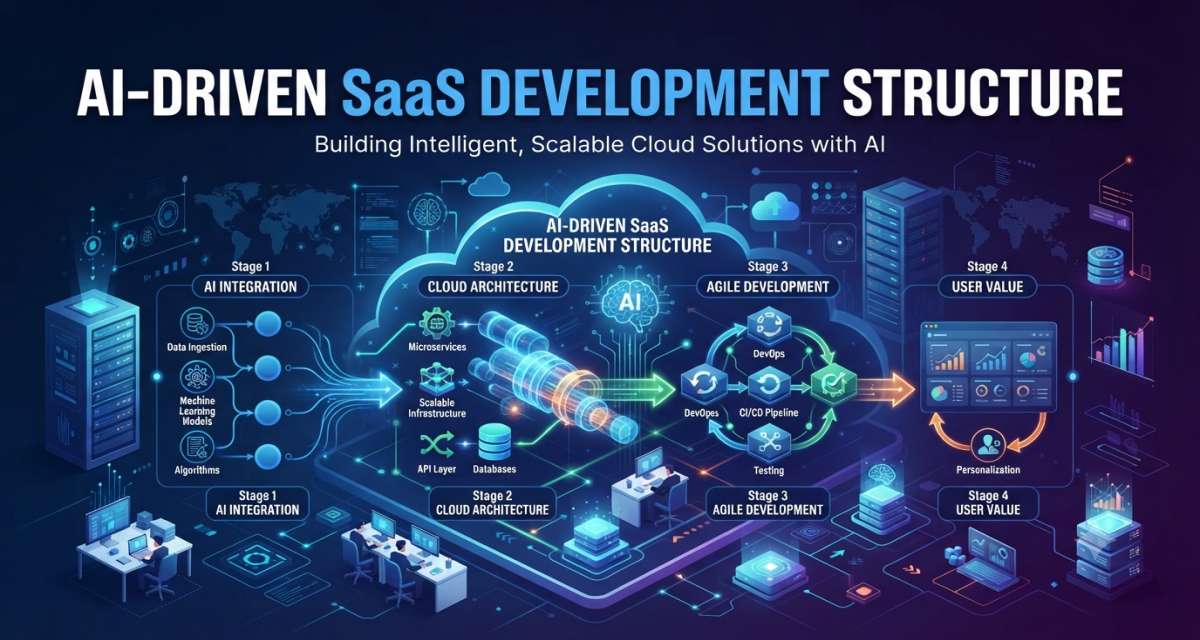
A normal SaaS product usually starts with users, features, database design, authentication, billing, and deployment. An AI SaaS product needs all of that, but it also needs model behavior, data quality, prompt control, evaluation, security rules, and human review.
That is why an AI-driven SaaS development approach should not be limited to “add ChatGPT to an app.” It means building a SaaS product where AI has a clear role, clear limits, and a clear path from user input to safe output.
For founders, this structure helps avoid building random AI tools features. For developers, it creates a cleaner system. For managers, it provides a better way to review costs, risks, and product quality before launch.
Start with the product job, not the AI feature
The first question is not “Which model should we use?” The first question is “What job should the product help the user finish?”
AI SaaS products fail when the team starts with the model and then searches for a use case. A better path starts with the user problem.
For example:
- A support SaaS may use AI to classify tickets and draft replies.
- A finance SaaS may use AI to summarize invoices and detect unusual entries.
- A marketing SaaS may use AI to create campaign briefs from customer data.
- A developer SaaS may use AI to explain errors, suggest tests, or review code.
The AI feature should fit inside the product workflow. It should not sit on the side as a novelty.
A useful planning question is:
Would the product still solve the user’s main problem if the AI feature were removed?
If the answer is yes, AI may be an enhancement. If the answer is no, AI is part of the core product structure. That difference affects architecture, testing, cost, and risk.
The seven layers of an AI SaaS structure
A practical AI SaaS product can be planned in seven layers. These layers help teams separate user experience, SaaS logic, AI behavior, data, integrations, security, and improvement.
1. User experience layer
This is what the customer sees.
It includes:
- Dashboard
- Chat interface
- Forms
- Reports
- Generated content
- Review screens
- Approval buttons
- Notifications
The key design question is simple: How does the user control the AI output?
Do not hide every decision inside the model. Give users clear actions such as edit, approve, reject, regenerate, save, export, or escalate.
For example, an AI proposal-writing SaaS should not only generate a proposal. It should let the user adjust tone, add company details, review claims, and approve the final version.
2. SaaS application layer
This is the normal SaaS product layer.
It handles:
- User accounts
- Team workspaces
- Permissions
- Billing
- Subscription plans
- Admin settings
- Activity history
- Tenant management
Azure’s SaaS architecture guidance explains that SaaS is a business model, while multitenancy is an architecture concept. Many SaaS products use multitenancy, but teams still need to design how users, teams, data, and resources are separated.
For AI products, this layer becomes more sensitive because model calls may use customer data. Tenant boundaries must be respected across the app, retrieval system, logs, analytics, and AI context.
3. AI capability layer
This layer contains the AI functions.
It may include:
- Text generation
- Classification
- Summarization
- Search assistance
- Code explanation
- Document analysis
- Recommendation logic
- Agent workflows
This is where the team decides which tasks need an LLM, which need rules, and which need a normal machine learning model.
Not every smart feature needs a large language model. A rule-based system may be better for fixed business logic. A smaller model may be enough for classification. A stronger model may be needed for complex reasoning or long-form content.
4. Data and retrieval layer
AI output depends heavily on context. If the model receives weak, outdated, or wrong data, the result will suffer.
This layer may include:
- Product database
- Customer files
- Knowledge base
- Vector database
- Search index
- Embeddings
- Data cleaning process
- Retrieval rules
- Access filters
RAG, or retrieval-augmented generation, combines language models with external knowledge sources so the system can use relevant information during generation. Google Cloud describes RAG as a method that connects LLMs with external knowledge bases to improve outputs.
For SaaS products, retrieval needs tenant-aware filtering. A user from Company A should never receive context from Company B.
5. Integration layer
Most SaaS products connect to other tools. AI SaaS products often require additional integrations because AI features are most useful when they can read or act on business data.
Common integrations include:
- CRM
- Help desk
- Calendar
- Payment tools
- Analytics tools
- Cloud storage
- Code repositories
- Internal APIs
This layer should define what the AI can read and what it can change.
A safe rule: start with read-only access. Add write actions only after logging, permission checks, and human approval are ready.
6. Security and governance layer
AI adds new risks. The product may handle prompts, files, customer records, generated text, model outputs, and tool calls. That makes security planning part of the product structure, not a late fix.
NIST’s AI Risk Management Framework helps organizations manage AI risks to individuals, organizations, and society. OWASP also lists LLM application risks such as prompt injection and insecure output handling.
This layer should include:
- Role-based access control
- Tenant isolation
- Prompt injection protection
- Output validation
- Audit logs
- Data retention rules
- Human approval for sensitive actions
- Secure secret handling
- Vendor review
- Model usage policy
Developers should never paste private credentials, API keys, customer records, or proprietary code into AI tools without approval.
7. Monitoring and improvement layer
AI SaaS products need monitoring beyond uptime.
Track:
- Model cost
- Token usage
- Latency
- Error rate
- User edits
- Regeneration rate
- Human rejection rate
- Hallucination reports
- Retrieval failures
- Security events
- Customer feedback
Google Cloud’s agentic architecture guidance says that designing agentic AI architecture is iterative, which aligns with real AI SaaS development, where model behavior and user needs often change after testing.
Monitoring helps the team improve prompts, retrieval, workflows, and product design with real usage data.
How the development workflow changes with AI
AI changes the SaaS development process because its output is less predictable than that of normal code.
A standard SaaS feature may be tested with fixed inputs and expected outputs. An AI feature may produce different wording each time, even if the answer is acceptable.
That changes the workflow.
A practical AI SaaS development flow looks like this:
- Define the user task.
- Decide where AI fits.
- Map required data sources.
- Design permissions.
- Create a first prompt or model workflow.
- Test with real sample cases.
- Add guardrails and fallback paths.
- Build the interface.
- Add logging and review tools.
- Run security checks.
- Launch to a small user group.
- Monitor quality and cost.
- Improve based on usage.
The biggest shift is that development does not end when the feature ships. AI behavior needs review after launch.
A prompt update, model change, retrieval change, or new customer data type can affect output quality. That means product, engineering, and support teams need a shared feedback loop.
A practical structure for an AI SaaS team
A small startup does not need a huge team, but it does need clear ownership. AI SaaS development fails when everyone assumes someone else is checking quality, privacy, or model behavior.
A lean team structure may include:
Product owner
Defines the user problem, workflow, feature scope, and success criteria.
Full-stack developer
Builds the app, API, database, authentication, billing, and user-facing product.
AI engineer or AI-focused developer
Design prompts, model calls, retrieval logic, evaluation cases, and AI workflow behavior.
Data owner
Checks data sources, quality, access rules, and update process.
Security reviewer
Reviews privacy, permissions, sensitive data, logging, and third-party AI usage.
QA tester
Tests normal cases, edge cases, bad inputs, and output quality.
In a very small team, one person may cover several roles. The point is not the job title. The point is accountability.
Someone must own the AI output. Someone must own the data. Someone must own security. Someone must own the user experience.
Example: structuring an AI writing SaaS product
Imagine a SaaS product that helps small businesses create blog briefs and draft content.
A weak structure would look like this:
- User enters a topic.
- AI generates an article.
- User downloads it.
That may work as a demo, but it is weak as a SaaS product.
A stronger structure looks like this:
- User creates a workspace.
- User adds brand details, audience, tone, and service pages.
- System stores the data under that tenant.
- User enters a topic.
- The system asks for the article goal and the target reader.
- AI creates a brief.
- User approves or edits the brief.
- AI drafts sections based on the approved brief.
- System checks for missing sections, weak claims, and repeated wording.
- User reviews the draft.
- Final content is saved with version history.
- Feedback is used to improve future drafts.
This structure gives the user control. It also gives the system better context and safer output.
The AI is not just generating text. It is part of a product workflow.
What to decide before development starts
Before coding starts, the team should answer a few practical questions.
Product decisions
- Who is the target user?
- What task should the AI help with?
- What will the user review?
- What can the AI do without approval?
- What should never be automated?
- What does a successful output look like?
Architecture decisions
- Will the app be single-tenant or multitenant?
- Where will customer data be stored?
- Will the product use RAG?
- Which data needs embeddings?
- Which model will be used first?
- What happens if the model fails?
- What should be logged?
AWS notes that its SaaS Lens focuses on designing, deploying, and architecting multi-tenant SaaS workloads in the AWS Cloud. That kind of cloud architecture review becomes more important when AI features share infrastructure across many customers.
AI behavior decisions
- Which prompts are controlled by the system?
- Can users customize prompts?
- How will prompt versions be tracked?
- What outputs need validation?
- What examples will be used for testing?
- How will the team compare model changes?
Business decisions
- How will AI usage affect pricing?
- Will plans include usage limits?
- Will heavy users create high model costs?
- What support is needed for failed outputs?
- What level of human review is realistic?
These decisions reduce rework later.
Security, privacy, and reliability checks
AI SaaS products need careful review before launch because they often process user text, files, business records, or private knowledge bases.
Use this launch check before releasing an AI feature.
Data safety
- Customer data is separated by tenant.
- Retrieval uses permission filters.
- Sensitive fields are masked where possible.
- Logs do not expose private content unnecessarily.
- Data retention rules are documented.
AI safety
- Prompt injection cases are tested.
- Model output is validated before being used by other systems.
- Unsafe or uncertain output has a fallback path.
- The system does not allow broad autonomous actions.
- High-risk actions require human approval.
OWASP’s LLM security guidance includes risks such as prompt injection, sensitive information disclosure, supply chain issues, data and model poisoning, improper output handling, excessive agency, and unbounded consumption.
Product reliability
- The app handles model downtime.
- Users receive clear error messages.
- Failed AI runs are logged.
- Costs are monitored.
- Quality feedback is reviewed.
- Support can inspect relevant activity history.
Development quality
- Generated code is reviewed by developers.
- Tests cover AI-assisted features.
- Security checks run before deployment.
- Prompt and model changes are versioned.
- Rollback paths are ready.
AI can support development, but it should not remove code review, testing, or security review.
FAQ
What is AI-driven SaaS development?
AI-driven SaaS development means building a SaaS product where AI supports or powers key workflows. It may include text generation, classification, retrieval, recommendations, agents, or automation. The product still needs normal SaaS features such as users, billing, permissions, database design, and support.
How do you structure an AI SaaS product?
Start with the user task. Then design the SaaS app layer, AI capability layer, data and retrieval layer, integration layer, security layer, and monitoring layer. This keeps AI connected to the product workflow rather than being a standalone feature.
What architecture is used for AI SaaS?
Most AI SaaS products use a normal SaaS architecture plus AI services, model APIs, data pipelines, retrieval systems, vector search, logging, and security controls. Many products also need multitenancy, so each customer’s data stays separate.
Does every AI SaaS product need RAG?
No. RAG is useful when the product needs to draw from company documents, customer data, product docs, or a knowledge base. If the AI task is simple classification or rewriting, RAG may not be needed.
What are the biggest risks in AI SaaS development?
The main risks are data leakage, weak tenant isolation, prompt injection, inaccurate outputs, high model cost, poor testing, and unclear human review. These risks should be planned during architecture and product design, not after launch.
How should startups test AI SaaS features?
Startups should test real user cases, edge cases, bad inputs, privacy-sensitive examples, and failure states. They should track output quality, user edits, rejection rates, latency, and cost. Human review is needed for high-risk outputs.
Can AI replace the SaaS development team?
No. AI can help with coding, testing, documentation, content creation, and analysis, but developers still need to design the architecture, review code, secure data, test features, and maintain the product. AI works best as support inside a controlled workflow.
Conclusion
An AI SaaS product needs more than a model connection. It needs a clear structure that joins product planning, SaaS architecture, data access, AI behavior, security, testing, and monitoring.
The safest way to build is to start with one user workflow. Define what AI should do, what humans should review, what data is allowed, and how success will be measured. Then build the smallest working version and improve it through real feedback.
For readers ready to move from strategy to execution, the next useful step is a focused guide on building an AI SaaS MVP or comparing AI development tools for SaaS teams.



Leave a Reply