
Project work breaks down when teams lose clarity.
Tasks get updated late. Meeting notes disappear into chat threads. Managers ask for status updates that already exist somewhere else. Developers lose time explaining blockers. Founders cannot tell which projects are healthy until a deadline is already at risk. Explore the 100 best AI tools for developers.
AI-based project management tools help teams organize, summarize, predict, and automate parts of project work. They can draft updates, turn meeting notes into tasks, detect risks, suggest priorities, and help managers see what needs attention.
They do not remove the need for project judgment. A tool can summarize a delayed sprint. It cannot fully understand customer pressure, team morale, technical debt, budget tradeoffs, or business politics without human review.
The best use of AI in project management is support, not autopilot.
The project work AI is actually helping with
A missing dashboard does not cause most project management problems. They come from messy coordination.
A project manager may have the plan in one tool, team discussion in another, requirements in a document, updates in email, and blockers inside meetings. The problem is not a lack of data. The problem is that the data is scattered and hard to turn into decisions.
AI helps by reading, grouping, summarizing, and connecting work signals.
For example, AI can look across tasks, deadlines, comments, and updates to answer questions such as:
- Which task is blocking the release?
- What has changed since last week?
- Which owner has too much work?
- Which deadline is most likely to slip?
- What should be included in the client update?
- Which meeting notes need follow-up tasks?
This matches the way many modern work platforms are adding AI. Atlassian describes AI project management as support for automating routine tasks, predicting project risks, and improving resource allocation.
The value is not that AI “manages” the project. The value is that teams spend less time searching for project context and more time making decisions.
What AI project management tools do
AI project management software uses language models, automation rules, analytics, and project data to support planning, tracking, reporting, and decision-making.
A normal project tool stores tasks, dates, owners, comments, boards, files, and timelines. An AI-assisted system adds a layer that can interpret that information and suggest next steps.
Common AI-supported functions include:
- Drafting project plans from a goal
- Turning notes into tasks
- Summarizing long project threads
- Creating status updates
- Flagging overdue or blocked work
- Suggesting task owners
- Finding risks in schedules or dependencies
- Answering questions about project progress
- Creating workflow automations
- Helping build dashboards or reports
Microsoft says Copilot in Planner can help generate plans, set goals, track status, and respond to project changes. Asana’s AI features include AI-generated status updates for goals, while monday.com describes AI workflows and workflow blocks for building automated processes.
These examples show the direction of the market. Project tools are moving from static task tracking to active work assistance.
Where AI fits inside a normal project workflow
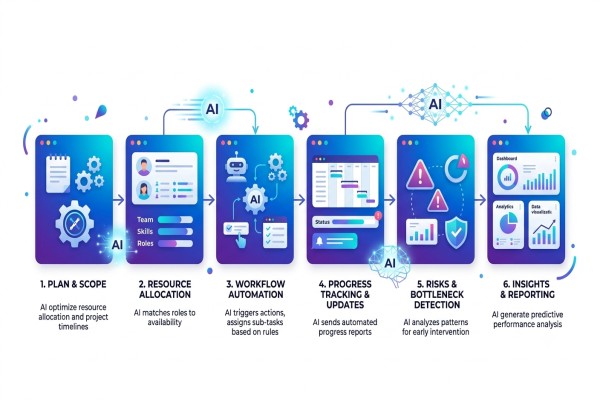
AI works best when it supports specific project moments. A vague instruction like “manage my project” is weak. A clear workflow gives better results.
Planning
At the planning stage, AI can help turn a project goal into a first draft of tasks, milestones, dependencies, and risks.
For example, a SaaS team planning a new billing feature might ask the tool to create a first draft of the plan from the product brief. The AI may suggest workstreams such as API changes, UI updates, payment testing, migration tasks, documentation, QA, and release communication.
That draft is useful, but it still needs review. The engineering lead should check the technical order. The product manager should check the scope. The QA lead should check test coverage. The founder or manager should check the timeline and business priority.
AI can start the plan. The team must own the plan.
Task creation
Meeting notes, Slack threads, emails, and client calls often contain hidden tasks. AI can extract those tasks and suggest owners, due dates, or categories.
A good AI-generated task should include:
- Clear action
- Owner
- Due date or priority
- Linked context
- Acceptance criteria
- Related file, meeting, or discussion
Weak task generation creates clutter. If the AI turns every sentence into a task, the board becomes harder to manage. Teams should approve generated tasks before adding them to active workflows.
Status reporting
Status reporting is one of the easiest places to use AI.
The tool can review task progress, comments, blockers, and due dates, then draft a weekly update. Asana’s documentation shows AI-assisted status updates for goals, reflecting a broader shift toward auto-drafted progress reports on work platforms.
A useful status update should answer four questions:
- What was completed?
- What is in progress?
- What is blocked?
- What needs a decision?
The project manager should edit tone, remove sensitive details, and confirm accuracy before sharing it with clients, executives, or external partners.
Risk review
AI can help identify risks by checking for overdue work, dependency chains, unclear ownership, workload imbalances, recurring blockers, and changes in scope.
PMI’s project management AI resources discuss using AI for risk management, schedules, communication, collaboration, and project data analysis.
AI can help create or update a risk register, but it should not become the only source of risk judgment. Some risks are political, contractual, emotional, or customer-related. They may not appear clearly in task data.
Resource planning
Resource planning is about matching work with capacity.
AI can support this by showing who has too many tasks, which skills are needed, where delivery depends on a single person, and what happens if a deadline shifts.
This is useful for agencies, SaaS teams, product teams, and service businesses. It can reveal hidden pressure before people burn out or deadlines slip.
Still, workload data can be misleading. A person with five small tasks may have less work than a person with one difficult architecture task. A manager should read AI workload suggestions as signals rather than the final truth.
Practical use cases for SaaS, software, and business teams
AI-assisted project tools are useful in different ways depending on the team.
For software teams
Software teams can use AI to support sprint planning, bug triage, release notes, blocker summaries, and dependency tracking.
A developer team might use AI to summarize all open bugs linked to a release. The project manager can then ask which bugs affect paying customers, which block QA, and which can be moved to the next sprint.
The AI helps organize the work. The product and engineering team still decides what matters.
For SaaS founders
Founders often manage product, marketing, sales, support, and operations simultaneously.
AI can help create a weekly founder view:
- Product tasks at risk
- Customer issues are waiting for a response
- Marketing campaigns delayed
- Sales follow-ups overdue
- Hiring or finance tasks needing approval
This helps a founder see the business as connected work rather than separate lists.
For agencies
Agencies deal with client approvals, creative tasks, deadlines, revision rounds, and reporting.
AI can draft client updates, summarize feedback, flag missing approvals, and detect when one designer or strategist has too much work.
The agency should still review every external message. AI can write a polite update, but it may miss client history or contract details.
For operations teams
Operations teams handle repeatable internal processes such as onboarding, procurement, reporting, compliance checks, and handoffs.
AI can help turn a request into a workflow, route work to the right person, and identify missing information.
Monday.com describes AI workflows and workflow blocks that let teams build automation logic using actions, conditions, and delays. This type of AI-supported workflow can help operations teams reduce manual coordination when the process is clear.
A safe adoption workflow for teams
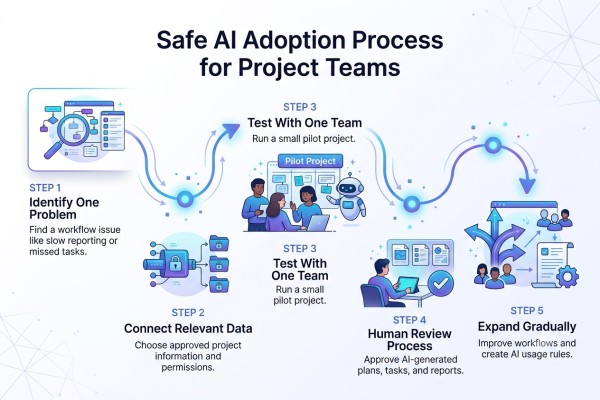
Teams should adopt AI in project management step by step. Start with low-risk use cases, then expand after trust improves.
1. Pick one project pain point
Do not start with every workflow.
Choose one problem, such as:
- Status updates take too long
- Tasks are created late after meetings
- Blockers are hard to detect
- Workload is unclear
- Project reports are inconsistent
- Client updates need too much manual effort
A small scope makes the tool easier to test.
2. Define the data the tool can access
AI output depends on the data it can read.
A project tool may use tasks, comments, docs, goals, calendars, meeting notes, and integrations. PMI’s data-focused GenAI course page highlights risks, security threats, data governance, volume, quality, and data types for project use.
Before connecting tools, decide what data is allowed. Sensitive items may include customer data, financial details, private HR notes, legal issues, credentials, vendor contracts, and internal strategy.
3. Test with one team
Run a pilot with one team or one project. Compare AI-assisted work with the current process.
Track simple outcomes:
- Time spent writing updates
- Number of missed follow-ups
- Quality of generated tasks
- Accuracy of risk summaries
- Team trust in AI suggestions
- Review time needed before sharing output
Do not measure success only by speed. Wrong updates created faster are still wrong.
4. Keep human approval in the workflow
Require review before AI-generated updates, tasks, plans, or risk reports are officially implemented on the project.
A human should approve:
- New project plans
- External status updates
- Changes to deadlines
- Owner assignments
- Budget-related decisions
- Scope changes
- Risk ratings
- Client-facing messages
This keeps the tool useful without giving it unsafe authority.
5. Create team rules
Write simple rules for AI use.
For example:
- AI can draft updates, but the project manager approves them.
- AI can suggest tasks, but owners confirm them.
- AI can flag risk, but leadership confirms priority.
- AI cannot change deadlines without approval.
- AI cannot automatically send client updates.
- AI cannot access restricted documents unless approved.
Good rules reduce confusion and protect the team.
What should AI not decide alone?
Project management includes human judgment. AI can process information, but it does not carry accountability.
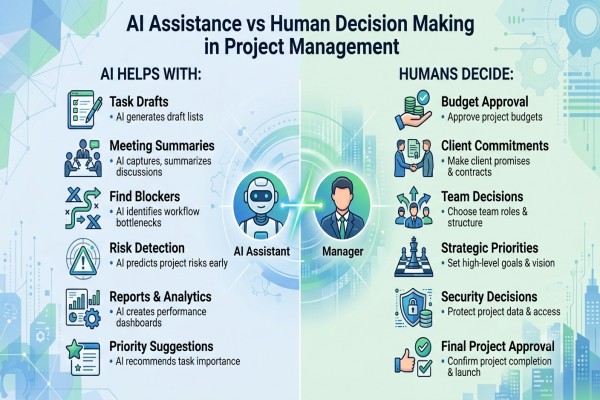
Avoid letting AI make final decisions about:
- Firing or performance judgment
- Budget approval
- Contract commitments
- Vendor selection
- Legal or compliance decisions
- Client promises
- Product scope cuts
- Team workload pressure
- Security-sensitive work
- Strategic priority changes
AI may miss tone, politics, team context, business risk, or customer sensitivity.
For example, a tool may suggest moving work from one developer to another because the second person has fewer assigned tasks. But the second developer may be new, handling hidden support work, or working on a harder task that is not fully documented.
AI sees the board. Managers need to understand the people.
How to evaluate an AI project tool before adoption
Do not evaluate the tool only by its AI demo. Evaluate whether it fits how your team actually works.
Use this checklist.
Workflow fit
- Does it support your project style: Agile, Kanban, waterfall, hybrid, client projects, or operations?
- Can it handle dependencies, milestones, owners, and approvals?
- Does it work with your existing tools?
AI usefulness
- Can it summarize project status accurately?
- Can it create useful tasks from notes?
- Can it answer questions using the project context?
- Can it flag risks with evidence?
- Can it explain why it made a suggestion?
Control and review
- Can admins turn AI features on or off?
- Can users approve AI-generated changes?
- Can the team see what data was used?
- Can sensitive workspaces be excluded?
Atlassian notes that organization admins can deactivate AI-powered features in its Rovo/Jira context if the organization is not ready for AI.
Security and governance
- What data does the AI access?
- Is data used for model training?
- Are permissions respected?
- Are audit logs available?
- Can the team restrict external sharing?
- Does the vendor support enterprise controls?
Reporting quality
- Are AI status updates clear?
- Can reports be edited before sharing?
- Can the tool separate facts from assumptions?
- Can it show evidence behind a risk warning?
Adoption effort
- Will the team need training?
- Will the tool create more admin work?
- Will it improve an existing workflow or force a new one?
- Does it help both managers and contributors?
A strong tool should reduce coordination friction without making the project process harder to trust.
Common mistakes to avoid
Treating AI as a project manager
AI can support project managers. It should not replace ownership, stakeholder communication, judgment, or accountability.
The project manager still needs to manage tradeoffs, people, expectations, and decisions.
Connecting messy data too early
If tasks are outdated, owners are missing, and deadlines are wrong, AI will produce weak summaries.
Clean the workflow before expecting strong AI results.
Letting AI create task clutter
AI-generated tasks can multiply quickly. Too many tasks create noise and hide real work.
Approve generated tasks before they enter the active plan.
Sharing AI updates without review
AI may misread progress, skip a blocker, or phrase an update poorly.
Review every external update before sending it to clients, executives, or partners.
Ignoring privacy and permissions
Project tools may contain sensitive details. Check data access, workspace permissions, retention rules, and vendor policies before rollout.
Measuring only time saved
Time saved matters, but it is not enough.
Also measure accuracy, trust, fewer missed follow-ups, better risk visibility, and less coordination stress.
FAQ
What are AI-based project management tools?
AI-based project management tools are platforms that use AI to support planning, task tracking, status reporting, risk detection, and workflow automation. They help teams summarize project data, create tasks, answer progress questions, and spot blockers. Human review is still needed for decisions, client updates, budget changes, and priority shifts.
How does AI help project managers?
AI helps project managers reduce manual coordination work. It can draft updates, summarize meetings, create task lists, flag overdue work, identify blockers, and suggest changes to the workload. It is most useful when the project data is clean and the team has clear rules for review and approval.
Can AI manage a project automatically?
AI can automate parts of project work, but it should not manage the whole project alone. Projects involve people, tradeoffs, budgets, clients, risks, and changing priorities. AI can suggest next steps, but a project manager or team lead should approve important decisions.
Are AI project management tools safe?
They can be safe when used with the right controls. Teams should check permissions, data access, admin settings, audit logs, vendor policies, and privacy rules. Sensitive data such as contracts, HR notes, credentials, financial details, and customer records should be protected.
What features should I look for?
Look for AI status updates, meeting-to-task conversion, project Q&A, risk detection, workload views, workflow automation, approval controls, integrations, permission settings, and clear reporting. The best feature set depends on your team’s workflow, not the longest feature list.
Do small teams need AI project management software?
Small teams may benefit if they struggle with missed follow-ups, unclear ownership, slow reporting, or too many scattered tools. A small team should start with one use case, such as status updates or meeting task extraction, before using AI across the full project workflow.
What is the biggest risk of using AI in project management?
The biggest risk is trusting AI output without review. AI may create inaccurate tasks, miss context, overstate risk, or expose sensitive data if governance is weak. The safest approach is to use AI for drafts and signals while keeping human approval for important actions.
Conclusion
AI-assisted project management is most useful when teams use it to reduce coordination friction. It can help turn scattered project information into clearer plans, updates, risks, and decisions.
The safest path is to start with one workflow, connect only the necessary data, review every AI-generated output, and create team rules on what AI can and cannot do. After that, teams can explore separate comparison pages or product reviews to choose the right platform for their budget, workflow, and security needs.




Leave a Reply