
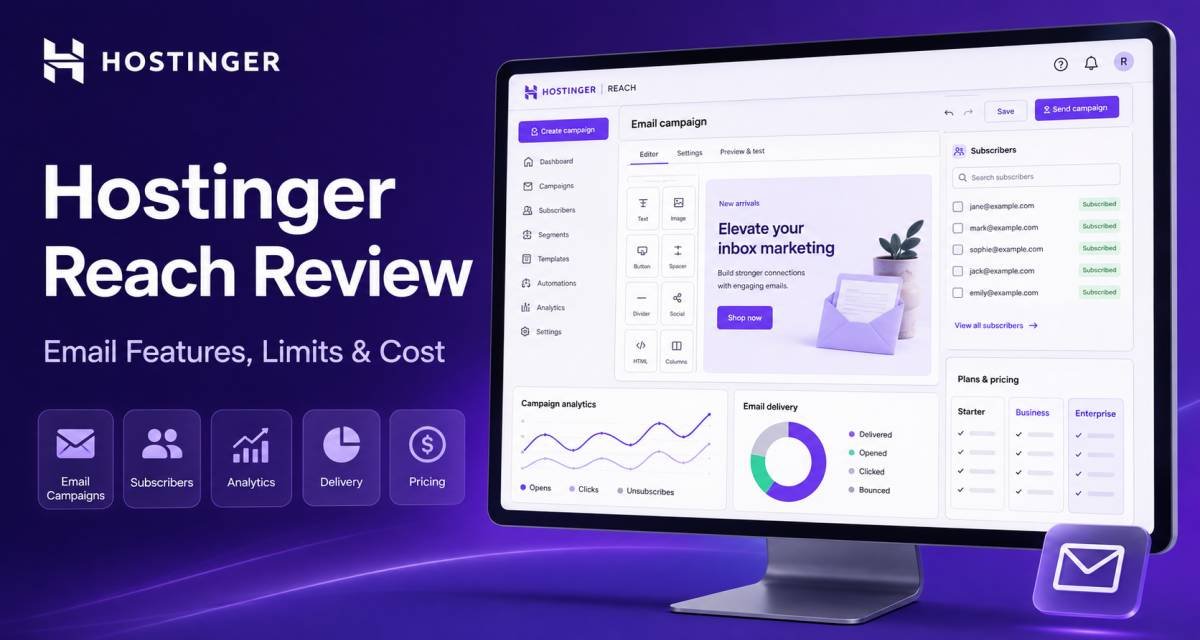
Hostinger Reach helps businesses create newsletters, organize subscribers, and send automated marketing emails. It is an email marketing platform; a mailbox for individual conversations and incoming replies is a separate service.
Reach deserves a place on a small business’s shortlist when convenient campaign creation and website contact collection matter. Its usefulness depends on your sending schedule, required automations, and comfort with an evolving product.
This assessment draws on current documentation and public user discussions. It does not include hands-on testing, measured deliverability, or verified conversion results.
Consider Reach for a small, permission-based audience, but evaluate the complete workflow before committing to a long subscription.
The strongest fit is an owner who wants to move from occasional announcements to organized campaigns without assembling many separate tools.
Its appeal is combining assisted email creation with audience management. The free option omits automations, so it cannot validate the complete paid workflow. Previous free-plan use also changes refund eligibility after upgrading.
Start with the available free option to assess basic usability. Before upgrading, confirm the features you need and the applicable refund conditions.
Product snapshot
| Item | Current position |
| Category | Email marketing and automation |
| Suitable users | Small businesses, creators, and newsletter publishers |
| Creation tools | AI, visual Design editor, and paid HTML editing |
| Audience tools | Forms, tags, segments, and contact imports |
| Entry paid tier | Reach 500 |
| Verified introductory offer | $1.99/month equivalent for 24 months |
| Free access | Reach 100 for one year; claimable once |
| Main planning issue | Separate recipient, sending, and AI allowances |
Published plan and editor details.
Features and practical use
Understand recipients before choosing a plan
Reach counts two different things: unique email addresses contacted during a calendar month, and total emails sent. Campaigns and automations share the sending allowance. Deleting an address does not erase its contribution to that month’s recipient total.
For example, contacting the same 220 subscribers twice uses 440 sends but reaches 220 unique recipients. This is an illustrative calculation, not a performance claim.
Stored contacts are another matter. Hostinger says you can retain more contacts than your subscription’s sending allowance. A large address book therefore does not mean you can email everyone in it.
Build your budget around broadcasts plus automated messages. Leave capacity for new subscribers and event reminders instead of allocating the entire allowance to scheduled newsletters.
Setup and the learning curve
You can prepare campaign and automation drafts before connecting a domain. Sending campaigns or activating automations requires a verified sending domain, which may be registered with Hostinger or another provider. One domain can be connected at a time.
For supported Hostinger-domain setups, onboarding can configure SPF, DKIM, and DMARC records automatically. External domains require ownership and DNS verification.
The interface may simplify the steps, but the underlying decisions remain yours: which audience should receive an email, what they agreed to receive, and where replies should go.
Use a monitored sender address with a working mailbox. Hostinger’s setup guide specifically recommends a mailbox when you want to receive replies.
AI, visual editing, and HTML control
Reach currently offers three starting points: AI generation, a template library, or uploaded HTML. You can then adjust content through its editing tools. The Code editor is available on Reach 500 and higher plans.
That flexibility matters because creating a draft and approving it are different tasks. AI can suggest an arrangement; a person should check the offer, prices, dates, links, and tone.
The Design editor supports changes to content, sections, buttons, and global template styles. A sensible workflow is to approve one reusable layout and make targeted edits for each campaign.
Do not assume a template that looks correct in the editor will behave identically everywhere. Send test messages to the inboxes your audience uses and inspect the mobile version.
AI credits need their own budget
New users receive 20 welcome credits once. The free tier has no recurring monthly credits; paid tiers provide monthly allowances.
Some actions have explicit costs: applying Quality Checker’s AI fixes uses one credit. Manual correction is also available.
This makes selective AI use sensible. Reserve it for drafting or substantial revisions, then make small wording changes manually. Extra credit-package prices were not verified, so they are excluded from the cost estimates below.
There is also a documentation inconsistency: the sales page advertises unlimited spam checks, while the subscription guide describes a limited checker. Confirm the allowance if repeated automated checks are central to your workflow.
Forms and responsible list growth
Reach’s form builder supports embedded forms and standalone forms with shareable links. Its current guide still labels native pop-up forms as forthcoming.
A shareable form can help a business collect subscribers from social profiles or event materials without first building a dedicated landing page. Make the invitation specific: explain the content, frequency, and benefit of subscribing.
Double opt-in adds confirmation before an automatically synced contact becomes subscribed. It does not apply to manually added contacts or CSV imports, where existing consent is expected. Confirmation messages do not consume the monthly sending allowance.
Keep evidence of permission when moving an existing list. A successful import is not proof that someone agreed to receive your newsletter.
Forms support acquisition; they do not supply an audience by themselves. You still need useful content and a legitimate way to attract interested visitors.
Segments, tags, and custom fields
Segments can use contact information, source, engagement, and tags. You can create rules manually with AND/OR conditions or ask AI to propose them. Free accounts can send to only their three oldest segments; paid plans allow unlimited segments.
Tags add another organizational layer. Hostinger documents up to 180 tags per account and 50 per contact.
Custom fields can be imported and used for targeting. However, their documentation inconsistently labels collecting them through forms as “Coming Soon” while also describing setup. Verify that feature if your signup process depends on it.
For a small list, begin with a few meaningful distinctions. Ten well-understood audience groups are more useful than dozens of labels nobody maintains.
Automations now go beyond a welcome message
Paid Reach plans support automations. Current documentation describes custom triggers, email steps, delays, and conditions that create different paths based on subscriber behavior. Delays can be relative or tied to a specified date.
Form-trigger behavior deserves particular attention. A native Reach form can trigger a response for every submission, including an existing contact’s repeat submission. Integrated website forms may instead depend on a contact entering a segment, which behaves differently.
For stores, the Hostinger eCommerce integration supplies purchase and abandoned-checkout events. Its guide says cart emails require a contact who has agreed to marketing and already has subscribed status.
Write down the trigger, recipient, delay, and stopping conditions before activating a sequence. Test repeat submissions and completed purchases so subscribers do not receive inappropriate reminders.
Integrations and reporting
Reach documents website contact syncing and a public API for custom connections. The API can manage contacts, fields, tags, and segments and retrieve information about campaigns and automations.
A custom API connection still requires implementation and maintenance. Confirm exactly what synchronizes; importing a contact does not automatically reproduce an entire CRM workflow.
Reports include opens, clicks, click-to-open rate, bounces, unsubscribes, click maps, and device breakdowns. Automation email steps also have detailed reports.
Treat opens cautiously. Apple’s privacy protection can fetch remote content without someone viewing the message, making an open an imperfect measure of attention. Compare meaningful clicks with outcomes recorded on your website or store.
Paid Smart Sending distributes delivery over a 24-hour window using prior open behavior. For a time-sensitive announcement, consider fixed scheduling instead. Neither scheduling assistance nor an attractive report establishes inbox placement.
Privacy and checks before sending
Quality Checker reviews template issues but does not assess full sender reputation or guarantee inbox placement. Its result should inform a human review, not replace one.
For US commercial email, the FTC’s guidance includes accurate sender information, truthful subject lines, a valid postal address, and a working opt-out process. Using a platform does not remove the sender’s responsibility.
Limit subscriber information to what you need. Avoid placing confidential customer records in AI prompts, review data-processing terms, and control account access. Paid Reach plans support collaborators with different permissions.
Three hypothetical use cases
- A bookshop running recurring author events. A native Reach form could collect registrations and send event details to new and returning subscribers. Test the repeat-submission setting so an existing reader receives the next event’s information.
- A craft-kit seller supporting recent buyers. A purchase-triggered sequence could offer assembly guidance to consenting customers. Match messages to the relevant product and avoid sending a promotional reminder after the customer has already bought it.
- A consultant publishing industry briefings. Import contacts who explicitly requested updates, group them by topic, and send relevant editions. Review actual clicks before expanding the schedule, and keep conference registration separate from newsletter permission.
These examples illustrate possible configurations; they are not customer case studies.
Verified introductory prices
Prices checked on August 30, 2026, excluding taxes: Check Out Price
| Option | Advertised rate | Initial payment | Initial duration | Renewal information |
| Reach 100 free option | $0 | $0 | One year | Page advertises $0.99/month afterward; billing period unverified |
| Reach 500 monthly | $5.99/month | $5.99 | One month | Future renewal quote unverified |
| Reach 500 annual | $2.49/month equivalent | $29.88 calculated | 12 months | Unverified |
| Reach 500 two-year | $1.99/month equivalent | $47.76 calculated | 24 months | Unverified |
Prepaid totals are calculated from the displayed rates and exclude taxes and optional add-ons. Verify checkout.
A two-year introductory offer does not establish a two-year renewal. Hostinger’s renewal guide currently lists one-month and twelve-month renewal options for Reach.
Monthly allowances by tier
| Tier | Unique recipients | Email sends | Recurring AI credits |
| Reach 100 | 100 | 200 | 0 |
| Reach 500 | 500 | 3,500 | 10 |
| Reach 1000 | 1,000 | 7,000 | 20 |
| Reach 2500 | 2,500 | 17,500 | 30 |
| Reach 5000 | 5,000 | 35,000 | 30 |
Allowances reset on the first day of the month. Higher-tier US prices were not verified and should be obtained before budgeting.
Larger audience tiers do not necessarily provide proportionally more AI credits. Estimate content-generation requirements separately from subscriber growth.
Upgrades and additional costs
Upgrading increases both recipient and email allowances; they cannot be increased independently. Reaching a limit can prevent campaigns or automation messages from sending.
Price the tier that covers your busiest realistic month. If a short promotion substantially increases sending, decide whether its value justifies the larger subscription.
Also budget for a domain, a mailbox for replies, optional AI credits, and any paid integration services you need. Multiple brands may require separate Reach workspaces, each with its own subscription and allowances.
Refunds require careful reading
The general money-back message has important Reach-specific conditions. Hostinger’s policy requires a request within 30 days of the relevant transaction and more than 180 days since another Reach refund, if applicable. Cryptocurrency purchases are not refundable.
Previous free-plan use changes eligibility. Hostinger’s explanatory guide says that after upgrading from free, only the first paid-plan renewal is eligible—not the initial upgrade payment. Confirm your situation before paying.
You can disable automatic renewal, but doing so does not itself refund an earlier charge. Keep the free-year ending date and the paid subscription’s next charge date in your own records.
Strengths, limitations, and alternatives
Strengths
- Editing flexibility: AI assistance and manual controls can support different ways of preparing campaigns.
- Useful targeting: Segments and behavior-based conditions allow more relevant follow-ups than sending every message to everyone.
- Practical acquisition tools: Embedded and shareable forms give small businesses several places to collect subscribers.
Limitations
- Restricted free evaluation: Paid automation requirements mean the free option cannot validate every intended workflow.
- Coupled capacity upgrades: A frequent sender may need a larger tier even without substantial audience growth.
- Features still evolving: Native pop-ups remain forthcoming, and some documentation needs clarification.
What public user comments add
A March–May 2026 Reddit discussion includes complaints about AI-heavy editing, template changes, and difficulty creating simple text-style emails. Those are individual accounts, not representative testing or a satisfaction score.
Current documentation now describes manual Design and paid HTML editing, so older claims that everything requires AI should not be treated as the complete current picture.
The useful takeaway is to test editing, saving, reopening, and sending a template before migrating an important newsletter. Current documentation establishes available options; it does not prove that every historical usability issue has disappeared.
Two alternatives worth comparing
| Alternative | Why consider it? | Main qualification |
| MailerLite | A broader free starting allowance with some automation | Check subscriber, sending, and feature limits as the list grows |
| Kit | A creator-focused option for regular broadcasts | Advanced automations and sequences require paid access |
MailerLite currently lists a free tier with 250 subscribers, 2,500 monthly emails, and three automations. It deserves comparison when you want to evaluate a basic sequence before paying. Use your intended campaign as the test, rather than choosing solely from allowance totals.
Kit’s current Free plan supports up to 10,000 subscribers and unlimited broadcasts, forms, and landing pages. Its help guide places visual automations and email sequences on paid plans. That makes it relevant to publishers prioritizing broadcasts, while automated customer journeys require a separate cost comparison.
These alternatives do not establish a deliverability winner. None should be selected on an unsupported promise of higher opens or sales.
Who should choose Reach?
Shortlist it if you have a manageable audience, value assisted campaign creation, and can connect your signup or store workflow without extensive custom development.
Compare alternatives first if a generous ongoing free plan, advanced automation testing before payment, or a very specific editing format is essential. Avoid buying a long term until you have checked the everyday tasks you will repeat.
FAQs
Do I need Hostinger web hosting to use Reach?
No. You can connect a domain registered elsewhere, and Reach forms can be embedded on an external website. Keep domain ownership, hosting, and email marketing as separate purchase decisions. You need access to the relevant DNS settings when authenticating your sending domain.
Can I write emails without relying on AI?
Current documentation supports template-library starting points, manual Design editing, and HTML code editing on Reach 500 or higher. A simple HTML email can look text-focused, but that does not establish native plain-text-only sending. If that format matters, confirm it and inspect a test message before subscribing.
What happens if I reach a monthly limit?
New campaigns can be blocked, and automations may fail to send when recipient or email allowances are exhausted. Monitor both counters before a promotion. Leave room for automated messages, and check affected workflows after upgrading or after the monthly reset rather than assuming missed messages will retry.
Can one subscription cover several brands?
Reach supports one connected sending domain at a time, and separate plans operate as independent workspaces. Their contacts, automations, usage, and allowances are not pooled. For several brands, calculate the subscription cost per workspace and decide which team members should have access to each.
Why might a new signup not receive an automation?
The contact may still be awaiting double opt-in confirmation, or the selected trigger may not cover repeat submissions. Check subscription status, whether the form is active, the automation’s entry rule, and remaining sending capacity. Test with both a new address and an existing subscriber before launch.
Final verdict
Try Reach’s free option for basic campaign work, then consider a paid plan only after confirming your automation and editing requirements.
Its appeal is a connected process for collecting subscribers, organizing audiences, and preparing emails with varying levels of AI assistance.
The reasons to pause are specific: limited free evaluation, separate usage allowances, unclear renewal figures, and refund restrictions after free-plan use. Confirm the full cost, test a representative campaign, and choose a tier with room for both planned broadcasts and automated follow-ups.Hostinger Bundle Review: AppSumo Value and Renewal Costs




Leave a Reply