
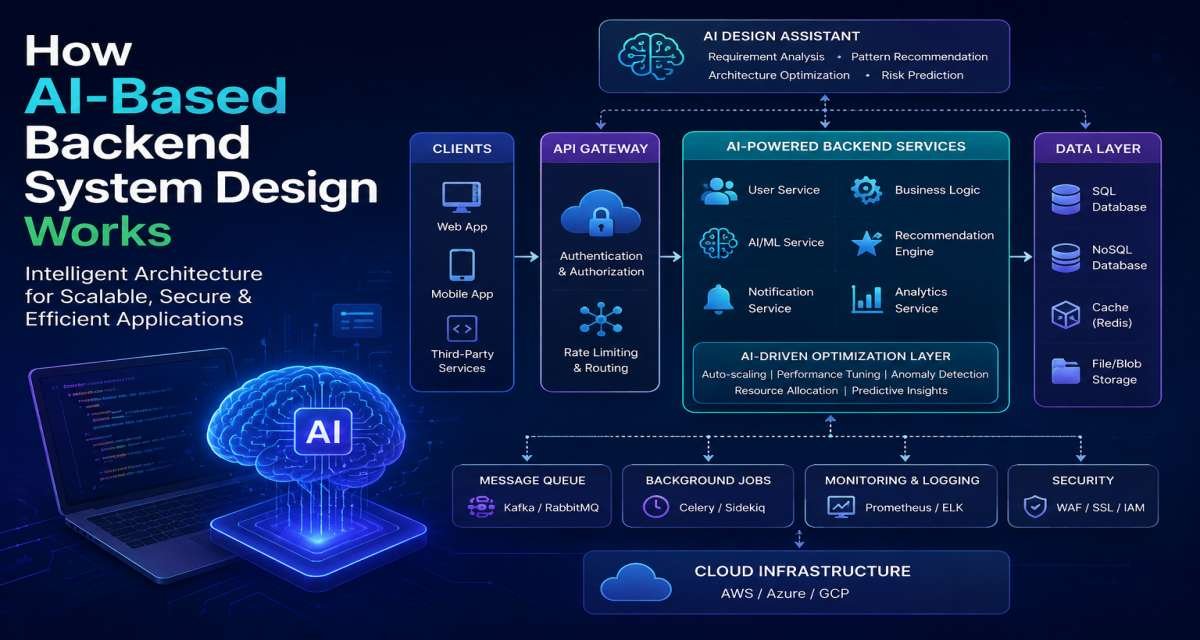
AI-based backend system design means building a normal backend architecture in which one or more parts of the application depend on AI models for tasks such as classification, retrieval, summarization, generation, extraction, recommendation, or workflow assistance.
The AI model does not replace the backend. The system still needs APIs, authentication, authorization, databases, queues, business rules, validation, testing, logging, security controls, and monitoring.
What changes is uncertainty.
Traditional backend logic usually follows defined rules. Model output may instead be incomplete, inaccurate, slow, expensive, inconsistent, or unsafe. A practical architecture therefore has to control what the model sees, what it can return, what it is allowed to influence, and what happens when it fails.
This guide explains how to place AI inside a backend architecture, choose between direct model calls, RAG, agents, and human review, and design the surrounding controls needed for a production system.
What Changes When AI Becomes Part of the Backend
Adding an AI model changes some of the assumptions developers normally make about application logic. Developers can explore different AI tools for developers to understand how AI can be integrated into modern development workflows.
A traditional password-reset flow is largely deterministic. The backend validates the request, verifies the account, generates a token, stores the required state, and sends a message. Each stage has a defined outcome.
An AI-assisted request may be different.
Suppose a user asks:
“Show me the unpaid invoices from last quarter and prepare a reminder.”
The system may need to interpret the request, determine which records the user is allowed to access, retrieve the invoices, prepare context for a model, generate a reminder, validate the result, and possibly ask the user to approve it.
That creates additional design questions.
The team must decide:
- What data can the model receive?
- What information should remain outside the model?
- How will the output be validated?
- Can the model trigger an action?
- What happens when its output is wrong?
- What happens when the model is unavailable?
- Does the user need to approve the result?
- How will latency and cost be controlled?
These questions should be answered as architecture decisions rather than left to prompt wording.
Deterministic logic versus model output
One useful design principle is to keep deterministic responsibilities outside the model whenever possible.
Authentication should not depend on an LLM deciding whether someone appears legitimate.
Authorization should not depend on the model deciding whether a user probably has access.
Payment calculations, database constraints, transaction boundaries, account ownership, and other exact business rules should also remain controlled by application logic.
AI is more useful where inputs are ambiguous or unstructured.
Typical examples include:
- Classifying customer messages
- Extracting information from documents
- Summarizing records
- Searching knowledge bases
- Drafting responses
- Explaining errors
- Generating structured suggestions
- Supporting workflow routing
The model should complete a defined task inside the system rather than becoming the system’s authority.
Where AI belongs in a request flow
AI can appear at several points.
- Before business logic:
A model can classify a request or identify its intent. - After data retrieval:
The backend can retrieve approved records and ask a model to summarize them. - During a controlled workflow:
The model can suggest which predefined next step is appropriate. - Before a response:
The application can convert structured information into a clearer user-facing answer. - During internal engineering workflows:
AI can help developers explain code, generate tests, review changes, or draft documentation.
Consider a SaaS support system.
A customer message reaches an API. The backend authenticates the request and may place the message in a queue for asynchronous processing. A classifier identifies the type of support issue. The backend retrieves account information from its main database and relevant support documents through search or a vector retrieval layer.
A language model then drafts a response from that controlled context.
Before the draft becomes visible or actionable, the application can validate it and send it to a support agent for approval.
The important point is that the model handles one part of a larger backend flow.
Core Components of an AI Backend
Most AI backends contain familiar backend components plus several layers specifically designed to control model use.
A typical architecture may include:
- User interface
- API layer
- Authentication and authorization
- Application or orchestration service
- Database
- Retrieval or vector search
- Prompt or context builder
- Model inference service
- Output validator
- Queue or background worker
- Cache
- Logging and monitoring
- Human-review interface where necessary
Not every application needs every component. The architecture should reflect the problem rather than a preferred AI framework.
API, authentication, and application logic
The API layer remains the controlled entry point into the backend.
It should authenticate the requester, validate the request, enforce permissions, apply rate limits, and determine which service should handle the operation.
This should happen before private information is sent to a model.
For example, if a user asks:
“Summarize this month’s failed payments.”
The backend should first verify that the user is authorized to view those payment records. The model should receive only the records the application has already determined that the user can access.
The orchestration or application layer then controls the sequence of work.
It may:
- Read data
- Perform retrieval
- Build model context
- Call an inference service
- Validate the result
- Save the result
- Request human approval
- Trigger another controlled operation
Keeping this orchestration outside the model makes the workflow easier to test and reason about.
Model and inference layer
The model can be accessed through an external API, a managed cloud service, or a self-managed deployment.
The right choice depends on factors such as:
- Privacy requirements
- Data policies
- Expected request volume
- Infrastructure expertise
- Latency
- Model capability
- Operational burden
- Long-term cost
Hosted models can reduce infrastructure work and make experimentation faster.
Self-managed models may make sense where teams need stronger deployment control, custom infrastructure, specific data-handling requirements, or different economics at high volume.
The decision should follow the product requirements rather than the assumption that one deployment method is always better.
Retrieval and data layer
A model’s built-in knowledge may not contain the private, current, or product-specific information an application needs.
Retrieval-augmented generation, commonly called RAG, addresses this by retrieving relevant information before generating the answer.
A simplified flow is:
- Receive the user’s request.
- Authenticate the user.
- Determine what information the user can access.
- Search approved documents or records.
- Select relevant context.
- Send that context to the model.
- Generate an answer.
- Validate the response.
- Return it to the user.
RAG can be useful for:
- Company documentation
- Product help centers
- Internal policies
- Customer-support knowledge
- User files
- Technical documentation
- Internal knowledge systems
Authorization should remain outside retrieval and generation. The model should never be expected to determine which confidential documents a user deserves to see.
Validation, logging, and monitoring
Model output should be considered untrusted until the application checks it.
If the backend expects structured data, use a defined schema.
If the model is extracting an invoice, for example, the application may require:
- Invoice number
- Due date
- Currency
- Total amount
The output can then be checked before entering another backend process.
The same principle applies to generated commands, database queries, URLs, tool parameters, or account actions. Model-generated content should not automatically become executable behavior.
Monitoring also needs to cover more than ordinary application errors.
Useful AI-specific signals include:
- Model latency
- Failed model requests
- Token or request cost
- Validation failures
- Retrieval failures
- Empty or unusable responses
- User corrections
- Unsafe outputs
- Human rejection rates
- Changes after model updates
Sensitive prompt or response data should not be logged without appropriate controls.
Choosing the Right AI Architecture Pattern
Most applications do not need the most complex possible AI architecture.
Four patterns cover many practical cases:
- Direct model call
- RAG
- Agent workflow
- Human-review workflow
A production system may combine them, but the simplest pattern that solves the requirement is usually easier to secure, test, and operate.
Direct model calls
A direct model call sends a controlled prompt to a model and uses the returned result.
It works well for bounded, low-risk tasks such as:
- Rewriting text
- Summarizing non-sensitive material
- Generating descriptions
- Explaining simple errors
- Creating draft content
- Producing suggestions
For example, a developer platform might send a validation error and relevant technical context to a model and ask it to explain the error in plain language.
A direct call becomes less appropriate when the task depends on private data, current internal information, external tools, or high-risk actions.
Retrieval-augmented generation
RAG is appropriate when the model needs trusted information that is not reliably contained in its general knowledge.
Instead of asking the model to answer from memory, the backend retrieves relevant content and includes that content in the request.
A customer-support assistant, for example, can retrieve relevant help-center articles before drafting a response.
RAG provides more controlled context, but it does not solve every problem.
The backend still needs to manage:
- User permissions
- Retrieval quality
- Context size
- Document freshness
- Input manipulation
- Output validation
- Missing information
Poor retrieval can still produce poor answers.
Agent workflows
An agent workflow allows the model to select or coordinate actions involving multiple tools or services.
A sales operations assistant might:
- Read an approved CRM record.
- Retrieve recent activity.
- Check a predefined internal service.
- Draft a follow-up.
- Suggest creating a task.
This design introduces more flexibility and more risk.
The model should not receive broad access merely because it can call tools.
Agent systems need:
- Narrow tool permissions
- Defined tool schemas
- Request limits
- Execution limits
- Validation
- Audit records
- Approval requirements
- Clear failure behavior
If the requirement is simply to answer questions from internal documentation, RAG is usually easier to control than an agent.
Human-review workflows
Some tasks should stop before an AI result becomes an action.
The model can prepare a draft, recommendation, or classification and place it in a review queue.
Human approval is especially useful for actions such as:
- Sending important customer communications
- Changing account settings
- Updating financial records
- Publishing sensitive content
- Making consequential moderation decisions
- Triggering business operations with significant impact
Human review does not eliminate the need for backend validation. It adds another control for situations where mistakes carry greater consequences.
A Practical Process for Designing the Backend
The architecture should start with the problem rather than the model.
Teams sometimes begin by asking which LLM or agent framework they should use. That decision comes too early.
Start by defining what the backend needs to accomplish.
Define the task
Describe the required AI task narrowly.
Poor definition:
“AI handles customer support.”
Better definitions:
- Classify each support ticket into one of five categories.
- Retrieve relevant approved help articles.
- Draft a response from the retrieved material.
- Extract an order number from the customer’s message.
- Summarize the last three account events for an agent.
Narrow tasks are easier to validate, test, monitor, and replace.
They also make it easier to determine whether AI is actually necessary.
Some operations are better implemented as normal rules, database queries, or application logic.
Map the complete request path
Before implementation, map what happens from the initial request to the final result.
A basic flow might be:
- User sends a request.
- API validates the input.
- Backend authenticates the user.
- Authorization rules determine accessible data.
- Required records are retrieved.
- Application prepares model context.
- Model returns an output.
- Backend validates the output.
- Human approval occurs if required.
- Application stores or returns the result.
- Relevant events are logged.
This process reveals where AI is involved and, just as importantly, where it is not involved.
Control data access
Information minimization is a useful design rule.
The model should receive only what it needs for the assigned task.
If the user asks for information about one invoice, the system should not automatically provide the customer’s full account history.
The same principle applies to internal services. An assistant that only needs to read order status should not automatically receive permission to modify orders or issue refunds.
Data and tool access should follow the minimum-access principle.
Define validation and fallback behavior
Every AI-dependent step should have a failure path.
Ask:
- What if the model times out?
- What if the API is unavailable?
- What if the model returns invalid JSON?
- What if retrieval returns nothing?
- What if the response fails a safety check?
- What if the output contradicts required business rules?
- What if repeated calls become too expensive?
- What if the model response cannot be confidently used?
Possible fallback behavior includes:
- Retry with limits
- Return a standard response
- Use deterministic logic
- Ask the user for clarification
- Route the request to a human
- Store the task for later manual handling
- Fail without taking action
A fallback should be designed before production rather than invented during an incident.
Security and Data Controls
AI-specific backend security builds on normal backend security.
User input is untrusted. Retrieved content may also be untrusted. Model output is untrusted. Tool arguments generated by a model should be treated as untrusted as well.
The surrounding backend must enforce the boundaries.
Prompt injection and untrusted input
Prompt injection occurs when input attempts to manipulate the model into ignoring its intended instructions or performing an unintended task.
The malicious instruction may come directly from a user or indirectly from retrieved content.
A document could contain instructions telling the model to ignore previous rules or reveal unrelated data.
A prompt alone should therefore not be treated as a security boundary.
The application should independently control:
- What information is retrieved
- Which tools are available
- Which records a user can access
- What operations may execute
- Which outputs are considered valid
Even if a model follows a malicious instruction, backend permissions should prevent it from crossing those boundaries.
Authorization and sensitive data
Authentication answers who the user is.
Authorization determines what that user may do.
The distinction is especially important in AI systems because a model can generate convincing output even when the underlying data access is wrong.
Authorization should be enforced before model access.
Teams should also avoid sending unnecessary sensitive information to models.
Examples requiring particular care include:
- API keys
- Authentication tokens
- Customer records
- Payment information
- Private code
- Production logs
- Credentials
- Certificates
- Internal secrets
Approved tools and organizational policies should determine what data can be processed externally.
Output validation and excessive agency
An AI response is not verified application data merely because it has the right tone or structure.
Structured responses should be checked against schemas.
Model-generated SQL should not automatically run against a production database.
Generated shell commands should not become direct server operations.
A suggested account change should not automatically modify the account.
The same applies to agent workflows.
An AI assistant should receive only the tools and operations needed for its defined task.
If a support assistant needs to read an order status, it does not necessarily need permission to:
- Cancel the order
- Issue a refund
- Change the customer’s account
- Alter payment records
More capability creates more risk.
Testing AI Backend Systems
AI-assisted features need normal backend testing plus tests designed for uncertain model behavior.
The purpose is not to prove that the model will always produce the same sentence. It is to prove that the system behaves correctly around the model.
Functional and permission testing
Start with the deterministic parts.
Test whether:
- Authentication is required
- Authorization works correctly
- Users cannot retrieve another user’s data
- Admin-only actions remain restricted
- Input validation works
- Invalid requests fail correctly
- Expected database changes occur
- Transactions roll back when required
AI should not weaken these existing guarantees.
Retrieval and output testing
For RAG systems, test the retrieval process as well as generation.
Check whether:
- Relevant records are retrieved
- Unauthorized records are excluded
- Missing information is handled correctly
- Old or unrelated documents are not preferred
- Context size stays within expected limits
- Generated responses remain grounded in the provided context where required
If the model must produce structured output, test:
- Missing fields
- Incorrect field types
- Extra fields
- Invalid values
- Empty responses
- Unexpected formats
Validation failures should lead to controlled behavior rather than downstream errors.
Failure, retry, and edge-case testing
Real backend systems encounter conditions that ordinary examples miss.
Test scenarios such as:
- Model timeout
- External provider failure
- Database timeout
- Empty retrieval results
- Duplicate events
- Queue backlog
- Retry executed twice
- Invalid model output
- Concurrent updates
- Rate-limit exhaustion
- Partial failure between services
Hostile and messy inputs also matter.
A system that performs well on carefully written demo prompts may behave differently with incomplete requests, contradictory information, malicious instructions, or unexpected document content.
AI in the Backend Development Lifecycle
AI can support more than runtime application features. It can also help developers throughout the engineering process.
The role of AI in backend development lifecycle work is best understood as assistance rather than ownership.
It can help developers move more quickly from unclear requirements to reviewable technical work, but architecture, security, testing, deployment, and production behavior remain engineering responsibilities.
Requirements and API planning
AI can help convert a vague product request into questions that need answers.
Consider:
“Users should be able to cancel their subscription.”
The backend still needs to determine:
- Who can cancel?
- Is cancellation immediate?
- What happens to remaining paid time?
- Does the payment provider need an update?
- Are refunds involved?
- What happens if the provider fails?
- Can cancellation be reversed?
- What audit event should be stored?
AI can help surface these missing decisions.
It can also draft initial API contracts, including:
- Endpoint ideas
- Request fields
- Response structures
- Status codes
- Error cases
- Validation rules
- OpenAPI-style descriptions
These drafts still need review for permissions, consistency, backward compatibility, and data exposure.
Coding and refactoring support
AI coding tools can assist with bounded backend tasks such as:
- Service-layer drafts
- Controller boilerplate
- Validation code
- Test scaffolding
- Data mapping
- Error handling
- Code explanation
- Documentation
- Refactoring repeated logic
The scope matters.
“Build the backend” gives the tool too much room to make assumptions.
A bounded task provides the language, framework, current project pattern, allowed changes, expected errors, database behavior, and testing requirements.
Generated code should then be reviewed like code from an external contributor.
Developers should understand what it does before it is merged.
Testing, review, operations, and documentation
AI can help propose unit, integration, API-contract, failure-path, and edge-case tests.
It can also help identify possible problems during code review, including:
- Missing validation
- Inconsistent error handling
- Repeated logic
- Missing tests
- Potentially unsafe assumptions
- Unclear code paths
For operations work, it can help explain CI/CD failures, summarize redacted logs, organize incident information, and draft runbook updates.
Production configurations, infrastructure scripts, migrations, security-sensitive code, and deployment changes need stricter review because errors in those areas can have broad consequences.
Production Reliability, Cost, and Monitoring
A feature is not production-ready simply because its prompts work during development.
Model calls introduce dependencies that affect response time, cost, availability, and system behavior.
Latency and model failures
AI calls can be considerably slower than ordinary application logic.
That matters in synchronous user-facing requests.
Possible architectural responses include:
- Background jobs
- Queues
- Streaming
- Caching
- Timeouts
- Limited retries
- Fallback responses
Not every AI task needs to block the main HTTP request.
Long-running work such as document processing, large summaries, or bulk classification may fit better into asynchronous workers.
Cost controls
Model usage should be treated as an operational resource.
Cost can grow because of:
- Unnecessarily long prompts
- Large retrieved contexts
- Repeated calls
- Duplicate requests
- High-volume background processing
- Using a more capable model than the task requires
Useful controls include:
- Request limits
- Context limits
- Caching
- Usage monitoring
- Model selection by task
- Batching where appropriate
- Avoiding AI for deterministic operations
The cheapest model call is often the one the system does not need to make.
Observability and evaluation
Normal monitoring still matters:
- API latency
- Error rates
- Queue depth
- Database performance
- Service availability
- Resource usage
AI features add other useful signals:
- Inference latency
- Validation failure rate
- Retrieval success
- Fallback frequency
- Cost per request
- User corrections
- Human approval or rejection rates
- Unsafe-output incidents
- Changes after model updates
These signals help teams determine whether the AI feature is improving the product or merely producing acceptable demonstrations.
Common AI Backend Design Mistakes
Several recurring mistakes make AI backend systems harder to secure and maintain.
1. Starting with the model instead of the workflow
Choosing a model before defining the user problem encourages architecture around technology rather than requirements.
Define the task and request flow first.
2. Asking the model to do too much
Large responsibilities create unclear failure boundaries.
Split the work into smaller tasks such as classification, retrieval, extraction, generation, and approval.
3. Treating model output as verified data
Generated output can be plausible and still be wrong.
Validate structure and business rules before using the result.
4. Putting authorization inside prompts
A prompt cannot replace server-side access control.
Determine permissions before retrieving or sending data to the model.
5. Giving agents excessive tool access
More tools do not automatically create a better system.
Give each workflow the minimum access needed.
6. Testing only successful examples
Production input will include missing data, hostile instructions, provider failures, retries, malformed output, and unusual user behavior.
Test those conditions deliberately.
7. Ignoring cost and latency
An architecture that works in a small demo may become slow or expensive at production volume.
Measure both before scaling.
8. Logging sensitive model data without controls
Prompts and responses can contain private information.
Apply the same data-handling discipline used elsewhere in the backend.
9. Using agents where RAG or deterministic logic is enough
Complexity creates more failure modes.
Choose the least complex pattern that satisfies the workflow.
10. Treating AI-generated code as final code
Generated code may contain insecure dependencies, missing transactions, weak authorization, or project-specific mistakes.
Developers should review, test, and understand it before release.
Conclusion
A reliable AI backend is not built by placing a model call in the middle of an application and hoping the output is useful.
The surrounding architecture matters more.
Define a narrow task. Keep authentication, authorization, business rules, and sensitive operations in controlled backend logic. Limit the information and tools available to the model. Validate outputs before using them. Add fallback behavior, testing, monitoring, and human approval where the consequences justify it.
Start with the simplest pattern that solves the problem. A direct model call may be enough for a low-risk drafting feature. RAG is useful when the model needs approved private knowledge. Agents are more appropriate when controlled multi-step tool use is genuinely required.
AI can also support developers throughout backend planning, coding, testing, review, and operations, but the same principle remains: AI may assist with the work, while engineers retain responsibility for how the system behaves.
FAQ
What is an AI backend system?
An AI backend is a backend architecture that uses one or more AI models for tasks such as classification, retrieval, extraction, summarization, generation, or workflow assistance while standard backend services continue to control data, permissions, business logic, and system behavior.
How does AI fit into backend architecture?
AI usually operates as one service inside a larger request flow. The backend authenticates the user, enforces permissions, retrieves approved data, calls the model, validates its output, and then returns or processes the result.
What is RAG in an AI backend?
Retrieval-augmented generation retrieves relevant documents or records before calling the model. The retrieved information becomes context for the response, making RAG useful for internal documents, product knowledge, policies, and customer-support systems.
When should I use an AI agent instead of RAG?
Use RAG when the main task is finding and answering from known information. Consider an agent when the workflow genuinely requires controlled multi-step interaction with several tools or services. Agents need stricter permissions and validation.
Can AI build an entire production backend?
AI can draft APIs, service code, schemas, tests, documentation, and architecture ideas. Developers still need to verify security, permissions, database behavior, failure handling, performance, maintainability, and production readiness.
How should AI-generated backend output be validated?
Use deterministic backend checks. Validate structured responses against schemas, verify permissions independently, reject invalid values, sanitize unsafe output, and require human approval before high-risk actions where appropriate.
What should teams monitor in an AI backend?
Monitor normal application metrics alongside model latency, failed AI requests, retrieval quality, validation failures, fallback frequency, cost, unsafe outputs, user corrections, and human approval or rejection rates.




Leave a Reply