
Picture this familiar scenario: you’re at your computer, about to engage with an AI system—be it a virtual assistant, a chatbot, or a customer service bot. Type in the question; press enter; and. nothing. Or, even worse, you get an answer that’s not what you were hoping for. We’ve all been there.
It makes all the difference in the world to figure out how to talk clearly with AI. In this post, I’m going to show you some practical techniques on how to talk to AI ,whether it’s for work, research, or just the fun of it. You, the user, are pivotal to the success of this communication. Whether you are using a chatbot to resolve an issue, asking your virtual assistant for the weather or chatting with AI about a tough question, knowing how to request information can get you more efficient and accurate results.
So, let’s dive into the exciting world of AI communication, where I’ll show you how simple tweaks can transform your experience!
What Exactly is Artificial Intelligence?
Let’s start with an interesting idea. In simplest terms, artificial intelligence (AI) is the superpower machines are equipped with to perform tasks that typically require human intelligence. AI allows computers to understand and process language, problems, and even decisions based on the information it takes in.
There are a lot of different types of AI floating around, all doing slightly different things. One type of AI is in the form of chatbots that mimic conversation and can be found in customer service for responding to common queries, as well as a host of other uses. Virtual assistants such as Siri and Alexa are made to do things for us every day — set reminders, control smart home devices. Then there are generative AI tools such as ChatGPT, which are able to have complex conversations and create content based on what input they’re given.
We are on AI every day, even if we don’t realize it — it could be asking Alexa to play your favourite song or sending and receiving messages through a customer support bot. Pretty cool, right?
Why Is It Important to Communicate Well with AI?
Good conversationalists with AI are seen as those with the key to better results. Think back to when you’ve asked too vaguely, and chances are high that you got a vague response. But when you’re clear and specific, the AI will have a much higher chance of feeding you the info you actually want.
Here’s why that matters:
- Accuracy in Responses: AI is only as good as the data it receives. Clear questions lead to accurate answers, saving you time and frustration.
- Time-Saving: You’ll get faster results when you ask the right questions. A well-worded prompt helps the AI get to the point quicker.
- Maximising AI’s Potential: By communicating effectively, you can tap into the full potential of the AI, using it for more complex tasks or creative endeavours.
- Avoiding Frustration: Clear communication prevents misunderstandings, so you’re not wasting time rephrasing or asking the same question repeatedly.
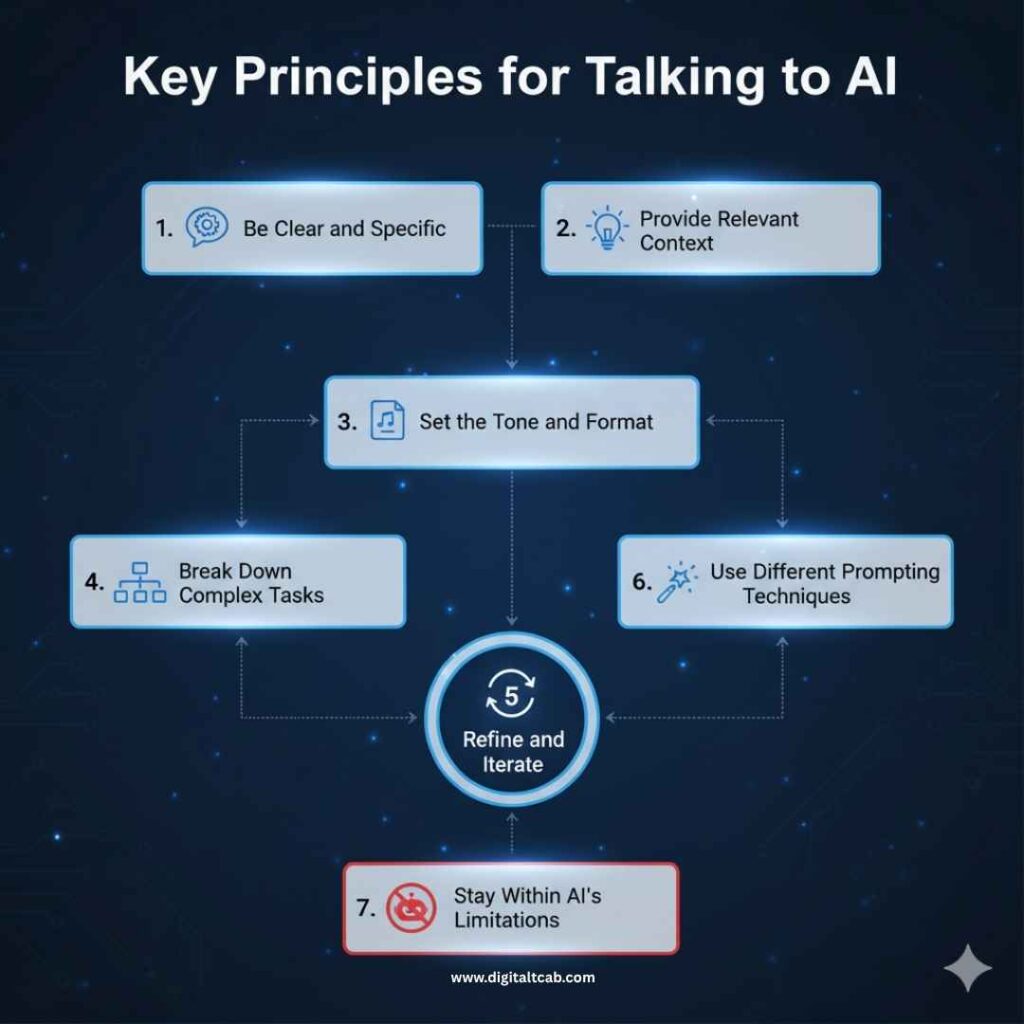
Key Principles for Talking to AI
Now that we know why good communication is important, let’s look at how to make it happen. Here are some tried-and-tested tips for getting the most out of your AI conversations.
1. Be Clear and Specific
You can’t have Vaporware AI exceed Particularity Allowance. Consider asking someone what they know about AI. That’s proud. AI may have difficulty figuring out precisely what you’re looking for. But when you ask a question that is both clear and specific, you’re handing the AI exactly what it needs to give you an accurate answer. Transparency like that is hugely empowering as a user and allows you to get the most out of your AI exchanges.
2. Provide Relevant Context
Just as socializing with a new friend is easier when they know your story, putting AI in the right context makes it better at understanding what you’re asking. If you ask, “Tell me about AI,” an AI will have no idea whether you want to know its history, how it is used in health care or the uses of the term within technology. Instead, provide context: “How is A.I. helping doctors diagnose diseases?” The more information you provide, the better the AI’s answer will be.
3. Set the Tone and Format
How you talk to AI matters. Does your AI assistant assist with tasks? Then keep it plain and straightforward. Is the AI you’re talking to having a profound conversation with? You can ask open-ended questions, but don’t forget — AI doesn’t have the same unspoken understanding of subtleties we do; keep things clear.
4. Break Down Complex Tasks
Let’s be honest—AI can handle a lot, including complex, multi-step queries. If you’re asking something big, AI is up for the challenge. For example, instead of saying, “Tell me how AI can revolutionize healthcare and education,” AI can handle it. It can break it up into smaller parts: “How can AI improve healthcare diagnosis?” “How can AI enhance learning for students?” It’s much easier for AI to process.
5. Refine and Iterate
And if your initial prompt fails to get the answer you’re looking for, don’t be scared to fine-tune it. Remember, persistence pays off. The AI could be misreading or provide a generic response. Consider asking this question differently to get an exact answer.
6. Use Different Prompting Techniques
AI loves follow-up questions. If you’re discussing a topic and the AI gives a good answer, but you want more info, ask another question. AI is designed to handle this kind of back-and-forth dialogue, so use it to your advantage.
7. Stay Within AI’s Limitations
AI is powerful, but it’s not all-knowing. Be mindful of what AI can and can’t do. For example, AI can generate creative writing or assist with research, but it won’t be able to give personal opinions or handle subjective questions the way a human might.
How to Choose the Right AI Platform for Communication
Not all AI platforms are created equal, so picking the right one can make all the difference in how your conversation goes. Here’s a quick rundown:
- Chatbots: These are great for answering specific questions, like checking a flight status or getting help with a product issue.
- Virtual Assistants: AI assistants, like Siri, Alexa and Google Assistant, are ideal for short questions — setting alarms, playing upcoming upcoming or looking something up.
- Generative AI Tools: Tools like ChatGPT excel at having conversations and generating detailed responses for complex questions, brainstorming ideas, or even writing content.
How to Start a Conversation with AI
Ready to chat with AI? Here’s how to get started:
- Choose an AI Platform: Whether it’s a chatbot, virtual assistant, or a tool like ChatGPT, pick the platform that best fits your needs.
- Start the Conversation: It can be as simple as saying, “Hey, Siri,” or typing your first question into a chatbot.
- Craft Your Prompt: Make your request clear and specific. The more concise, the better!
- Refine and Verify: If the first response isn’t quite right, don’t hesitate to ask again in a different way.
Types of AI Agents: Chatbots, Virtual Assistants, and More
- Chatbots: These AI models are used in customer service, helping you with anything from ordering food to troubleshooting problems.
- Virtual Assistants: Some examples of virtual assistants that make life a little easier are Siri, Google Assistant, or Alexa.
- Generative AI Models: Tools like ChatGPT are perfect for generating content, providing explanations, or chatting about almost anything.
Common Mistakes When Talking to AI and How to Avoid Them
Here’s where we’ve all gone wrong at one point or another. I’ve asked AI vague questions and been frustrated by the lack of helpful answers. Here are a few mistakes to avoid:
- Being Vague: As we’ve seen, a vague question gets a vague response.
- Overloading the System: Don’t ask too much at once. Stick to one thing at a time for the best results.
- Ignoring AI’s Limitations: AI can’t do everything. Understand what it can and can’t handle.
- Misunderstanding AI Responses: If the AI doesn’t understand, ask again in a clearer way.
Real-World Applications: How AI is Revolutionising Communication
AI is revolutionizing the way we communicate across many industries. For example:
- AI and Healthcare: Imagine AI helping doctors diagnose diseases or even assisting with patient care. It’s happening right now.
- AI in Banking: Revolutionizing customer service and financial advice with intelligent virtual assistants.
- AI in Education: Personalized learning is becoming possible with AI tutoring systems that adapt to students’ needs.
- AI in Customer Service: AI chatbots are improving customer service by providing instant help, day or night.
- AI and Entertainment: AI-powered Barbie is one of the toys altering kids’ relationships with their playthings.
- AI in E-commerce: AI in E-commerce is transforming the customer experience, optimizing operations, and driving personalized recommendations.
- AI for Insurance: Enhancing policyholder engagement and streamlining claims processing through smart chatbots.
FAQs About Talking to AI
What’s the best way to talk to AI for accurate answers?
Be specific and use clear, concise language.
Can AI understand humour and sarcasm?
AI struggles with humour, so it’s better to keep things direct.
How do I get the best results from AI?
Break down complex questions into smaller, manageable parts.
Are there limitations to how AI can help?
Yes, AI can’t provide opinions or make real-world decisions like a human can.
Conclusion
And there you have it! Talking to AI doesn’t have to be complicated. By being clear, specific, and mindful of its limitations, you can have smooth and productive conversations with these powerful tools. Don’t hesitate to try out different AI platforms and refine your approach—over time, you’ll get better at it!
Remember, AI is a tool meant to help, and the more you understand how to use it, the better it will serve you. Keep experimenting, and soon it’ll feel like second nature!




Leave a Reply